Side-by-side account reviewers
If you keep a statement or bill on one screen and a spreadsheet, calculator or reference document on the other, check that both displays can connect independently and fit on your desk.


Check that your computer can run two external displays before choosing a pair for household accounts. Full HD is a sensible starting point for statements and everyday spreadsheets; consider QHD if fitting more spreadsheet detail on each screen matters, and check stand adjustment and desk space whichever resolution you choose. USB-C video and charging are useful only when the laptop, monitor and cable support the intended setup.
If you keep a statement or bill on one screen and a spreadsheet, calculator or reference document on the other, check that both displays can connect independently and fit on your desk.
If account columns and transaction descriptions feel cramped, compare QHD with Full HD at a similar screen size. Dell UK lists 23.8-inch examples at both resolutions, making resolution a useful choice to settle before choosing connections.
If you connect and disconnect a laptop regularly, USB-C video and monitor-delivered charging may simplify the desk. Check the laptop's display support and charging requirement before relying on a one-cable connection.
Confirm two-display support and the available desk space first. Then decide how much spreadsheet detail and screen adjustment your account reviews call for.
| Concern | What to check when buying | Who this matters to |
|---|---|---|
| Desk fit and alignment | Measure desk width and depth against both monitors and their stands. Check adjustment range or the mounting pattern if you plan to use arms. | If two screens crowd my desk, I need room to place and align both where I can use them. Around 31% of consumers put desk fit and alignment first. |
| Spreadsheet detail | Compare native resolution at the screen size you want, and check whether text scaling is comfortable. Dell UK lists 23.8-inch Full HD and QHD models with different pixel counts. | When I compare long transaction lists, I want more account detail visible without moving between windows; roughly 23% of consumers make that their primary concern. |
| Computer connections | Check how many external displays the computer or dock supports, at which resolutions, and through which outputs. For USB-C, check video, charging and cable compatibility separately. | I need both screens to work with the computer I already use, rather than assume that two monitor sockets guarantee two working displays. About 31% of consumers prioritise connection compatibility. |
| Longer-session comfort | Look for suitable height adjustment or compatible mounting, and consider screen position and reflections. The Health and Safety Executive advises placing the top of a screen around eye level, roughly an arm's length away. | If an account review takes a while, I need to position the screens without repeatedly turning or stretching. Around 15% of consumers put longer-session positioning first. |
Two suitable monitor inputs do not establish that a laptop, desktop or dock can drive two external screens at the resolutions you intend to use.
Check the computer manufacturer's external-display specifications, then match the monitors and cables to its supported outputs.
A compatible dock, adapter or different cables may be needed for the intended arrangement.
Dell UK specifies the P2425H's downstream USB-C port for data with up to 15 W, whereas its P2425DE lists up to 90 W power delivery. The USB-C label alone does not establish a one-cable laptop setup.
Check USB-C video support on the laptop, its charging requirement, the monitor's stated functions and the cable specification.
If the intended connection cannot supply suitable charging, you may still need a separate laptop charger.
A display specification does not tell you whether two screens can be placed at a workable height and viewing distance on your desk.
Compare stand movement or mounting compatibility, then arrange the screens and keyboard to avoid twisting during regular use, in line with Health and Safety Executive guidance.
GOV.UK's guidance on CE and UKCA marking for Great Britain distinguishes it from the processes applicable in Northern Ireland.
For a Northern Ireland purchase or import, check the applicable Northern Ireland product-marking requirements rather than relying on the Great Britain route alone.
Dell UK lists 23.8-inch office monitors that illustrate the choice between Full HD connections and a QHD USB-C hub setup.
HP Support lists the 23.8-inch E24 G5 as a Full HD office-monitor option with height, tilt, swivel and pivot adjustment.
Lenovo Support describes the ThinkVision T24i-30 as a 23.8-inch Full HD office display with an adjustable stand and mounting options.
These monitors offer different starting points for a two-screen account-review desk, from Full HD models to QHD and WUXGA options. Check the connection and positioning requirements for each monitor before buying a pair.
 No image available
Consider this WUXGA IPS model if document layout and positioning are priorities for your paired screens. Check the stand and connection details against your desk and computer; if you plan to use USB-C, confirm video and charging compatibility with your laptop.
 No image available
Consider this QHD IPS model when spreadsheet detail is your main reason for choosing a higher resolution. Before buying two, check that your computer supports the intended resolution on both outputs and that any planned USB-C connection suits your laptop and cable.
 No image available
This 24-inch Full HD model is worth considering for routine bills, statements and spreadsheets across two screens. Check its stand or mounting arrangement for the alignment you need, and match the planned connections to both computer outputs.
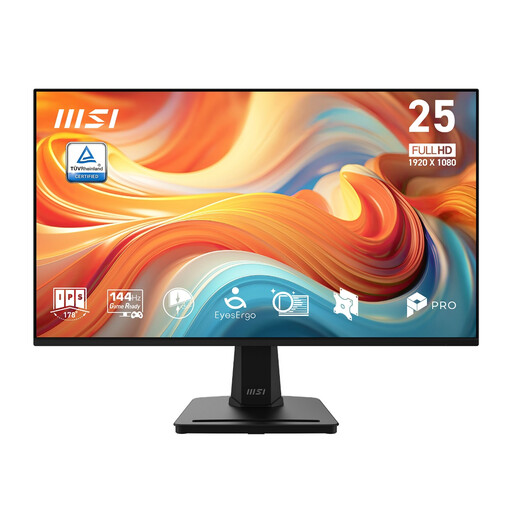 No image available
Consider this 24.5-inch, 1920 × 1080 IPS model for ordinary account documents if its size fits alongside your other screen. Its title also specifies 144 Hz and Adaptive-Sync; for account work, check connections, stand adjustment and any mounting requirements rather than choosing on refresh rate alone.
 No image available
Consider this model for a household-account desk after checking its resolution, inputs and stand movement against the screen you intend to pair it with. If matching screen height or using a monitor arm matters, confirm the adjustment and mounting details before purchase.
No: whether two external monitors work depends on the laptop or dock and the intended connections. Check its documented display count, outputs and supported resolutions, then match those to both monitors; check USB-C video support separately if you plan to use it.
Place the screen you use most directly in front of you and arrange the other so you can refer to it without repeatedly twisting. The Health and Safety Executive advises positioning the top of the screen around eye level and the screen roughly an arm's length away; check desk stability and mounting compatibility before using an arm.
For Great Britain, GOV.UK guidance updated on 21 August 2026 says CE marking continues to be recognised alongside or instead of UKCA marking where the relevant product-regulation requirements are met. Northern Ireland follows different processes, so check the rules applicable to a purchase or import there rather than applying the Great Britain guidance unchanged.
Use an appropriate electrical-equipment collection route rather than putting an old monitor in ordinary household waste. GOV.UK describes waste electrical and electronic equipment rules aimed at recovery, reuse and recycling; check whether a retailer take-back service or local-authority collection is available to you.