Fine-detail diagram editors
If you work with small labels, dense panels and several reference windows, consider screen resolution and scaling alongside the space available for two displays.


For small diagram labels and side-by-side reference windows, start by considering two matching 27-inch IPS monitors; choose 4K when fine detail and workspace density take priority. A QHD hub monitor may suit a compatible laptop desk where connections matter more, but check how the computer will drive both screens and whether the pair will fit and adjust on your desk.
If you work with small labels, dense panels and several reference windows, consider screen resolution and scaling alongside the space available for two displays.
If you move a laptop between locations, a monitor hub may simplify connections for displays and peripherals. Check the laptop’s two-display capability and the connection method before choosing a pair.
If colleagues review or share figures with colour-coded legends, look for documented colour modes and calibration-related features. A published colour specification alone does not establish that two individual screens will match.
Decide whether fine detail, screen positioning or laptop connections are your main constraint, then check that the computer and desk can accommodate the intended pair.
| Concern | What to check | Who this matters to |
|---|---|---|
| Fine detail and workspace | Compare native resolution at the same screen size, and check application scaling and the computer’s output settings for both displays. | When small labels and reference windows need to stay visible together, I want enough detail without constantly rearranging them; around 42% of consumers put fine-detail workspace first. |
| Two-screen positioning | Measure desk width, depth and stand footprints; check height adjustment and mounting compatibility if you need an arm. | For long diagram sessions, I need to position the main screen in front of me without repeatedly twisting towards the second; positioning comes first for around 33% of consumers. |
| Laptop connections | Confirm the laptop’s external-display limit and the ports, cables or dock needed for two screens; check charging requirements separately. | If I regularly connect a laptop at the desk, I want fewer separate connections without losing the intended two-display setup; around 25% of consumers prioritise this connection need. |
A monitor’s USB-C socket does not establish what a particular laptop can output or how a second screen must be connected.
Check the laptop’s external-display limit, supported resolution and refresh rate, charging requirement and the cables or dock needed for the complete setup.
The connection plan may require a compatible dock, cable or separate power supply.
Two stands and poorly placed screens can make it difficult to keep the main work area directly in front of you. The Health and Safety Executive’s display-screen guidance emphasises workstation positioning.
Measure desk width and depth, compare stand footprints, and check monitor, arm and desk compatibility before choosing a mounting arrangement.
A suitable monitor arm or changes to the desk layout may be needed.
Gamut and calibration figures describe particular models and conditions; they do not guarantee matching colour between two individual displays.
For colour-sensitive figures, consider matching models, select the intended colour modes and check what your calibration workflow requires.
Colour-critical work may call for a separate calibration device or service.
Monitors are electrical equipment. GOV.UK describes the UK’s WEEE framework as supporting recovery, reuse and recycling of electrical products and components.
Check suitable local collection, reuse or recycling arrangements when replacing a monitor.
Dell’s cited 27-inch UltraSharp models illustrate different priorities: 4K resolution on the U2723QE and a QHD Thunderbolt hub on the U2724DE.
The PD2705U is a 27-inch 4K model with documented colour specifications and stand adjustment.
LG’s cited 27UP85ZK-W combines a 27-inch 4K IPS panel with USB-C connectivity and stand adjustment.
These 4K monitor options relate to detailed diagram and reference work. If buying for two screens, check the quantity supplied, whether you can obtain a matching second unit and how both will connect to your computer.
 No image available
Consider this for detailed diagrams when a 27-inch 4K display and USB-C connection suit your computer.
The product name specifies a Nano Glossy IPS panel and a height-adjustable stand. Check the computer’s two-display support and whether a matching second unit is available; colour claims alone do not establish a matched pair.
 No image available
Consider this 27-inch 4K option when fitting diagram detail and reference windows across two screens is the priority.
The product name specifies a 16:9 display. Check the stand adjustments you need, the laptop’s charging requirements if using USB-C, and the connection plan for a second monitor.
 No image available
Consider this for fine diagram detail if your computer can connect two displays through the video outputs you plan to use.
The product name specifies 60 Hz, HDMI and DisplayPort, and DCI-P3 95%. If consistent figure colour matters, check the colour mode and calibration workflow rather than relying on gamut coverage alone.
 No image available
Consider this if diagram workspace and a USB-C connection are both relevant to your laptop desk.
The product name specifies Google TV and USB-C with 65 W power delivery. Check whether that charging level meets your laptop’s needs, whether the computer supports two displays and what your colour workflow requires.
 No image available
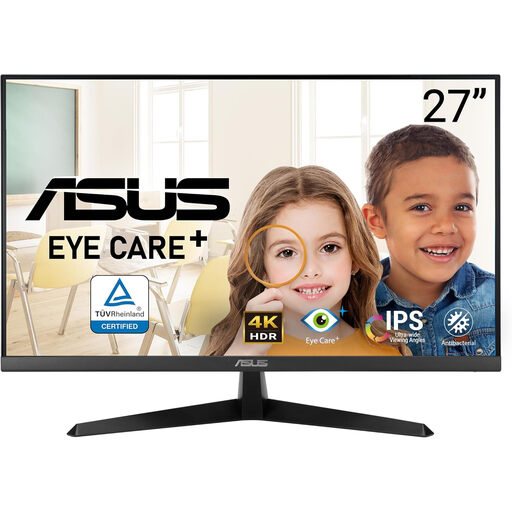
Consider this 4K option for detailed diagram content if its connections and physical adjustment suit your two-screen desk.
Check the stand’s height and pivot options if you need to align two screens, along with the computer’s outputs and support for the intended pair.
Check the laptop manufacturer’s stated external-display limit, supported resolutions and refresh rates, and available video outputs. Then confirm whether your chosen pair needs separate cables, a compatible dock or a supported USB-C or Thunderbolt display chain; a USB-C socket alone does not guarantee two-screen operation.
Place the screen you use most directly in front of you and arrange the second to limit repeated twisting. The Health and Safety Executive’s workstation guidance gives a screen top level with the eyes and a viewing distance of about an arm’s length as setup points; check that your desk and stands allow a workable arrangement.
For workers covered by Great Britain’s display-screen-equipment requirements, employers must carry out a workstation assessment when display screens are used daily as part of normal work for continuous periods of an hour or more. The Health and Safety Executive says the assessment should consider the whole workstation, working conditions, the job and individual requirements, including changes to the setup.
Use a suitable collection, reuse or recycling route for the old electrical equipment rather than putting it in ordinary household rubbish. GOV.UK describes the UK WEEE Regulations 2013, as amended, as underpinning measures that encourage recovery, reuse and recycling; check the arrangements available locally.