Desk-based inventory reviewers
If you compare a household inventory with receipts, photographs or spreadsheets at a regular workstation, the laptop display and one compatible external monitor can keep the material side by side.


Count the screens you need before choosing a laptop: its built-in display plus one monitor, two external monitors, or two displays built into the laptop. For a desk setup, check the exact configuration’s display support and connections; a dock does not replace that check. If you move around the house, a portable monitor or native dual-display laptop offers a different arrangement, with an extra device to carry or a smaller secondary screen.
If you compare a household inventory with receipts, photographs or spreadsheets at a regular workstation, the laptop display and one compatible external monitor can keep the material side by side.
If you need two external monitors rather than two screens in total, check display support for the exact laptop configuration. Lenovo and Apple publish model-level specifications that distinguish this capability from simply connecting one monitor.
If you update the inventory in different rooms, consider a portable monitor or a laptop with a built-in secondary display. The choice changes what you carry and how much space the second screen provides.
Start by deciding whether the laptop’s own display counts as one of your two screens. Then match the connections and screen arrangement to where you review the inventory.
| Concern | What to check | Who this matters to |
|---|---|---|
| Number of displays | Confirm how many independent external displays the exact configuration supports and whether its built-in screen can stay active. | If I need two external monitors as well as the laptop screen, support for just one monitor will not fit my workspace; around 45% of consumers put confirmed display capacity first. |
| Desk connections | Match laptop video outputs with monitor inputs, and check whether a suitable cable or adapter is needed. | When I return to a fixed desk, I want my inventory and supporting documents on screens I can connect and arrange without changing the setup each time; around 36% of consumers prioritise desk connectivity. |
| Portable use | Compare a separate portable monitor’s connection requirements with the size and arrangement of a built-in second screen. | If I review items in different rooms, I need to weigh carrying another screen against working on a smaller built-in secondary display; around 19% of consumers place portable two-screen use first. |
The port and monitor must support a compatible display connection. Lenovo advises checking video outputs and notes that differing connectors may require an adapter.
Check the exact laptop’s video-capable ports against the monitor input before choosing cables or adapters.
A dock’s listed display modes do not establish what every connected laptop can drive.
Confirm the laptop’s display capacity first, then check the dock’s compatibility and the required resolution and refresh mode.
A dock is another piece of equipment to connect and accommodate at the workstation.
Lenovo’s ThinkBook Plus Gen 3 has an 8-inch secondary display, which may not serve the same purpose as a separate desk monitor. Lenovo UK listed the model as unavailable on its own site.
Check the secondary screen’s size, the current product listing and the applicable warranty terms before committing to this arrangement.
GOV.UK describes the UK waste electrical and electronic equipment framework as supporting recovery, reuse and recycling.
If this purchase replaces a laptop or monitor, check a suitable retailer or local-authority recycling route for the old device.
Lenovo offers documented examples of both a conventional multi-monitor laptop and a laptop with two built-in displays.
MacBook Air is a route for inventory workflows that suit macOS and require two external displays alongside the laptop screen.
Dell’s portable monitor and dock specifications can help you assess accessories for a laptop-based workspace.
These laptops represent two ways to review a household inventory across screens: a model with built-in dual displays and a MacBook Air for a compatible external-monitor workspace.
 No image available
Consider this built-in dual-display design if you review inventory away from a fixed monitor. The product name lists a 14-inch Dual OLED Touch configuration, Intel Core Ultra 7 255H, 16GB LPDDR5X memory and a 1TB SSD.
Confirm the exact panel resolution before buying. If your plan also requires two external monitors, check this configuration’s external-display support separately.
 No image available
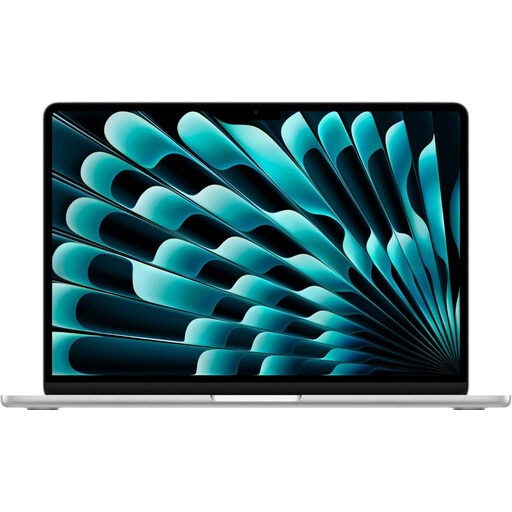
Consider this MacBook Air if your inventory software and file-sharing workflow suit macOS. Apple states that MacBook Air supports up to two external displays while keeping its built-in display active; this listing identifies a 15-inch model with an M5 chip, 16GB memory and a 1TB SSD.
Check the selected configuration’s external-display resolution and refresh conditions against your monitors and connections.
No. If the laptop’s built-in display is one of your two screens, check that the laptop can drive one compatible external monitor. Documented support for two external monitors matters when both separate monitors are part of your intended setup.
Check the laptop’s own display support first. Then match the dock to that laptop, your monitors’ connections and the resolution and refresh mode you need; a dock’s listed outputs do not establish compatibility on their own.
After connecting a compatible monitor, use Windows Display settings to identify the screens and arrange them to match their positions on your desk. Microsoft also documents display-detection and window-location options for connected monitors.
Check an appropriate retailer or local-authority recycling route for the old device. GOV.UK describes the UK waste electrical and electronic equipment framework as encouraging recovery, reuse and recycling.