
24/7 Customer Support

Free returns

Same-day & Next-day Delivery

Quality Guaranteed

Unlock Your Welcome Offers: FREE Delivery | Up to 80% OFF | Free 30-day JoyPlus trial
Download the APP
Moving files between devices can be a frustrating task. You have a presentation on your new USB-C laptop, but the office projector only has a traditional USB-A port. Or perhaps you want to quickly back up photos from your Android phone to free up space, but connecting it to your old desktop computer is a hassle. This is where a dual USB C flash drive becomes an essential tool.
This simple but effective device features both a modern USB-C and a classic USB-A connector, bridging the gap between your new and old gadgets. As your Joybuy Product Recommendation Officer, my role is to help you understand what to look for. This guide will walk you through the key features to consider and present some solid options to make your data transfers seamless.
Before picking a drive, it helps to understand a few key specifications. This ensures you get a device that truly meets your needs without overpaying for features you won't use.
Transfer speed determines how quickly you can move files. Modern drives often use the USB 3.2 standard, but it comes in different tiers:
For most users, a Gen 1 drive provides a great balance of performance and value. However, if you're a content creator or gamer, investing in a Gen 2 high speed USB 3.2 drive can save you significant time.
How much space do you need? A 2 in 1 thumb drive comes in various sizes, and the right one depends on your usage.
The physical design impacts durability and convenience. Many drives feature a metal casing, which helps dissipate heat during intensive file transfers and offers better protection against drops.
Look for designs with protective mechanisms like a 360-degree swivel cap or a sliding connector. This prevents dust and debris from damaging the ports, especially when carried in a pocket or bag. Also, ensure the drive supports OTG (On-The-Go) if you plan to use it with your phone. An OTG flash drive for Android allows you to plug it directly into your smartphone's USB-C port to access files, making it a true flash drive for phone and computer.
Here are a few dual-interface drives that offer a great combination of features, performance and build quality.
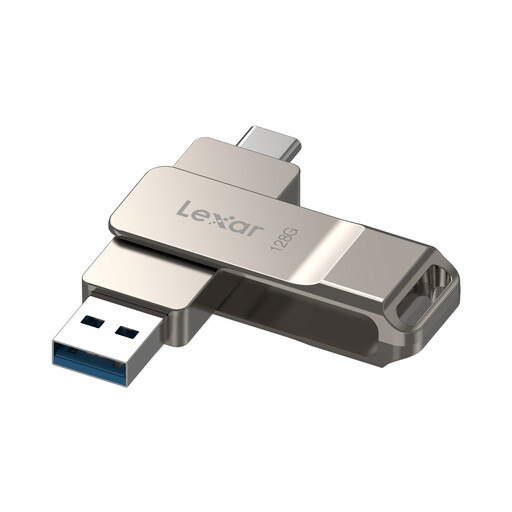
Why It Stands Out: The Lexar D40E is a reliable and practical choice for everyday use. Its durable metal housing and 360° rotating cap provide robust protection for both connectors without the risk of losing a separate cap. It also includes access to software for 256-bit AES encryption, adding a layer of security for your sensitive files.
Pros:
Who is it for?: Students, office workers and anyone needing a dependable and secure USB C memory stick for daily file transfers between various devices.
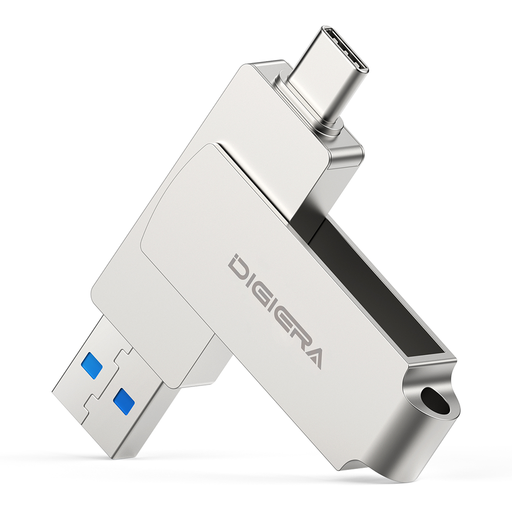
Why It Stands Out: The DigiEra LUS320 offers an impressive combination of high capacity and strong performance. With 512GB of storage and read speeds up to 500MB/s, it's built to handle large files with ease. The premium aluminium alloy body not only looks sleek but also provides excellent heat dissipation during sustained use.
Pros:
Who is it for?: Users who need significant storage space and fast transfer speeds for managing large files, such as photographers, video editors or those who want to back up their entire system.
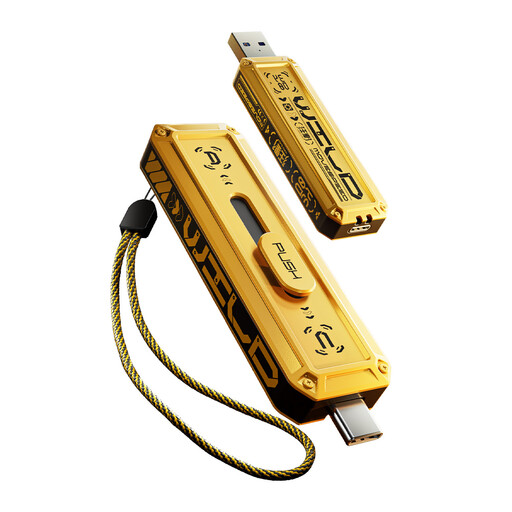
Why It Stands Out: For those who prioritise speed above all else, the MOVESPEED YSUWD10 is a top contender. Leveraging the USB 3.2 Gen 2×1 interface and 3D NAND flash, it achieves remarkable read and write speeds that can transfer a 1GB file in about a second. Its striking mecha-inspired design and robust zinc alloy housing make it a standout in both performance and style.
Pros:
Who is it for?: Content creators, IT professionals and tech enthusiasts who require extreme speed for transferring massive files, running portable applications or gaming.
If these specific models don't quite match what you're looking for, whether you need a different capacity or a unique design, there are many other choices available.
? Explore our full range of USB gadgets to find the perfect drive for your needs.
What is a dual USB C flash drive used for? A dual USB C flash drive is a portable storage device with two connectors: a standard USB-A and a modern USB-C. It is used to easily transfer files—like documents, photos and videos—between devices with different ports, such as a new MacBook (USB-C only) and an older desktop PC (USB-A), or between a computer and an Android smartphone.
Do I need software for a 2 in 1 thumb drive? No, almost all modern 2 in 1 thumb drives are "plug-and-play." This means you do not need to install any drivers or software for them to work on Windows, macOS or Linux. For use with a smartphone, your device simply needs to support USB OTG (On-The-Go), a standard feature on most recent Android phones.
Is a metal USB stick better than a plastic one? A metal casing generally offers two main advantages over plastic. First, it is more durable and resistant to physical damage from drops or pressure. Second, metal is better at dissipating heat generated during long file transfers, which can help maintain consistent performance and protect the internal components over time. However, a well-made plastic drive is perfectly suitable for light, everyday use.