Choose an independently adjustable dual arm if colleagues need to reset two screens or turn one towards another person. If the shared desk cannot take a clamp or grommet mount, consider a freestanding stand instead, allowing for its base on the work surface. Either way, check each monitor’s fixing pattern and display-only weight, as well as the mount’s capacity and fit to the desk.
Who is this setup for?
People sharing a dashboard desk
When colleagues use the same workstation, each may need to reset the height and angle of the dashboard and report screens. Independent adjustment is particularly relevant if one display is sometimes turned towards a colleague.
Analysts at a fixed workstation
With two known monitors and a consistent side-by-side arrangement, the priority may be keeping the main screen in front while leaving room for documents and peripherals.
People using clamp-restricted desks
If the desk edge, underside or workplace rules rule out clamp and grommet mounting, a freestanding stand is an installation route to assess. Its base still needs space on the desk.
What matters when choosing?
Adjustable desk-mounted arm
Consider it when: different users need to reposition the screens independently or turn one display towards a colleague.
Allow for: a compatible clamp or grommet position, plus clearance behind and beside the moving screens.
Freestanding dual stand
Consider it when: the shared furniture cannot accept a clamp or grommet mount.
Allow for: a base that occupies space needed for reports, a keyboard or other desk equipment.
For consumers viewing a dashboard beside a report at a shared desk, the main question may be whether the screens will fit, move easily between users, leave enough work surface or install on the available furniture.
| Concern | What to check | Who this matters to |
|---|
| Monitor and desk fit |
Match each monitor’s VESA fixing pattern and display-only weight to the exact two-screen configuration. For a desk-mounted arm, check the clamp or grommet requirements. |
If my monitors or desk cannot take the mount, its adjustment features will not help me; around 31% of consumers put compatibility first. |
| Adjustment between users |
Check whether the screens adjust independently and have room to move past walls, dividers and cables. |
When colleagues take turns at the desk, I need to reset the viewing position without moving both displays together; roughly 25% of consumers prioritise adjustment. |
| Side-by-side work |
Check the intended screen arrangement and whether it leaves room for the keyboard, mouse and paper report. |
I need the dashboard and report readable together without crowding my working area; about 25% of consumers make the layout and desk space their main concern. |
| Clamp-free installation |
Check whether desk mounting is permitted; if not, compare a freestanding base with the space available. |
If workplace rules rule out fixing anything to the desk, I need a stand I can place on its surface; around 19% of consumers put clamp-free installation first. |
Mistakes to avoid
-
Choosing by screen size alone
A monitor within a mount’s advertised diagonal range may still have the wrong fixing pattern or exceed its supported load.
Check both monitors’ rear fixings and display-only weights against the mount’s stated capacity for the exact dual-screen configuration.
-
Ordering a clamp arm without inspecting the desk
An unsuitable edge, obstruction beneath the desk or lack of a usable grommet position can prevent installation even when the monitors fit.
Measure the proposed attachment point and check underneath the desk before choosing a clamp or grommet model.
-
Expecting the arm to solve the whole workstation setup
The UK Health and Safety Executive’s display screen equipment guidance covers screen positioning, the workstation and work routine, not just the mount.
Reset screen positions for each user. Where the UK display screen equipment rules apply, include a changed workstation or change in its use in the employer’s assessment and retain suitable breaks or changes of activity.
-
Overlooking a freestanding base
A freestanding stand avoids a clamp but can occupy space needed for the report, keyboard or shared peripherals.
Compare its base dimensions with the desk as it is actually used, rather than measuring an empty surface.
Brands to consider for dual-monitor mounts
Ergotron
Its desk-mounted range includes independently adjustable dual arms and compact dual-direct configurations.
- Ergotron specifies its HX Dual Monitor Arm for two displays up to 32 inches and 2.3–7.9 kg per display.
- Check the exact model’s VESA and weight requirements, along with the proposed desk attachment; one configuration’s limits should not be applied to another.
Fellowes
Its Vista clamp-mounted and Seasa freestanding ranges offer different ways to install a dual-screen setup.
- Fellowes specifies Vista for screens up to 10 kg and 32 inches, with 75 × 75 mm and 100 × 100 mm VESA plates.
- The Seasa route avoids a desk clamp but uses desktop space. Check the capacity and fit of the particular stand against both monitors.
Humanscale
Its modular M/Flex system is relevant where an office may need a layout that extends beyond two monitors.
- Humanscale describes M/Flex as scalable to six monitors on a single post.
- Its configurations differ, so identify the exact arms and connecting components before checking monitor capacity and desk fit.
Dual-monitor stands on Joybuy
These two stand listings offer starting points for a dashboard-and-report setup. Check how each positions two monitors and fits the intended desk before ordering.
 No image available
Dell Pro Dual Monitor Stand MDS19
A two-monitor stand to consider if the dashboard and report need separate screens. Check the available adjustment, monitor fixings and how the stand attaches to the intended desk.
View on Joybuy
 No image available
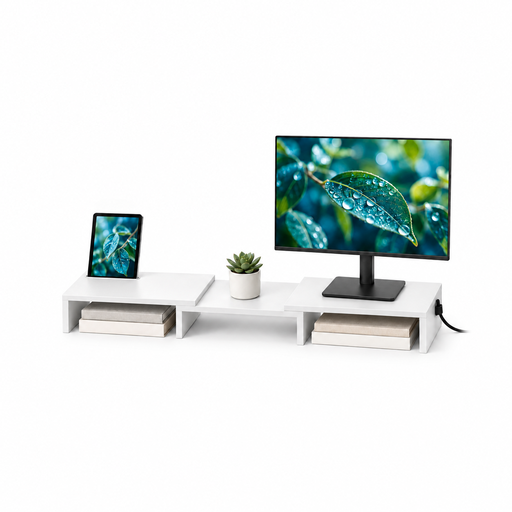
Floordirekt Adjustable Two-Monitor Stand, MDF, White, 80–108 cm
For keeping two monitors together, this listing describes adjustable width and angle. Check its dimensions, how it supports each monitor and whether the white 80–108 cm variant fits the shared desk.
View on Joybuy
Questions about shared-desk setups
Does changing to a dual-monitor stand require a UK workstation assessment?
It does where the employer’s UK display screen equipment duties apply and the workstation or its use changes. The Health and Safety Executive says those duties apply to workers who use display screen equipment daily for continuous periods of an hour or more; the assessment should consider the workstation, not just the new stand.
Where should the dashboard and report screens sit?
Start with the screen used most often directly in front of the user, then position the other beside it and adjust the arrangement if it causes repeated twisting. The Health and Safety Executive advises placing a screen about an arm’s length away with its top at eye level; the position of a secondary screen should be considered as part of the individual workstation setup.
Can an adjustable arm replace breaks from screen work?
No. An arm changes where screens can be positioned, while the Health and Safety Executive says employers must plan breaks or changes of activity for workers covered by the UK display screen equipment rules. The work routine still matters after a mount is installed.
Will two monitors fit an arm if their screen sizes are within its limit?
Not necessarily. Check each monitor’s rear fixing pattern and display-only weight against the arm’s requirements for the intended two-screen configuration; screen diagonal alone does not establish fit. Check whether any required adapter or fixing hardware is suitable, too.


