
24/7 Customer Support

Free returns

Same-day & Next-day Delivery

Quality Guaranteed

Unlock Your Welcome Offers: FREE Delivery | Up to 80% OFF | Free 30-day JoyPlus trial
Download the APP
Whether you are looking to add a second player to your couch co-op sessions, replace a well-loved gamepad or upgrade your PC gaming setup, choosing the right controller is essential. The official DualSense PS5 controller has become a popular topic for both PlayStation 5 owners and PC enthusiasts, largely due to its advanced features designed to deepen immersion.
This guide offers a straightforward look at the Sony PS5 controller, breaking down its key features and compatibility. Our goal is to provide you with the practical information needed to decide if this is the right controller for your gaming needs, without the marketing hype.
Navigating the specifications of modern gaming hardware can be complex. Here are a few key points to consider when looking at the PS5 wireless controller.
Two of the most discussed features of the DualSense are its haptic feedback and adaptive triggers.
The DualSense controller for PC has become a popular choice for those seeking a premium gamepad experience. It can be connected to a Windows PC via Bluetooth or a USB-C cable. While many modern games, particularly on platforms like Steam, offer native support, the implementation of its advanced features can vary. Some games may fully support the adaptive triggers and haptics, while others might only recognise it as a standard gamepad. It is worth checking the compatibility for your favourite PC titles if these features are a priority for you.
When playing on a PlayStation 5, using an official PlayStation 5 controller ensures complete and seamless compatibility. All features, from the touchpad and motion sensors to the haptics and triggers, are guaranteed to work as intended with the console and its library of games. This plug-and-play reliability is a significant factor for many console gamers.
Based on its features and integration, here is our recommended controller for PS5 and PC gamers.
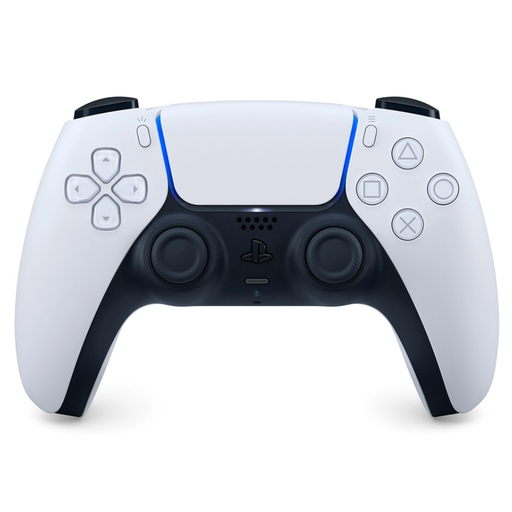
Why It Stands Out
The Sony DualSense PS5 Wireless Controller in the classic PS5 controller white colour scheme is the standard for the current generation of PlayStation gaming. Its main appeal lies in its immersive technology. The combination of detailed haptic feedback and adaptive triggers creates a level of interaction that few other controllers on the market can match. Beyond its signature features, the controller has a comfortable, ergonomic design that feels substantial and balanced in the hands. It also includes a built-in microphone for quick communication and a USB-C port for modern, convenient charging.
Pros
Who is it for?
This controller is ideal for PlayStation 5 owners who need an additional or replacement controller and want the full, intended experience for their games. It is also an excellent option for PC gamers who play titles that support its advanced features and are looking for a high-quality, comfortable gamepad.
View the Sony DualSense PS5 Wireless Controller
The DualSense controller is available in a variety of colours to match your setup. If you are interested in different colourways or want to browse other gaming peripherals, you can explore our full range of gaming controllers and accessories.
Explore all gaming controllers on Joybuy
Here are answers to some common questions about the DualSense PS5 controller.
Yes, the DualSense controller for PC is fully functional. You can connect it via a USB-C cable for a wired connection or pair it via Bluetooth for wireless play. The Steam platform offers robust support, enabling features like haptic feedback and adaptive triggers in a growing number of games. For games outside of Steam, functionality may vary, and some features might require third-party software to work correctly.
The main differences are the DualSense controller's advanced features. While the DualShock 4 (for the PS4) has standard rumble, the DualSense introduces much more precise haptic feedback. The DualSense also features adaptive triggers, which the DualShock 4 lacks. Additionally, the DualSense has a slightly larger, more ergonomic design, a built-in microphone and uses a USB-C port for charging instead of the Micro-USB port found on the DualShock 4.
You can charge your PS5 wireless controller by connecting it to one of the USB ports on your PlayStation 5 console using a USB-C cable. The controller can be charged while the console is on or in rest mode. Alternatively, you can use a dedicated DualSense charging station, which allows you to charge two controllers simultaneously without connecting them directly to the console.