Daylight novel readers
If you mainly read long, text-heavy novels outside, a focused reader is worth considering. Amazon describes the Kindle Paperwhite display as glare-free, while Kobo describes its E Ink readers as glare-free.


For text-heavy science-fiction novels outdoors, start by comparing dedicated E Ink readers: Amazon describes the Kindle Paperwhite display as glare-free, and Kobo makes the same claim for its E Ink readers. An Android E Ink device may suit you if reading apps matter more than a single-store setup; a conventional tablet makes more sense when colour content and other tablet tasks are also priorities. Check your books and services, the exact display configuration and any water-resistance conditions before choosing.
If you mainly read long, text-heavy novels outside, a focused reader is worth considering. Amazon describes the Kindle Paperwhite display as glare-free, while Kobo describes its E Ink readers as glare-free.
If your books come from several stores or include personal files, check how each device handles them. Amazon accepts EPUB and PDF uploads through Send to Kindle; Kobo lists EPUB, PDF and MOBI among its supported eReader formats. A supported format alone does not settle access to a protected title or particular service.
If illustrated editions, comics or other apps matter alongside novels, consider whether an Android E Ink device or a conventional tablet fits your reading services. BOOX describes Google Play access for its Go 7 series; Apple offers iPad Pro display configurations intended to reduce reflections.
Choose it when: Outdoor, text-led reading is your main use and you want a device focused on books.
Allow for: Book access depends on the reader's store and import workflow rather than unrestricted tablet-app choice.
Choose it when: You want an electronic-paper reader but need access to particular reading apps.
Allow for: Check the exact app, account and book service before purchase; app availability does not establish that every app works well on E Ink.
Choose it when: Colour reading and general tablet tasks matter as much as your novels.
Allow for: Daylight suitability depends on the exact display and glass option; Apple limits iPad Pro nano-texture glass to selected storage configurations.
| Concern | What to check | Who this matters to |
|---|---|---|
| Daylight readability | Compare the exact E Ink display or tablet glass configuration. If you will read near water, check that model's water-resistance rating and conditions. | I mainly want to follow a long novel outside without reflections interrupting the text. Roughly 42% of consumers put daylight reading first. |
| Books and services | Check a representative purchased, borrowed or personal title against the device's store, import method and any digital rights restrictions. | My backlist is spread across files and services, so being able to open the books I already use matters most. Around 33% of consumers prioritise book and service access. |
| Colour and apps | Decide whether you need colour editions or specific apps, then confirm they work on the exact device. | I read novels, but also want illustrated stories or other tablet functions on the same device. About 25% of consumers place colour and app versatility first. |
Screen size does not tell you which glare-reduction features the chosen configuration has. Amazon and Kobo describe their E Ink readers as glare-free, while Apple identifies nano-texture glass as a separate iPad Pro option for bright light.
For outdoor novels, compare E Ink displays first. If you prefer an iPad Pro, confirm whether the selected device has standard or nano-texture glass.
A suitable screen will not resolve an incompatible store, protected file or required reading app. Amazon's EPUB and PDF route uses Send to Kindle; Kobo lists supported file formats, but access to a particular title still needs checking.
Pick a few books you expect to read next and confirm the purchase, borrowing, upload or app route for each.
Amazon lists IPX8 water resistance for the Kindle Paperwhite (12th Generation). That rating does not carry over to another model or brand.
Before reading near water or in rain, check the precise model and its manufacturer-stated water-resistance conditions.
Apple limits the iPad Pro nano-texture option to 1TB and 2TB configurations. An iPad Pro with standard glass is not the same display configuration.
Check both the storage variant and glass specification on the exact device you select.
A dedicated-reader option if you want focused reading and use the Kindle ecosystem.
An E Ink reader option if you use the Kobo Store or keep books in supported file formats.
An Android E Ink option if access to several reading apps is important.
A conventional tablet option when colour content and broader tablet use are part of the decision.
These choices cover compact Android E Ink reading, a larger E Ink note-taking device and a conventional colour tablet. Choose by the books, apps and display configuration you need rather than treating them as interchangeable outdoor readers.
 No image available
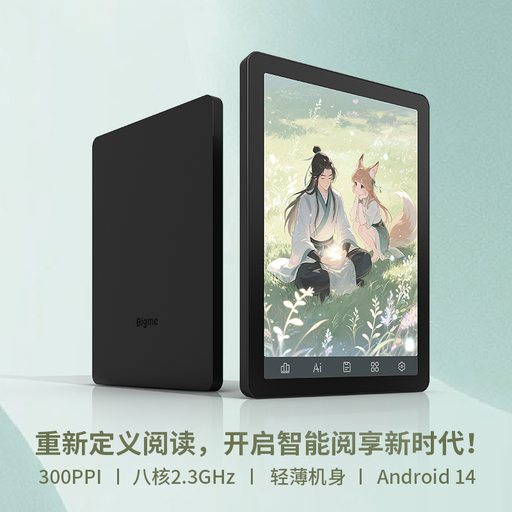
Consider this compact E Ink option if you want to check reading apps as well as books. Its listed configuration includes Android 14, Google Play and a 36-level front light; confirm that your particular titles and services work before buying.
 No image available
Consider this model if colour content and Android apps matter alongside fiction reading. The title lists Android 14; check your required books and services, and assess the display in your usual daylight conditions.
 No image available
Consider the larger screen if reading documents and taking notes are both important. The product information lists EPUB and PDF formats but specifies no reading light; check protected-book and store compatibility, and whether you also need built-in illumination.
 No image available
Consider this conventional tablet if colour content and other tablet tasks matter alongside novels. Apple describes nano-texture glass as reducing glare in bright light; confirm the exact display configuration and that your reading apps and titles meet your needs.
Yes, if long-form text reading is your main use: Amazon describes the Kindle Paperwhite display as glare-free, and Kobo describes its E Ink readers the same way. If you also need colour or general tablet apps, compare those requirements against the exact device and display configuration.
They may, but the route depends on the device and the title. Amazon accepts EPUB and PDF uploads through Send to Kindle, while Kobo lists those formats for its eReaders; check a representative purchased or borrowed book for any protection or service restrictions.
Do not assume that every eReader is water-resistant. Amazon lists an IPX8 rating for the Kindle Paperwhite (12th Generation), but you should check the rating and manufacturer conditions for the precise device you intend to use.