Long-session folklore readers
If you mostly read continuous, reflowable text, a compact E Ink reader puts portability and a glare-free screen ahead of general-purpose apps. Check that your editions can be opened on the reader you choose.


Choose a compact E Ink reader if your folklore collection is mainly reflowable text and you value a portable, glare-free screen. For scanned pages, annotated PDFs or illustrated editions, compare a larger E Ink device with a conventional tablet. Before deciding, check how your actual files and library loans work on the device, as well as which accessories come with it.
If you mostly read continuous, reflowable text, a compact E Ink reader puts portability and a glare-free screen ahead of general-purpose apps. Check that your editions can be opened on the reader you choose.
If you inspect facsimiles, fixed-layout PDFs or handwritten notes, look at the page at its intended scale before choosing a screen. Rakuten Kobo lists a 10.3-inch Elipsa 2E with PDF markup; larger conventional tablets offer another route.
If your collection includes colour maps, web material, audio or loans read inside an app, a conventional tablet offers those functions alongside reading. Libby says available titles depend on the library, so check the service and books you intend to use.
Start with the form your folklore collection takes: reflowable books, fixed-layout documents or app-based loans. That determines which screen and reading workflow are worth checking first.
Consider it when: Most reading is continuous text and you want a portable, glare-free device.
Trade-off: A small screen can mean frequent zooming on scans and fixed-layout PDFs; lending compatibility also varies.
Consider it when: Reading and marking up source documents matter more than using a range of apps.
Trade-off: It takes up more space than a compact reader, and file-transfer and loan compatibility still need checking.
Consider it when: Colour pages, library apps, audio or browser research are part of the same task.
Trade-off: A larger screen is less convenient to hold for extended reading; check whether a pen is included if you need one.
| Concern | What to check | Who this matters to |
|---|---|---|
| Long text sessions | Check whether your books reflow, then compare screen size, lighting and how comfortably you can hold the device. | If I read collections straight through, I want a portable screen that suits long passages rather than a full set of tablet apps. Around 31% of consumers would put text-reading comfort first. |
| PDFs, scans and notes | Open a representative page at a readable scale; check pen support and whether you can mark up the file as needed. | When a source preserves its original page, I need to see the text and marginalia without constant zooming. For around 31% of consumers, document viewing and annotation would be the primary concern. |
| Loans and file access | Check your library’s service and a specific title, including its file format, digital rights management and transfer method. | If the books I want come from my library or use protected files, access matters before screen preferences. Around 23% of consumers would make compatibility their first priority. |
| Illustrations and other tasks | Check whether colour pages, audio, browser access or other apps are needed alongside reading. | For illustrated editions and related research, I want to view maps and move between reading and other material. Colour and wider tablet use would come first for around 15% of consumers. |
Libby describes its Kindle e-reader delivery option as available in the US only. A Kindle that suits purchased books therefore should not be chosen on that assumption for UK library loans.
Look up a folklore title in your local library’s digital catalogue and check its reading options. Compare reading in the library app with a supported Kobo workflow where applicable.
A scan or fixed-layout PDF preserves its page design, so footnotes, maps and marginalia may require repeated zooming on a compact screen.
Try representative files at the size you intend to use. If page-scale viewing or markup matters, compare larger E Ink screens and tablets.
Box contents differ: Rakuten Kobo lists a stylus with the Elipsa 2E, Samsung lists an S Pen but no travel adapter with the Galaxy Tab S10 FE series, and Apple offers Pencil separately for iPad Air.
Check the contents of the exact model and bundle, particularly if handwritten notes or a charging adapter are essential.
An accessory obtained separately can add another item to carry and arrange before you start using the device.
Kobo offers text-focused E Ink readers as well as the larger Elipsa 2E for notes and PDF markup.
iPad Air is a conventional tablet option for colour documents, reading apps and related research.
The Galaxy Tab S10 FE range offers conventional Android tablets for larger documents and app-based reading.
Kindle e-readers are a text-first option when the books you intend to read work within their reading workflow.
These choices cover compact E Ink reading, a larger E Ink screen and conventional tablets for folklore documents. Match the device to your files and lending service before treating screen size or pen input as the deciding factor.
 No image available
Consider its larger E Ink screen if reading source documents matters more than carrying a compact reader.
The product title specifies a 10.65-inch E Ink screen and a protective case. Its stated lack of a reading light makes suitable ambient lighting worth considering; check protected-book and library-loan compatibility for your titles.
 No image available
Consider this conventional tablet if you want a larger screen and supplied input accessories alongside reading.
The product title lists a 10.1-inch in-cell display and 256GB of storage. Confirm the operating-system version for this exact model and check your required library apps and PDF annotation workflow.
 No image available
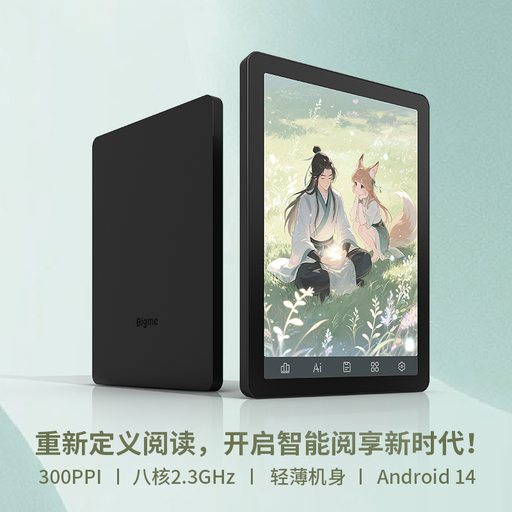
Its compact colour E Ink format is worth considering when portable reading takes priority over viewing scans at full-page scale.
The product title specifies a 6.13-inch display, Android 14 and 8GB plus 256GB memory and storage. Check the formats, lighting and library access you need before choosing it for a particular collection.
 No image available
Consider this compact reader for text-focused collections when adjustable lighting is important to you.
The product title lists a 36-level front light, Android 14 and 4GB plus 64GB memory and storage. A 6-inch screen may require frequent zooming on scans; check file formats and lending compatibility for your books.
 No image available
Consider its larger conventional screen if your folklore reading involves fixed-layout pages or other tablet tasks.
The product title specifies an 11-inch, 90Hz IPS display and 256GB of storage. If handwritten PDF notes or library loans are essential, check pen support, the relevant app and your library’s titles before buying.
Do not plan on using Libby’s Kindle e-reader delivery for UK loans: Libby describes that option as available in the US only. Check your local library’s reading options for the exact title; an app on a conventional tablet or a compatible Kobo loan may provide another route.
Kobo lists EPUB and PDF among its supported e-reader formats. For a protected file, check its digital rights management and transfer instructions; Adobe Digital Editions may be needed, and a library loan must also be compatible with the chosen device.
Start by viewing a representative scan at the size you would actually read it. A compact 6–7-inch reader suits portable text reading, while larger options include Kobo’s 10.3-inch Elipsa 2E, Samsung’s 10.9-inch and 13.1-inch Tab S10 FE models, and Apple’s 11-inch and 13-inch iPad Air models; the page layout and your need to annotate matter as well as the diagonal measurement.
Check the exact model and bundle because the contents differ. Rakuten Kobo lists a stylus with the Elipsa 2E; Samsung lists an S Pen but no travel adapter with the Galaxy Tab S10 FE series; Apple offers Pencil separately for iPad Air.