Start with a book you want to read and the way you need to access it, then try the book and its menus on the intended device or app. A dedicated E Ink reader may suit focused reading, while a phone, tablet or computer can offer different apps and assistive tools; readers who need Braille should check the whole display, file, host and app setup. RNIB notes that accessibility options may only appear after a book is opened, and a feature listed for one model or title does not guarantee that every UK device or book will work.
Who these reading setups may suit
Speech-first readers
If spoken access to books and controls is a priority, try a title and navigate the menus before choosing an e-reader or app. Kindle VoiceView guidance, for example, describes spoken navigation on supported models using compatible Bluetooth audio; book support can vary.
Large-text readers
If you need adjustable text or contrast, check how a representative book looks alongside the library, settings and other menus. RNIB notes that some accessibility options may only be available once a book is open.
Braille readers
If you read by touch, match the display with the files or host device, screen reader and app you intend to use. Apple lists supported Bluetooth Braille displays, while RNIB describes file and connection options for the Orbit Reader 20.
What to check before choosing
For accessible personal reading, start with the book and the access method you rely on, then check the device controls and how you will use it. RNIB notes that some book accessibility options may only appear after opening a title, so test the book itself as well as the menus.
| Concern |
What to check when buying |
Who this matters to |
| Speech for books and controls |
Try finding and opening a title, navigating menus and listening with the intended audio setup. Check whether that book supports speech. |
If I rely on spoken access, I need to hear both the book and the controls I use to reach it. Around 28% of consumers put speech access first. |
| Enlarged text and contrast |
Open a representative book and test its text and colour options; check the library and settings screens separately. |
If small text is difficult to use, I need to see whether the book and the device menus can each be adjusted. Roughly 22% of consumers prioritise readable text, contrast or lighting. |
| Access to the books you use |
Check the formats, digital rights restrictions, library service and title eligibility for books you already own, borrow or plan to read. |
If I want to keep reading my existing books or library loans, I need those titles to work in the proposed setup. About 22% of consumers put book and format access first. |
| Braille compatibility |
Check the precise display, file format, host device, screen reader and app together, or test a prepared file on a standalone reader. |
If tactile reading is essential, I need Braille output to work through my intended file or device workflow. Around 17% of consumers make Braille access their main priority. |
| Controls and portability |
Try page changes, menus, screen visibility and handling in the places you expect to read; include any required audio or display accessories. |
If I carry my reader around or find touch controls difficult, I need a setup that suits how I handle and view it. Roughly 11% of consumers prioritise controls, viewing conditions or portability. |
Buying pitfalls to avoid
-
Choosing a device for speech without testing the book and menus
Speech can differ between models, titles and parts of the interface, so a feature listed for a device may not cover the whole reading experience.
Try a representative title from search through playback, using the audio equipment you plan to use. Check navigation as well as the book text.
-
Assuming every eBook transfers to a new reader
Store restrictions, digital rights arrangements, library participation and title eligibility can affect whether an existing or borrowed book opens on another device.
Before choosing, check a sample of your purchased titles, library loans and personal files against the exact device and service.
-
Treating page-turn buttons as proof that the whole device is accessible
Physical buttons may turn pages without making setup, searching or menus usable without sight. Kobo's documented screen-reader and Read Aloud update is stated to apply to readers in the European Union, not as confirmation of UK availability.
Try the complete workflow on the precise UK model and software. If speech is essential, check its availability for that model rather than relying on its buttons.
-
Buying a Braille display without checking the content path
Standalone file reading and use through a host device can require different files, software and connections.
Test a prepared BRF, BRL or TXT file on the intended standalone reader, or try the exact display, host, screen reader and app together.
Relevant brands and reading ecosystems
Kindle
A dedicated-reader option for readers whose books work in the Kindle ecosystem and who want to read on an E Ink screen.
- Kindle's VoiceView guidance describes spoken navigation on supported 12th-generation Paperwhite models through compatible Bluetooth audio.
- Check speech support for the exact title and model. VoiceView gestures and Bluetooth audio requirements may not suit every reader.
Rakuten Kobo
Its UK range includes dedicated e-readers with different screen and control options; local-library borrowing may matter when the service and title are eligible.
- Kobo lists adjustable display features, and the Libra Colour has page-turn buttons.
- Page-turn buttons do not establish that menus are accessible. Kobo states that its optional screen-reader and Read Aloud update is available only to readers in the European Union, so do not assume it is available on UK devices.
Apple
An iPhone or iPad can provide a multi-app reading route for people who want to use VoiceOver or a supported Bluetooth Braille display.
- Apple Support lists supported Braille displays, including the Orbit Reader 20, for use with VoiceOver on compatible devices.
- Device-level display support does not ensure that every reading app or eBook has accessible content; check the particular combination.
Google
Android reading apps may offer adjustable display settings or spoken reading, depending on the app and book.
- Google's help guidance describes font, colour and layout adjustments for supported books.
- Available options vary by book. Read aloud requires flowing-text mode and is not enabled for every title.
Orbit Research
The Orbit Reader 20 represents a tactile route using prepared files or a connection to a compatible device.
- RNIB describes 20 refreshable Braille cells and options for reading files from an SD card or connecting to a device.
- Check the exact file or the host device, screen reader and app together before relying on the setup.
Joybuy product choices
These Joybuy choices cover foldable-phone reading, dedicated e-readers and a larger E Ink tablet. Their listed features do not establish compatibility with a particular accessible book, screen reader or Braille display, so check your intended setup before choosing.
 No image available
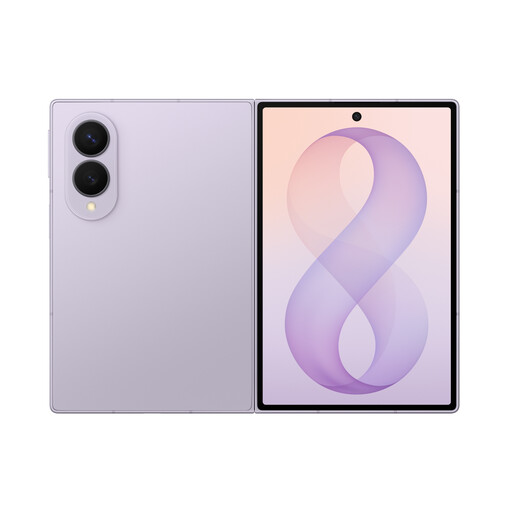
Samsung Galaxy Z Fold 8, Lavender, 512GB
A foldable-phone route to try if you want to read on a phone rather than choose a separate e-reader; check the specific reading app, book and accessibility controls.
The product description identifies a 7.6-inch main screen and anti-reflection technology.
Joybuy
 No image available
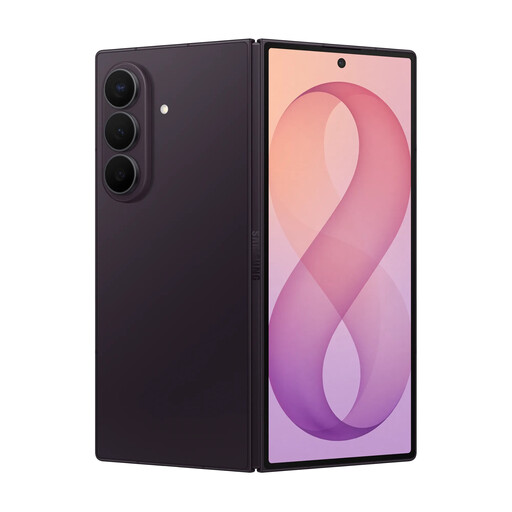
Galaxy Z Fold 8 Ultra Techo, Violet, 512GB
Consider this foldable-phone route if you want a larger inner screen for reading, but check the intended book and app with the accessibility features you need.
The product description specifies an 8-inch inner display, Android 17 and One UI 9.
Joybuy
 No image available
Bigme HiBreak Pro Color, 6.13-inch, 8GB+256GB
This dedicated e-reader may suit someone looking for a colour ePaper screen and Android apps; verify that the particular reading app and book provide the required access features.
The listed specifications include a 6.13-inch Kaleido 3 colour ePaper display and Android 14.
Joybuy
 No image available
Bigme B6, 6-inch e-Ink reader, 4+64GB
A compact dedicated-reader option for focused text reading; check that the software and books you use work with the accessibility features you need.
The listed specifications include a 6-inch, 300 PPI monochrome E Ink display, a 36-level adjustable front light and Android 14.
Joybuy
 No image available
iFLYTEK AINOTE 2, 10.65-inch E Ink tablet with protective case
This larger E Ink tablet may suit readers who want a tablet-sized reading surface; check the accessibility of the intended files and software before relying on it.
The specifications list EPUB, PDF, TXT, MOBI and AZW formats. The product has no reading light.
Joybuy
Frequently asked questions
Will enlarging text also enlarge the book list and menus?
Not necessarily; book text and device navigation may have separate accessibility options. RNIB notes that some options are available only after opening a book, so test both the title and menus. Do not assume Kobo's update described for EU readers is available on a UK device.
Can I use my UK public-library card on a Kobo?
It depends on your local library and the title. Kobo describes borrowing on supported readers, but the library must offer the service and the particular book must be eligible; check both before choosing a reader.
How do I connect a Braille display to an iPhone?
For a supported Bluetooth display, Apple directs users to pair it in Bluetooth settings and select it under Accessibility, VoiceOver and Braille. Check Apple's supported-model list and test the display with the reading app and book you intend to use.
Do I need to buy a new device to use RNIB Talking Books?
Not necessarily. RNIB describes EasyReader apps for Apple and Android phones and tablets, as well as a Windows version. Check the Reading Services eligibility and UK-residency terms that apply to your use.
What if a device is faulty or an online purchase does not suit me?
GOV.UK guidance says faulty or misdescribed goods qualify for remedies. For an eligible online distance sale, it generally gives 14 days after receipt to notify the seller of cancellation and a further 14 days to return the item; check the transaction and applicable conditions rather than assuming the same rules apply to every digital-content purchase.


