
24/7 Customer Support

Free returns

Same-day & Next-day Delivery

Quality Guaranteed

Unlock Your Welcome Offers: FREE Delivery | Up to 80% OFF | Free 30-day JoyPlus trial
Download the APP
Buying earphones and headphones can seem straightforward until a new pair fails to connect to your phone, becomes uncomfortable after an hour or delivers poor call quality in a busy room. Marketing terms such as “studio sound”, “noise cancellation” and “low latency” can also hide important differences between products.
This guide from the Joybuy Product Recommendation Officer focuses on practical checks for UK shoppers, helping you compare wired earphones, wireless earbuds, gaming earbuds and headsets before you buy.
USB-C is the connector shape, not a guarantee of universal compatibility. Some USB-C wired earphones rely on digital audio through the port, while others may require device support for audio output. Check compatibility with your specific smartphone, tablet, laptop or console before ordering.
A fixed wired connection can be useful if you want to avoid charging, but confirm that the cable length and connector position suit your daily use. This is particularly important for USB-C smartphones without a traditional 3.5mm headphone socket.
Active Noise Cancellation (ANC) is designed to reduce external sound that you hear. It does not automatically make your voice clearer to other people on a call. For meetings, look separately for microphone positioning, beamforming or stated background-noise reduction.
A noise-cancelling headset with a boom microphone may therefore suit office calls more closely than wireless earbuds with ANC, especially in an open-plan workplace.
Terms such as “Hi-Res audio” and multi-driver design describe technical features, but the result also depends on the ear tips and how securely in-ear headphones sit. A poor seal can reduce bass, let in more surrounding sound and affect call performance.
Look for several ear-tip sizes or an ergonomic shape. For commuting and exercise, a secure fit may be more useful than a longer feature list.
Choose the connection according to how you use your devices:
For computers, also check whether the product includes USB-A support, a USB-C dongle or an adapter. Compatibility claims should be read alongside the actual ports on your equipment.
For calls, live streaming and gaming chat, identify the microphone type rather than relying on the word “mic” alone. An integrated microphone is compact and suitable for general calls. A boom microphone can be positioned closer to your mouth, while beamforming microphones use multiple pickup points to focus on speech.
A wired headphones-with-microphone setup can be practical for long meetings because it avoids battery concerns. In-line remotes may also provide call, volume and music controls, although button functions can vary by device.
Consider wearing style, weight and storage:
For safe listening, keep volume at a comfortable level and maintain awareness of traffic, cyclists and other hazards when outdoors.
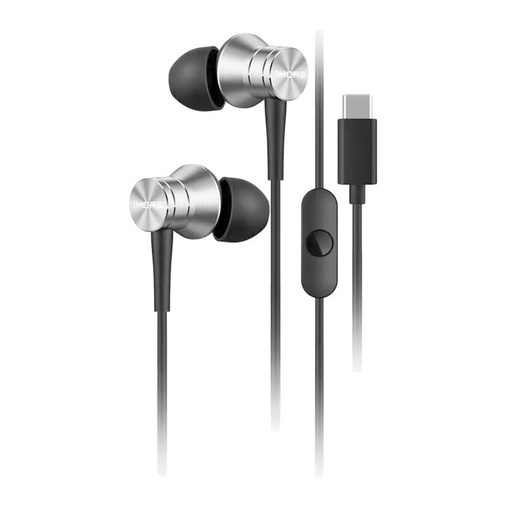
Why This Fits Their Persona: A two-pack gives mobile listeners one pair for home and another for a bag or car, without depending on wireless charging.
The USB-C plug, in-line remote and built-in microphone are clearly specified, helping buyers check the essentials before ordering.
45° angled design, extra silicone tips, 14g aluminium-alloy construction and a Kevlar-reinforced cable.
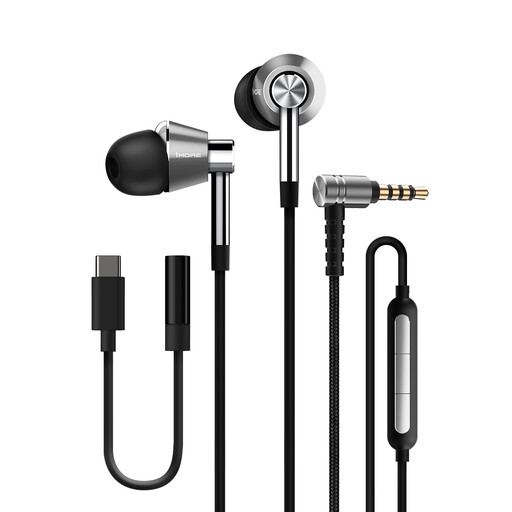
Why This Fits Their Persona: Suitable for listeners who prioritise wired music playback, detailed specifications and a choice of ear-tip sizes for a more personalised fit.
The product information identifies the driver arrangement, MEMS microphone and included tip options instead of relying only on broad sound-quality wording.
Three-driver design, in-line controls, MEMS microphone and nine sets of listed ear tips.
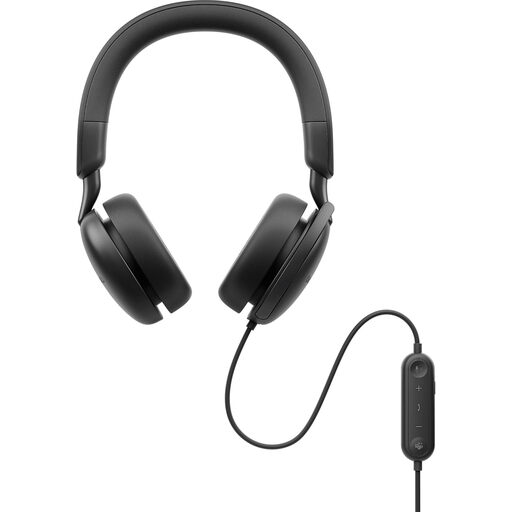
Why This Fits Their Persona: Designed around desk-based communication, it suits home offices, open-plan workspaces and frequent video meetings.
It separates ANC for the wearer from its AI-based, beamforming microphone for voice pickup, making the functions easier to assess.
USB-C connectivity with USB-A adapter, replaceable memory-foam cushions, transparency mode and a rotating boom microphone.
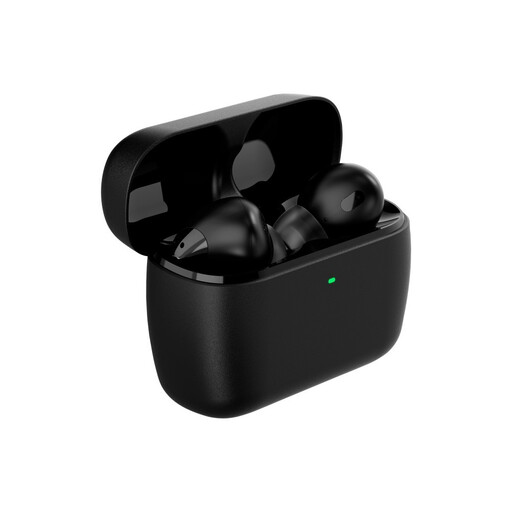
Why This Fits Their Persona: A practical match for players switching between console, PC and mobile gaming, including users who want wireless earbuds for travel.
The connection options are specified separately: low-latency 2.4GHz wireless through a USB-C dongle and Bluetooth for compatible devices.
Built-in microphone, charging case, multiple ear-tip sizes and stated compatibility with PC, Nintendo Switch, Steam Deck, PlayStation, Android and iOS.
We have compiled a complete, real-time list of products that fully satisfy these strict selection criteria and UK safety regulations.
No. They are suitable for devices that support USB-C audio output, but port compatibility can vary. Check your phone or tablet specification and confirm whether digital audio accessories are supported. A USB-C adapter may be needed for other connection types.
Lifespan depends on construction, storage and frequency of use. Cable strain, moisture, dirt and repeated drops can shorten the working life of both wired and wireless products. Store earbuds in their case, disconnect wired models by holding the plug and keep charging ports dry. Rechargeable wireless batteries will also gradually lose capacity over time.
They do not usually have a subscription cost, but they need electricity for charging. The practical ongoing consideration is battery ageing and whether the charging case or earbuds can be replaced. Wired earphones avoid battery charging, while wireless models offer greater freedom of movement. Choose according to your device setup and daily routine rather than connectivity alone.