Choose a simplified 4G phone when straightforward calls, texts and physical keys matter more than apps. If messaging apps and video calls are important, choose a smartphone whose accessibility settings the user can try; a Wi-Fi tablet can provide a larger screen for video calls at home, but does not replace a mobile handset needed away from Wi-Fi. For any handset, check compatibility with the intended network and coverage where it will be used.
Who is choosing the device?
Calls-and-texts-first users
For someone who mainly contacts familiar people by voice call or text, an uncomplicated way to find contacts and use the controls may matter more than access to apps. Doro distinguishes its calls-and-texts Leva phones from its app-capable Aurora smartphones.
Video-call and messaging users
People who keep in touch through an app need a device that can run their chosen service and a screen they can use comfortably. Age UK offers beginner guidance for making video calls, including with help from friends or family.
Supported smartphone learners
A smartphone or tablet may be workable when someone can help set it up and practise familiar tasks with the user. Age UK provides step-by-step digital guides, while AbilityNet describes accessibility settings that can be adjusted on devices.
What matters when choosing?
Start with the contact methods the person actually needs: ordinary calls and texts, or app-based messaging and video. Then try the controls with that person and, for a mobile handset, check the intended network.
Simplified 4G phone
Choose it when: Physical keys and a straightforward routine for calls and texts are the priority.
Trade-off: A feature phone may not run the messaging or video-call apps the person wants; check the exact model before choosing it for those tasks.
Smartphone with accessibility settings
Choose it when: The person needs apps or video calls and can try settings that make the screen or controls manageable.
Trade-off: Touchscreen gestures and app setup may take practice; settings also vary by model and software version.
Tablet for home video calls
Choose it when: Video contact usually happens at home over Wi-Fi and a larger screen is useful.
Trade-off: A Wi-Fi tablet does not take the place of a mobile handset for ordinary calls away from home.
| Concern |
What to check |
Who this matters to |
| Everyday simplicity |
Ask the user to unlock the device, find a contact, answer a call and send a message. Check whether useful shortcuts can be set up. |
If I mainly call and text familiar people, I want to repeat those tasks without searching through menus. Roughly 25% of consumers put manageable everyday use first. |
| Readability |
Try contact names, messages and app controls at the preferred text size and contrast; check that enlarged controls remain usable. |
When names or messages are hard to read, I need a clearer display without making buttons difficult to reach. Around 20% of consumers prioritise readability. |
| Physical controls |
Try the keys or touch controls, volume buttons and charging connection. If considering a cradle, confirm it fits the exact handset. |
If tapping small targets or connecting a charger is difficult, I need controls I can use for routine calls. Approximately 20% of consumers make physical interaction their main concern. |
| Video contact |
Confirm the chosen app works on the device and try a call where it will normally be used, with the intended internet connection. |
When family contact depends on video calls or app messages, I need those services to be practical to use. Roughly 15% of consumers put video contact first. |
| Mobile-network suitability |
Confirm the exact handset with the intended provider and check Ofcom’s predicted coverage at the places that matter. |
If I depend on calls at home and while out, I need the handset and network to work in both places. Around 20% of consumers prioritise network suitability. |
Mistakes to avoid
-
Assuming a larger smartphone screen will solve every usability problem
More space can help with reading, but Apple notes that setting text too large can make buttons and other app functions hard to tap.
Try the dialler, contacts, messages and intended video-call app with the user’s preferred text, contrast and zoom settings before deciding.
-
Choosing a calls-and-texts phone for app-based contact
Doro separates its Leva feature phones from Aurora smartphones intended for apps and video calls. A simple calling routine will not meet a need for an unsupported app.
List the services the person uses with friends and family, then confirm that the exact device can run each essential one.
-
Treating a 4G label as a complete compatibility check
Ofcom says the UK’s 3G networks have switched off and 2G networks are being phased out. It also cautions that choosing a phone described as 4G-ready is not the whole compatibility decision.
Check the precise handset with the intended provider, then use Ofcom’s coverage checker for the places where the person needs service.
-
Assuming the pictured charging accessories are included
Doro describes handset-specific charging cradles and says its cradles do not include USB cables or power adaptors.
Check the exact handset bundle, cradle compatibility and included charging accessories before purchase.
A separately obtained Doro cradle may also need a USB cable and power adaptor.
Brands to consider for these needs
Doro
Doro offers distinct UK routes: Leva feature phones for calls and texts, and Aurora smartphones for apps and video calls.
- Doro describes 4G Leva models with large keys; a compatible charging cradle may also be an option for a particular handset.
- Do not assume a Leva phone has Aurora’s app functions, or that a cradle and its power accessories come with the handset.
Apple
An iPhone or iPad offers app-based communication alongside adjustable accessibility controls.
- Apple documents larger text, Display Zoom, contrast adjustments, VoiceOver and Voice Control.
- Try the settings in the apps the person will use: Apple notes that very large text can make some controls difficult to tap.
Samsung
Galaxy smartphones and tablets provide another app-based route with adjustable accessibility features.
- Samsung documents visibility, screen-reading and interaction-and-dexterity settings for its mobile devices.
- Check the exact model and software version, as Samsung says available settings can differ.
Joybuy products for home video contact
This Wi-Fi tablet is a choice to consider when video calls will normally take place at home. If ordinary mobile calls away from Wi-Fi are essential, assess a compatible handset separately.
 No image available
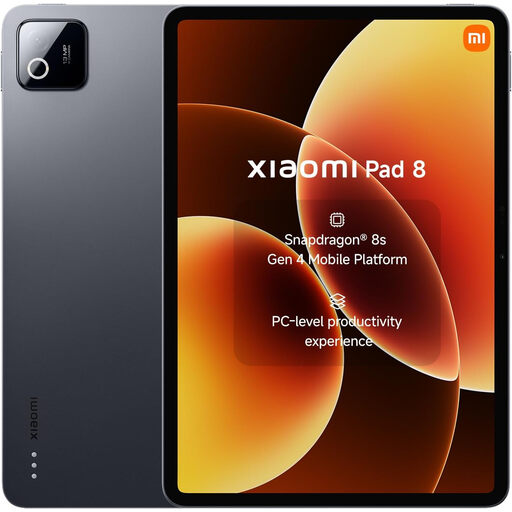
Xiaomi Pad 8, 8G RAM, 128GB, Wi-Fi, Gray
Consider this tablet for video contact where Wi-Fi is available. Confirm that the preferred calling app runs on this exact model, and try its display and interaction settings with the user before buying.
8G RAM, 128GB storage and Wi-Fi are stated in the product name. As a Wi-Fi tablet, it should not be treated as a replacement for a handset needed for ordinary mobile calls away from Wi-Fi.
View on Joybuy
Common questions
Should I buy a 2G-only or 3G-only phone for use in the UK?
Choose a handset with at least 4G or 5G support for a new purchase, then confirm it works with the intended provider. Ofcom says UK 3G networks have switched off and 2G networks are being phased out; a stated 4G capability alone does not confirm every service will work on a particular network.
How can I check mobile coverage at home?
Use Ofcom’s mobile coverage checker for the relevant postcode and the provider tied to the planned SIM. Its indoor and outdoor coverage information is a prediction, so it is more useful for this decision than a general claim about nationwide coverage, but it cannot guarantee reception inside a particular room.
Can a tablet replace a phone for keeping in touch?
A Wi-Fi tablet can handle home video calls through a compatible app and internet connection, but it does not automatically replace a handset for ordinary mobile calls away from Wi-Fi. Keep the need for calls while out separate from the desire for a larger screen at home.
What should I set up before handing over the device?
Set up essential contacts, the chosen communication app and a workable charging routine, then practise a call and message together. Age UK provides beginner video-calling guidance; for display or interaction adjustments, check the settings available on the exact device and software version.


