
24/7 Customer Support

Free returns

Same-day & Next-day Delivery

Quality Guaranteed

Unlock Your Welcome Offers: FREE Delivery | Up to 80% OFF | Free 30-day JoyPlus trial
Download the APP
Choosing Edifier Bluetooth desktop speakers involves more than comparing wattage or selecting the most attractive cabinet. A speaker that sounds impressive in a product description may still be inconvenient beside a monitor, incompatible with your phone’s codec or unsuitable for moving between rooms.
As the Joybuy Product Recommendation Officer, I focus on practical details that help shoppers avoid paying for features they cannot use. The following guide covers the common buying traps, essential specifications and suitable Edifier wireless speakers for different listening habits.
A higher RMS figure can indicate greater output capacity, but it does not describe tonal balance, bass extension, cabinet construction or dialogue clarity. A compact speaker with carefully matched drivers may be more suitable for a desk than a larger, louder system.
Look for the complete specification, including RMS output, driver size, amplifier type and speaker configuration. For example, the Edifier M60 uses separate 3-inch mid-bass drivers and 1-inch tweeters, with a stated total output of 66W RMS.
Terms such as LDAC speakers and Hi-Res Audio can be useful, but compatibility depends on the source device, operating system and connection method. The Edifier M60 and S300 support LDAC, while the listed specifications refer to Android devices running version 8.0 or later for high-resolution LDAC transmission.
An iPhone, Windows computer or older Android handset may use a different Bluetooth codec. If you want consistent high-resolution playback, check whether the speaker also includes USB-C, USB or AUX inputs.
A built-in battery makes a speaker easier to move, but it does not automatically make it water-resistant. Several tabletop models are intended for dry indoor environments. Check the product information for an IP rating before using a speaker in a garden, near a kitchen sink or outdoors in uncertain weather.
Battery figures are also stated under specified conditions. Volume level, wireless connection type and content can affect actual playback time.
For desktop computer speakers, Bluetooth provides a tidy connection to a laptop, tablet or phone. However, a wired input can be valuable for reducing latency during gaming or avoiding Bluetooth codec conversion.
Two-way speakers with separate tweeters and mid-bass drivers can help divide high and lower frequencies. Placement still affects the result. Keep left and right speakers at a similar distance from your listening position, avoid blocking the tweeters and leave space around rear bass ports.
For a compact desk, check the dimensions rather than relying on promotional photographs. The M60 measures approximately 100mm wide × 168mm high × 147mm deep per speaker and includes angled aluminium stands intended to direct sound towards ear level.
If you need speakers for a home office and occasional movement around the house, compare stated battery life and charging arrangements. The ES300 lists up to 12 hours of playtime, the D32 up to 11 hours and the QD25 up to 15 hours.
Also consider:
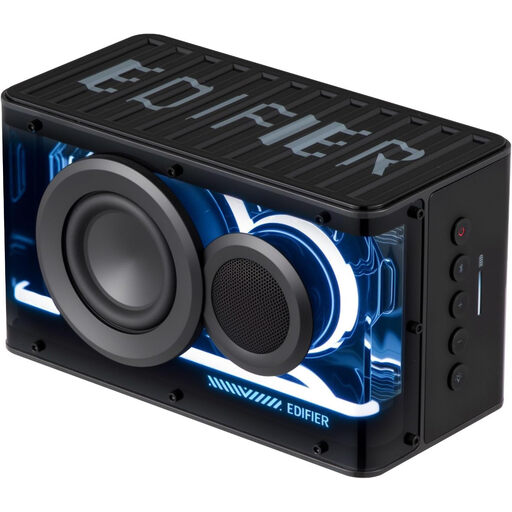
Why This Fits Their Persona: A compact starting point for listeners who want desktop audio that can also move to another room, an office or a day outdoors.
Its stated 15-hour battery life and USB-C charging address the assumption that a desktop speaker must remain beside a power socket.
25W RMS output, Bluetooth 6.0, USB-C charging, stereo pairing and four sound modes.
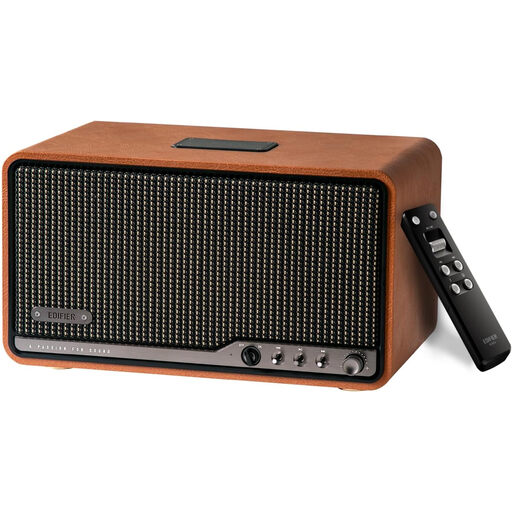
Why This Fits Their Persona: Suitable for a bookshelf, living room or spacious desk where cabinet design, wireless detail and room coverage matter.
It provides several connection routes, including Bluetooth 5.4, USB-C and AUX, so buyers are not dependent on one wireless source.
80W RMS, LDAC support, AirPlay 2, multi-room playback and stereo pairing.
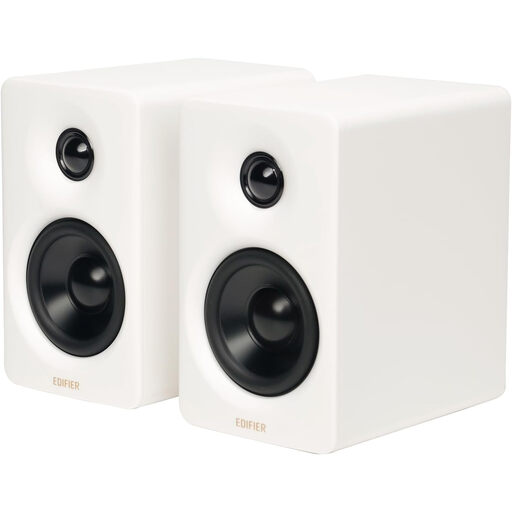
Why This Fits Their Persona: A focused desktop choice for home-office workers, gamers and music listeners who want separate stereo speakers without using much desk width.
Its compact per-speaker dimensions and included angled stands help address cramped desks and poorly directed sound.
66W RMS, Bluetooth 5.3 with LDAC, USB-C and AUX inputs, plus a touch control panel.
We have compiled a complete, real-time list of products that fully satisfy these strict selection criteria and UK safety regulations.
Yes, selected models can work well as speakers for home office use. Compact options such as the M60 suit a monitor desk, while the ES300 and D32 offer battery operation when you want to move around. For video calls, check whether your computer will use the speaker for output while retaining a separate microphone for input.
Not necessarily. LDAC can provide a higher wireless transmission bitrate on compatible Android devices, but it is not required for podcasts, standard streaming or general computer audio. If you use an iPhone or a computer without LDAC support, prioritise the inputs and features you will actually use, such as AUX, USB-C or multi-device pairing.
Running cost depends on power draw, listening volume and standby behaviour. RMS output is not the same as continuous electricity consumption. For a clearer estimate, check the adaptor’s input rating and the product manual, then multiply the appliance’s power use in kilowatts by your electricity tariff. Switching the speakers off when not needed can reduce unnecessary standby consumption.