For substantial slide revisions on a train, start with a Windows device and a physical keyboard; a detachable Surface Pro needs its optional keyboard for that setup. If you mainly review, annotate or make lighter edits, an iPad or Android tablet may suit you, provided you check your actual presentation against its PowerPoint features. Whichever route you choose, plan for offline file access, charging and the space your complete setup needs.
Who each setup suits
Frequent slide revisers
If you rewrite text and rearrange slides regularly, prioritise a keyboard you can use comfortably and check the PowerPoint functions your decks require. Microsoft documents platform differences, so opening a file is not the same as confirming your full editing workflow.
Touch-first annotators
If you mostly review layouts, sketch ideas or make small changes between meetings, consider pen compatibility and the screen you will use for markup. Apple lists compatible Pencil options for iPad Air, while Samsung lists an S Pen with its UK Galaxy Tab S10+ package.
Connectivity-dependent travellers
If you need to share or sync files during a journey, decide whether offline preparation meets your needs before choosing cellular hardware. For live access, check the service plan and coverage along the routes you use.
What matters for slide work
Choose the editing workflow first, then assess how its keyboard, screen and file access will work in the space available on a train.
Windows detachable
Consider it when: You make sustained, keyboard-led changes and want a laptop-like working position. Microsoft describes Surface Pro as a Windows 2-in-1 with an optional keyboard and touchpad.
Allow for: The keyboard is optional, and Microsoft’s advertised video-playback battery figure does not describe slide-editing runtime.
iPad Air
Consider it when: Touch-first editing and annotation matter more than a desktop-style workflow. Apple lists the 11-inch Wi-Fi model at 464 g.
Allow for: Check your deck’s required features in PowerPoint for iPad; Apple lists its keyboard and Pencil options as compatible accessories, not standard tablet components.
Galaxy Tab S with DeX
Consider it when: You favour an Android tablet for reviewing and marking up slides. Samsung identifies a 12.4-inch 5G Galaxy Tab S10+ and documents DeX workspace options.
Allow for: Check whether the screen and chosen keyboard fit your train table; Samsung’s UK Tab S10+ package information says a travel adapter is not included.
| Concern |
What to check |
Who this matters to |
| Dependable editing |
Test a representative deck on the intended PowerPoint platform, including the features you use. Check editing entitlement for your Microsoft 365 plan and screen size. |
If I regularly rebuild slides, I need the deck to retain the functions my work depends on. Around 29% of consumers would put dependable creation and editing first. |
| Train-table fit |
Compare the complete tablet, stand and keyboard setup with the space you normally have; check carrying weight and usable stand positions. |
A cramped table makes a typing setup difficult to position, even when the tablet itself is easy to carry. Around 29% of consumers would prioritise a portable, stable workspace. |
| File access |
Save the editable deck and essential media offline and test opening and saving them without internet. For live syncing, check the data plan and coverage. |
If colleagues may change a shared deck while I travel, I need a workable way to reach it without losing my offline copy. Around 24% of consumers would put connection resilience first. |
| Review and annotation |
Check pen compatibility, what comes with the chosen model and whether its screen size suits your usual table. |
When most of my work is spotting layout issues or marking up ideas, I want room to see and annotate the slides. Around 18% of consumers would make visual review their primary concern. |
Mistakes to avoid
-
Assuming a deck will edit correctly because it opens
Microsoft’s PowerPoint feature comparison distinguishes between platforms; a deck may open even though a particular editing or media workflow needs checking.
Try a copy of a representative presentation on the operating system and PowerPoint app you intend to use.
-
Judging portability by the tablet alone
Sustained typing may call for a keyboard and a usable stand. Microsoft identifies the Surface Pro keyboard as optional, and Apple lists compatible iPad Air accessories separately from the tablet specification.
Assess the whole kit you would carry, including any keyboard, pen and charging equipment you need.
-
Using a video-playback figure as an editing forecast
Microsoft’s advertised Surface Pro figure of up to 15.5 hours applies to video playback, not to your slide-editing workflow.
Arrange compatible charging and assess runtime against the way you will actually work.
-
Relying entirely on a live connection
A cellular-capable model still needs suitable service, while access to mobile-app features may depend on your Microsoft 365 entitlement.
Download the editable deck and essential media before departure, then check that the file opens and saves while offline.
Brands and product lines to consider
Microsoft Surface
Surface Pro is relevant if you want a detachable Windows tablet that can take on a laptop-like typing position.
- Microsoft describes an optional Surface Pro keyboard with a full-sized haptic touchpad.
- The keyboard is optional. Microsoft’s up-to-15.5-hour battery figure is for video playback, not presentation editing.
Apple
The 11-inch iPad Air is worth considering for touch-first PowerPoint edits and pen-led review.
- Apple lists the 11-inch Wi-Fi model at 464 g, with USB-C, an anti-reflective coating and support for Apple Pencil Pro, Apple Pencil (USB-C) and Magic Keyboard.
- Those accessories are compatible options rather than part of the tablet’s basic specification; check your deck’s PowerPoint features before relying on iPad editing alone.
Samsung
The Galaxy Tab S10+ is relevant if you want an Android tablet for slide review, handwriting and a larger display.
- Samsung identifies a 12.4-inch 5G Tab S10+ and lists an S Pen with its UK package.
- Check the screen and keyboard setup against your train-table space. Samsung says the UK package does not include a travel adapter.
Joybuy products for slide preparation
These choices span keyboard-equipped Windows convertibles, an Android tablet bundle and tablets for which the typing setup needs separate consideration. Match the complete device and accessory arrangement to the slide work you expect to do on the train.
 No image available
HP OmniBook X Flip 16-as0004na, 16-inch, Core Ultra 5 226V
Consider this keyboard-equipped Windows convertible if you make substantial text changes and can accommodate its 16-inch format on your train table.
The listing names a touchscreen, 16 GB RAM, a 512 GB SSD and Windows 11 Home. Check the complete device dimensions and editing runtime for your journey.
View on Joybuy
 No image available
TABWEE T20 10.1-inch tablet with keyboard, mouse and stylus
The listed keyboard bundle may suit short typing sessions and handwritten markup. Check how its keyboard and stand sit together on the table you normally use.
The product name lists 256 GB storage. Confirm the supplied Android version before choosing it, as the product information gives conflicting versions, and test your deck’s PowerPoint functions.
View on Joybuy
 No image available
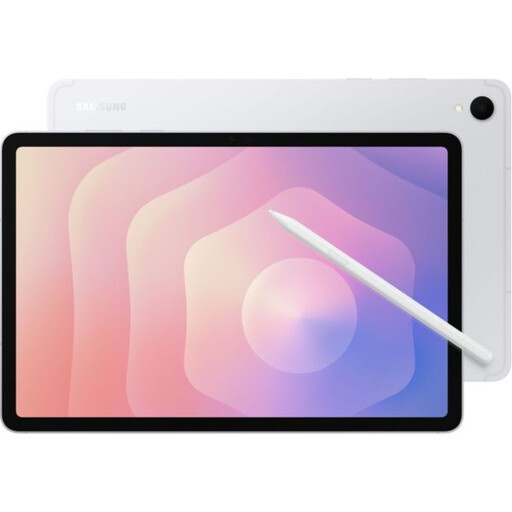
Samsung Galaxy Tab S11 10.9-inch, 256 GB, Silver
Consider this tablet if slide review and pen annotation take priority. For longer typing sessions, check which keyboard works with this exact model and whether it is supplied.
The product name identifies a 10.9-inch display and 256 GB storage. Check the deck’s Android PowerPoint features and the charging equipment you would take.
View on Joybuy
 No image available
HP OmniBook Ultra Flip 14-fh0006na, 16 GB RAM, 1 TB SSD
This Windows convertible is an option for keyboard-led slide editing if a laptop-style device fits your train workspace.
The product name specifies a 2-in-1 design and Windows 11 Home. Check its dimensions and editing runtime against your journey rather than relying on the convertible design alone.
View on Joybuy
 No image available
Apple iPad Pro 11-inch (M5), Wi-Fi, 256 GB, Standard Glass, Silver
Consider this iPad for touch-first slide work, adding a compatible keyboard if your revisions involve sustained typing.
The listing describes keyboard and Apple Pencil accessories as sold separately. Check compatibility with this exact iPad, how the complete setup fits your train table and the PowerPoint features your deck uses.
View on Joybuy
Questions about editing on trains
Do I need Microsoft 365 to edit PowerPoint slides on a tablet?
Check the editing entitlement for your plan and chosen tablet before relying on it. Microsoft says its mobile-app features and accessible files depend on the qualifying Microsoft 365 plan or one-time Office purchase, and some mobile editing availability depends on screen size; viewing a deck does not establish that your required edits are available.
Is Wi-Fi-only enough for preparing slides on a train?
Wi-Fi-only can meet your needs if you can save the editable deck and required media before travelling and do not need continuous collaboration. If live syncing is essential, assess a cellular model alongside a suitable data plan and coverage; 5G hardware alone does not supply a connection.
Can a tablet handle a presentation I cannot afford to alter accidentally?
Use the tablet for that deck only after testing a copy in the PowerPoint app and operating system you intend to use. Microsoft documents feature differences between PowerPoint platforms, so check the particular editing, layout and media functions your presentation requires.
Does the Galaxy Tab S10+ come with a charger?
Samsung’s UK Galaxy Tab S10+ purchase information lists a tablet, S Pen and USB-C data cable, but says a travel adapter is not included. Confirm the contents of the exact configuration you choose and plan compatible charging for the journey.


