What matters when choosing?
For tariff comparisons on a small desk, work out whether readable detail, the monitor’s footprint or computer connectivity is the constraint that matters most to you.
| Concern |
What to check |
Who this matters to |
| Table detail and workspace |
Compare native resolution at the same screen size, then check how text scaling works with your computer. |
If I regularly read narrow tariff columns beside a PDF or spreadsheet, I want enough detail to work without constant window switching. Around 42% of consumers put readable detail and workspace first. |
| Desk fit and positioning |
Check overall width and stand depth against your usable desk space; consider adjustment or compatible VESA mounting. |
With a laptop and keyboard already on my desk, the base must leave room to work and let me position the screen comfortably. For around 33% of consumers, desk fit and positioning are the primary concern. |
| Computer connections |
Match the monitor’s inputs to your computer. For a USB-C hub, check laptop video output and charging compatibility. |
If I switch between a laptop and other equipment, I need connections that suit what I own rather than hub features I cannot use. Connectivity is the first priority for around 25% of consumers. |
Brands to consider
These examples illustrate differences between specific monitor models, not capabilities shared by every model from a brand.
Dell
Dell UK lists 23.8-inch business monitors with distinct resolution and connection options in the P2425 range.
- The P2425D is a QHD option, while the P2425H is Full HD. Dell UK describes the P2425HE as a Full HD USB-C hub model with up to 90 W power delivery.
- Check the complete model suffix: QHD resolution and USB-C laptop charging should not be assumed across the range.
Lenovo ThinkVision
The ThinkVision T24i-30 is a compact Full HD example for users who need an adjustable stand or conventional connections.
- Lenovo Support GB lists a 23.8-inch IPS display, tilt, lift, swivel and pivot adjustment, and a 100 × 100 mm VESA mounting pattern.
- The T24i-30 is Full HD; compare QHD alternatives if extra pixel resolution is important for dense documents.
HP
The E24 G5 is a 23.8-inch Full HD example with stand dimensions that help with desk planning.
- HP Support UK specifies height, tilt, swivel and pivot adjustment, four USB Type-A ports and a three-year limited warranty for the E24 G5.
- Its native resolution is 1920 × 1080, so it has fewer pixels than a 23.8-inch QHD display.
Joybuy monitor choices
These monitors offer compact-screen choices for tariff webpages and documents, ranging from Full HD models to QHD and WUXGA options. Check each variant’s dimensions, connections and energy information against your own desk and computer before choosing.
 No image available
ASUS ProArt PA24ACRV IPS QHD
Consider this QHD model if dense tariff tables and PDFs are your main concern on a compact desk.
Check its overall footprint before buying and confirm that your laptop supports the USB-C functions you intend to use.
View on Joybuy
 No image available
ASUS ProArt PA248CNV IPS WUXGA
Consider this WUXGA model if document space and a laptop-based desk setup both matter to you.
Before relying on a one-cable connection, check your laptop’s USB-C video and charging requirements.
View on Joybuy
 No image available
Dell P2425 24-inch monitor
Consider this compact model for tariff documents and spreadsheets, but confirm the exact P2425 variant’s display specification and inputs before deciding.
Check its stand footprint against your available desk depth; confirm USB-C functions and refresh rate if either affects your choice.
View on Joybuy
 No image available
KOORUI E2412F 24-inch FHD monitor
This Full HD model is an option for ordinary tariff webpages and spreadsheets when extra QHD pixel resolution is not your priority.
Check its full dimensions and whether its available stand adjustment suits your working position.
View on Joybuy
 No image available
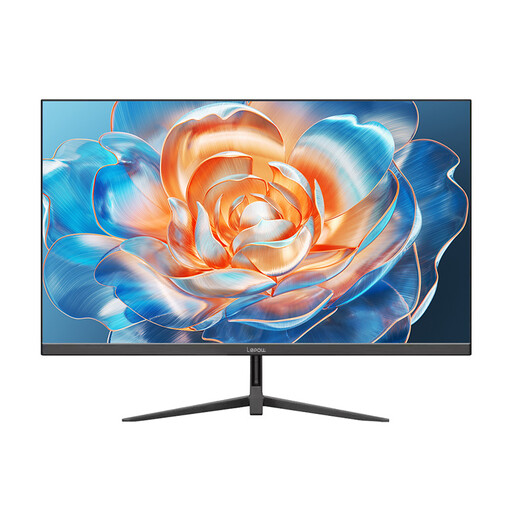
Lepow HC-24Z2 24-inch monitor, 100 Hz
Consider this compact model for everyday browser comparisons, while checking whether its display resolution gives you enough room for denser tariff documents.
Measure the available desk space and confirm its stand dimensions and positioning options before buying.
View on Joybuy
Frequently asked questions
Is a 24-inch monitor large enough to compare energy tariffs?
A monitor around 24 inches can work well when desk space is limited, but its full dimensions and resolution matter. Lenovo Support GB lists the 23.8-inch ThinkVision T24i-30 at 539.8 mm wide; if you frequently read dense tables or PDFs, compare QHD and Full HD at this screen size before choosing.
Do I need a USB-C monitor for tariff comparisons on a laptop?
You need a USB-C hub monitor only if its connection features suit your laptop and desk setup. Check that the laptop supports USB-C video output and compatible charging; Dell UK rates the P2425HE for up to 90 W power delivery, but that rating alone does not establish laptop compatibility.
What energy information should I check when buying a monitor online in the UK?
Look for the energy label and product information sheet for a monitor covered by the UK electronic-display rules. GOV.UK states that products in scope must display an accurate energy label at the point of sale, including on a website, and have a product information sheet available to consumers.
What should I do with an old monitor in the UK?
Check an appropriate electrical-waste collection or take-back route rather than treating the monitor as general household waste. GOV.UK describes the UK waste electrical and electronic equipment framework as supporting recovery, reuse and recycling; ask your retailer or local authority which service accepts your monitor.


