Choose a dedicated eReader if your journeys are mainly for reading text-heavy novels and you value a reading-focused display over general apps. Choose a compact tablet if you also need PDFs, notes, video or other apps; for either route, check that your books can be downloaded before travel and that the device is comfortable to hold.
Who is each option for?
Long-form train readers
If most journeys are spent on text-heavy novels, start with a device designed around reading. A glare-free screen, straightforward page turns and fewer charging interruptions may matter more to you than tablet apps; check the exact model rather than assuming every eReader has the same features.
Illustrated sci-fi and annotation readers
Colour maps, illustrated editions and handwritten notes make the display and controls more important. Rakuten Kobo identifies the Libra Colour as a model with a colour screen, page-turn buttons and stylus compatibility, but those features need not drive the choice if you mostly read plain text.
One-device commuters
If the same device needs to handle reading apps, PDFs, notes and entertainment, consider a general-purpose tablet. Compare its screen size and weight with the space in your bag and how you expect to hold it on the train.
What matters when buying?
Monochrome eReader
Choose it when: Long stretches of text-led reading matter more than general-purpose apps.
Trade-off: Check that its ebook ecosystem works with the books you already own or borrow.
Colour eReader
Choose it when: Illustrated editions, maps or annotation make colour and model-specific controls useful.
Trade-off: Confirm which stylus, buttons and library features the particular model offers.
General-purpose tablet
Choose it when: PDFs, notes and other apps are as important as novels.
Trade-off: Its tablet display and carrying size are different considerations from those of a dedicated E Ink reader.
| Concern |
What to check |
Who this matters to |
| Comfort during long novels |
Compare display type, glare treatment, page controls and the exact device’s weight. |
If I spend most of the journey immersed in a novel, I want a screen and controls I can use comfortably for sustained reading. Around 42% of consumers put reading comfort first. |
| Books and charging on the move |
Check how your books download, any offline restrictions and the maker’s battery-use conditions. |
When the next chapter is stored online, I need it on my device before the train leaves and want charging to fit my journey pattern. For around 33% of consumers, continuity away from Wi-Fi and charging is the primary need. |
| Apps, visuals and documents |
Check your reading-app compatibility, PDF-friendly screen size, storage and whether a stylus is included. |
I may switch from a novel to an illustrated edition, a PDF or notes on the same trip, so a reading-only device may not cover my plans. Broader use comes first for around 25% of consumers. |
Buying pitfalls to avoid
-
Assuming every owned ebook is ready offline
A book visible in a cloud library may still need downloading. Rakuten Kobo says its five most recently purchased or opened ebooks download automatically, while other titles may require a manual download.
Before leaving, download the books you expect to read and try opening one with Wi-Fi turned off.
-
Choosing a large screen for a mainly handheld novel
Space for PDFs can be useful, but a larger device changes what you carry and hold through a reading session. Apple lists the iPad mini Wi-Fi model at 293 g; Lenovo lists an 11-inch display for the Tab M11.
Decide whether novels or large documents will dominate, then compare the exact variant’s dimensions and weight, including any case you plan to use.
-
Treating colour and annotation as essentials
Rakuten Kobo lists colour, page-turn buttons and stylus compatibility for the Libra Colour. Their value depends on whether you actually read illustrated material, take notes or prefer buttons.
If you mostly read plain-text novels, weigh those features against the screen, controls and book access you will use on each journey. Check whether a stylus is included if annotation matters.
Brands worth considering
Amazon Kindle
Kindle’s dedicated eReaders suit a reading-first shortlist. Amazon UK describes the current Paperwhite with a 7-inch glare-free display and weeks of battery life; the latter is the maker’s claim, not a measured train-reading runtime.
- A reading-focused route for text-heavy novels.
- Check whether your existing ebook sources fit the Kindle ecosystem before choosing it over a tablet.
Rakuten Kobo
Kobo’s eReader range includes options for readers interested in colour, page buttons and annotation. Its support information also describes downloading books for use without Wi-Fi.
- Rakuten Kobo lists a colour screen, page-turn buttons and stylus compatibility for the Libra Colour.
- Confirm library integration, audiobook support, waterproofing and controls for the exact model; these features vary.
Apple
The iPad mini is a compact general-purpose tablet route when ebooks share the journey with PDFs, notes and other apps. Apple lists an 8.3-inch display and a weight of 293 g for its Wi-Fi model.
- Its tablet software supports a broader range of tasks than a reading-only device.
- Its display is not E Ink; compare the precise variant and your preferred reading apps before buying.
Lenovo
The Tab M11 is a larger Android-tablet option for readers who also use documents and other apps. Lenovo UK lists an 11-inch, 1920 × 1200 anti-glare IPS display for the named model.
- The larger listed screen gives documents more display space than a compact reader.
- Check whether an 11-inch device suits the seat space, bag and handheld reading you expect on the train.
Joybuy products for train reading
These choices span compact E Ink readers, a larger E Ink note-taking device and small general-purpose tablets. Choose by what you will read and do on the train, then check the exact app, offline-book and carrying requirements that matter to you.
 No image available
Bigme B6 6-inch E Ink reader, white, 4+64GB
Consider this compact reader if novels are your main use but you also want an Android device. Its listed features include a 36-level front light, Android 14 and Google Play. Check its weight, page controls and whether your ebook sources allow the offline access you need.
View on Joybuy
 No image available
Apple iPad Mini 7 (A17 Pro), 512GB, Space Grey
Choose this compact tablet route if reading needs to sit alongside other apps and notes. The listed model has an 8.3-inch display, 512GB storage and Apple Pencil Pro compatibility; check whether the Pencil is needed for your plans, as it is sold separately. Its display is not E Ink, and offline books depend on your chosen app and downloads.
View on Joybuy
 No image available
iFLYTEK AINOTE 2 10.65-inch E Ink tablet with protective case
This larger E Ink option is worth considering if documents and handwritten notes matter alongside books. Its named display is 10.65 inches; the product information also identifies PDF and EPUB support and a supplied stylus. It has no reading light, so consider how you would read in a dim carriage, and check access to your preferred ebooks offline.
View on Joybuy
 No image available
Bigme HiBreak Pro Color 6.13-inch E Ink reader, 8GB+256GB
Consider this compact colour E Ink model if illustrated sci-fi is part of your reading. The listed variant runs Android 14 and has 8GB+256GB memory and storage. Confirm its front lighting, weight, page controls and your ebook app’s offline behaviour before relying on it for a journey.
View on Joybuy
 No image available
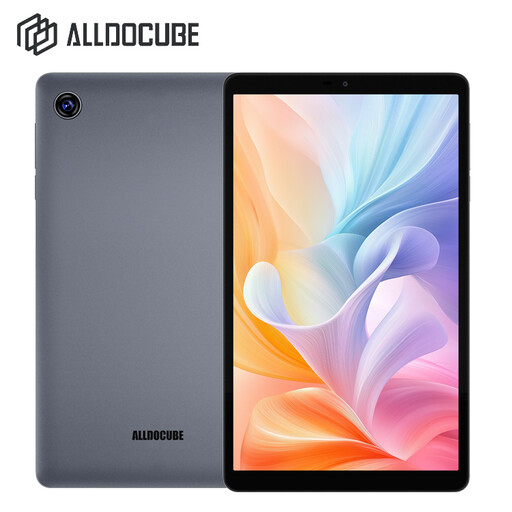
ALLDOCUBE iPLAY60 Mini 8.68-inch tablet, 4GB+64GB
This is a small general-purpose tablet to consider if you want reading alongside other Android apps. Its title specifies Android 15 and an 8.68-inch screen, but also says no charger is included. Check the display, weight, preferred reading app and offline-book options for your journey.
View on Joybuy
Frequently asked questions
Should I take an eReader or a tablet for science-fiction novels?
Take an eReader if text-led reading is the main purpose and you would rather have a reading-focused device than general apps. Take a compact tablet if PDFs, notes, illustrated material or other apps matter just as much; compare the exact screen and carrying weight before deciding.
Will I need Wi-Fi on the train to read?
Not if the books you need are downloaded before you travel and open offline in your chosen app or reader. Rakuten Kobo says its five most recently purchased or opened ebooks download automatically, so check and manually download any other titles you plan to read.
Can I borrow library books on a Kobo eReader in the UK?
Rakuten Kobo lists the United Kingdom as a country where built-in Libby works on supported Kobo eReaders. Before buying, check that the exact model supports the feature and that your local library’s catalogue and membership meet your needs.


