
24/7 Customer Support

Free returns

Same-day & Next-day Delivery

Quality Guaranteed

Unlock Your Welcome Offers: FREE Delivery | Up to 80% OFF | Free 30-day JoyPlus trial
Download the APP
As working from home solidifies its place in the UK's professional landscape, many of us are realising that the temporary setup on the dining table is no longer sustainable. The persistent neck ache, lower back twinges and general discomfort are clear signals that it's time for an upgrade. Creating a dedicated, ergonomic home office setup is not a luxury; it's a fundamental step towards protecting your health and enhancing your focus during the workday.
This guide is designed to help you navigate the essentials of building a comfortable and productive workspace. We will outline key principles for selecting the right ergonomic office furniture and share some of our top recommendations to help you assemble your ideal work from home setup.
Before you start adding items to your basket, it's helpful to understand the core principles of ergonomics. A few key choices can make a significant difference to your daily comfort and long-term well-being.
The single most important investment for your home office is a supportive chair. Look for adjustability as the primary feature. A good ergonomic chair should allow you to modify the seat height, backrest angle and armrest position. Crucially, it must provide effective lumbar support to maintain the natural curve of your spine. This is the foundation of good posture support for desk work.
Your desk is the centrepiece of your home office workstation. Its height should allow you to sit with your feet flat on the floor and your elbows at a 90-degree angle, close to your body. For those with multiple monitors or extensive paperwork, a larger surface area is essential. Look for a sturdy frame that doesn't wobble, as stability is key for a productive environment. A well-chosen computer desk and chair set works in harmony to support you throughout the day.
To prevent neck strain, the top of your computer screen should be at or slightly below eye level. If you primarily use a laptop, this is almost impossible to achieve without an accessory. A laptop stand or an external monitor is a non-negotiable home office essential for raising your screen to the correct height, allowing you to look straight ahead rather than constantly down.
Based on features that promote comfort, adjustability and durability, here are our recommendations for building your ultimate desk setup.
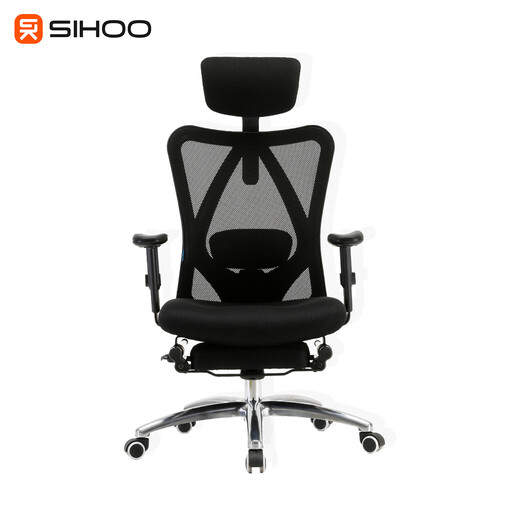
Why It Stands Out: This chair offers a comprehensive range of adjustments often found in much pricier models. With five key points of customisation—adjustable headrest, lumbar support, seat height, recline and armrests—it can be tailored to fit your specific body shape and posture needs. The breathable mesh back is particularly useful for maintaining comfort during long work sessions, while the inclusion of a retractable footrest provides an excellent option for relaxing during breaks. Its construction is validated by SGS and BIFMA certifications for the gas lift and base.
Pros:
Who is it for?: Professionals who spend the majority of their day seated and require a high degree of customisable support. It's an excellent choice for anyone looking to address back and neck discomfort with a single, versatile piece of furniture.
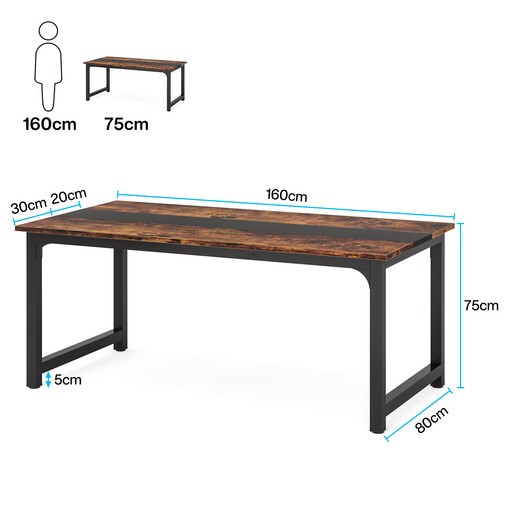
Why It Stands Out: The sheer size and stability of this desk make it a formidable foundation for any serious home office workstation. The 160 x 80 cm surface provides ample room for multiple monitors, a laptop and other WFH essentials without feeling cramped. Its heavy-duty powder-coated steel frame, reinforced with additional supports and a triangular connection design, ensures it remains completely stable, with a stated capacity of up to 400 kg.
Pros:
Who is it for?: Remote workers, freelancers and creatives who need a large, unshakeable surface for their equipment. It is particularly well-suited for those who use heavy monitors or require a large area for both digital and physical work.
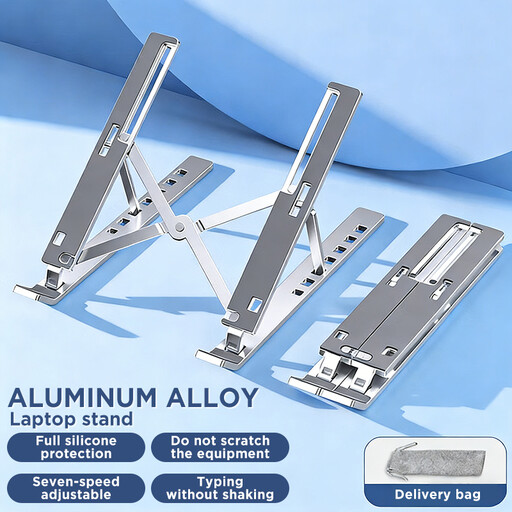
Why It Stands Out: This stand is a simple, elegant and effective solution to a common ergonomic problem. It elevates your laptop screen to eye level, instantly improving your posture. Made from sturdy aluminium, it is both lightweight and durable. Its foldable design makes it highly portable, perfect for hybrid workers who split their time between home and the office. The open design also promotes better airflow, helping to keep your device cool.
Pros:
Who is it for?: Essential for anyone who uses a laptop as their primary or secondary screen. It's a cost-effective and immediate way to improve the ergonomics of an existing desk setup.
The right desk sets the tone for your entire office. If you're looking for a different aesthetic, size or feature set, there are many designs to consider. To find the perfect centrepiece for your workspace, explore our curated collection of designer desks and find a style that matches your vision.
What is the most important part of an ergonomic home office setup? While every component plays a role, the ergonomic chair is often considered the most critical. It directly influences your posture and provides the necessary support to prevent strain on your back, neck and shoulders during long hours of sitting.
How do I know if my desk and chair are at the right height? When seated with your back against the chair, your feet should rest flat on the floor. Your elbows should form a roughly 90-degree angle when your hands are on the keyboard, with your forearms parallel to the ground. An adjustable chair is key to achieving this alignment with your chosen desk.
Can an ergonomic setup really improve productivity? By minimising physical discomfort and the distraction that comes with it, a proper ergonomic setup can help you maintain focus for longer periods. When you are not constantly shifting to relieve a sore back or neck, you can dedicate more mental energy to your tasks, which often contributes to improved concentration and efficiency.