Choose a battery-powered wireless ergonomic keyboard if you want to write without using a wall socket and move the keyboard around your desk. A larger split model gives you a different key shape and more room for a number pad, but takes up more desk space; a wired USB keyboard can also avoid a separate wall plug if your computer has a suitable port. Check the exact key layout and connection before buying, and make sure the keyboard fits your workstation rather than relying on its shape alone.
Who these keyboards may suit
Frequent language-exercise writers with limited power access
If you write extended responses, translations or drills, a keyboard that does not need its own wall plug may leave a scarce socket free for your computer. You still need a connection your computer supports and a typing position that works at your desk.
Comfort-first writers at a fixed desk
If long writing sessions make keyboard placement a priority, you may want to compare shaped and split keyframes, palm support and adjustment options. Allow space for the whole keyboard and assess its position as part of the workstation.
UK-layout and compact-desk users
If familiar punctuation positions or desk space matter most, check the exact UK-ISO variant and the keys retained by a compact layout. A smaller board is not necessarily a split or wave-shaped ergonomic keyboard.
What to check before choosing
Work out whether the scarce resource is a wall socket, a computer USB port or convenient access to charging. That distinction can change the choice: a battery-powered keyboard needs no wall plug during use, while a wired keyboard draws power from the computer but occupies a USB port.
| Concern |
What to check |
Who this matters to |
| Power and connection |
Check battery or charging requirements, Bluetooth support and whether a receiver needs a free USB port. |
I want to keep a wall socket free during regular writing, but need the wireless connection to work with my computer. Around 31% of consumers put socket-independent connection first. |
| Typing position |
Compare wave and split keyframes, palm support and desk fit; check that the keyboard can sit just below elbow height. |
For extended writing, I would prioritise a keyboard shape and desk arrangement I can use comfortably over a smaller footprint. Around 31% of consumers put sustained-writing comfort first. |
| Layout and space |
Confirm the selected UK-ISO variant, required punctuation keys and whether a 65% or TKL layout retains the keys you use. |
My exercises depend on finding symbols quickly, and I have limited desk room; around 19% of consumers put layout and space first. |
| Wired simplicity |
Check for a usable USB-A port and enough cable length for the keyboard's position. |
I write at one desk and would rather use a cable than manage wireless pairing or batteries. Around 19% of consumers put battery-free wired use first. |
Buying pitfalls
-
Assuming wireless means no power upkeep
A battery-powered keyboard need not occupy a wall socket during use, but it still needs power and a compatible Bluetooth or receiver connection.
Check the battery type, the manufacturer's stated battery life, what receiver is supplied and which ports your computer has.
A model using replaceable batteries will also need replacement batteries over time.
-
Choosing a shaped keyboard without checking the desk
Keyboard shape alone does not determine your typing position. The Health and Safety Executive advises keeping the keyboard just below elbow height and the screen and keyboard central, without twisting your back.
Before choosing a larger or split board, check that you can place it appropriately alongside your screen, chair and other desk items.
-
Assuming a UK listing guarantees the keys you expect
Keyboard lines can have different regional variants, and compact layouts may change access to punctuation or navigation keys needed for language exercises.
Check the selected variant's layout designation and key image, then compare its symbols and number-pad arrangement with what you use.
-
Treating every compact keyboard as a split ergonomic model
A smaller UK-ISO mechanical keyboard may address desk-space and layout needs without having the wave or split keyframe found on dedicated ergonomic models.
If keyframe shape is your priority, check for that physical design rather than choosing by size or wireless connection alone.
Relevant brands for reference
Logitech
Its Wave Keys and ERGO K860 illustrate two wireless ergonomic shapes: a compact wave-shaped keyboard and a larger split model.
- Logitech specifies Bluetooth and an included receiver for Wave Keys, with up to three years of battery life from two AAA batteries. ERGO K860 has a curved split frame, palm support and an integrated number pad.
- Check the space and layout needed for the particular model. Physical support features and the brand's comfort claims do not establish how either keyboard will feel for every writer.
Keychron
Its Q2 Max and K1 Max lines are relevant when a compact UK-ISO option and a choice of wireless connections matter more than a wave or split keyframe.
- Keychron lists a UK-ISO 65% Q2 Max option with Bluetooth, 2.4 GHz and wired connections; the K1 Max offers a low-profile TKL ISO line.
- Confirm the precise variant and key positions. These cited models are not direct physical equivalents to the dedicated wave and split ergonomic designs discussed here.
CHERRY
The KC 4500 ERGO is a wired option for a fixed desk where avoiding batteries matters more than cable-free placement.
- CHERRY specifies a curved keypad, padded palm rest, adjustable feet and a 1.8 m USB-A cable for the KC 4500 ERGO.
- It requires a suitable computer USB-A port and room to route the cable.
Joybuy keyboard choices
These choices cover wireless keyboards for different desk-space, layout and wrist-rest priorities. Some have a split design, while others offer a compact or full-size conventional layout; check the selected keys and connection against your language exercises before choosing.
 No image available
HP 960 Ergonomic Split Layout Wireless Keyboard with Padded Wrist Rest
Consider this if a split key layout and wrist rest matter more to you than keeping the keyboard small. Confirm the selected key layout and that your computer supports the connection you intend to use.
View on Joybuy
 No image available
ASUS ROG Strix Scope II 96 Wireless Keyboard, White, UK Layout
The named 96 layout may interest writers comparing a smaller board with a full-size one. Check the exact punctuation keys on the selected UK-layout version and its power arrangements before relying on it for lengthy exercises.
View on Joybuy
 No image available
ET Silent Full-Size 2.4 GHz Wireless Keyboard and Mouse Combo, US Layout
This full-size keyboard-and-mouse set is an option only if its US key layout suits the symbols you need. Check that your computer has a suitable port for its wireless connection before choosing it for a limited-socket desk.
View on Joybuy
 No image available
Targus EcoSmart Full-Size Wireless Keyboard (UK)
Consider this if you want a full-size wireless keyboard rather than a split or compact keyframe. Check the exact key positions on the UK version and which connection your computer can use.
View on Joybuy
 No image available
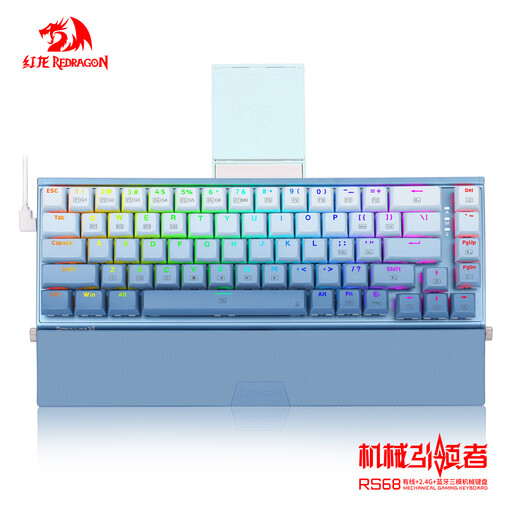
RS68 The Third Mock Examination Wireless Mechanical Keyboard, Gradient Blue
This compact wireless mechanical keyboard is worth considering when desk space is a higher priority than a split keyframe. Check its physical key layout and how its power arrangement fits regular writing sessions.
View on Joybuy
Questions about choosing a keyboard
Will a wireless keyboard free up a wall socket?
A battery-powered wireless keyboard can operate without its own wall plug, but it will still need battery replacement or charging. Logitech specifies up to three years from two AAA batteries for Wave Keys; you also need a compatible Bluetooth connection or a port for its included receiver.
Should I use Bluetooth or a USB receiver?
Bluetooth can keep a computer USB port free if your computer supports it. A supplied receiver is another option when you have a compatible port; check the receiver and the selected keyboard's connection options before buying.
Is a shaped keyboard enough to improve my desk setup?
No keyboard shape replaces checking the complete workstation. The Health and Safety Executive advises placing the keyboard just below elbow height and keeping the screen and keyboard central, so assess whether the keyboard you choose can sit in that position.
Why check UK-ISO layout for language exercises?
The physical layout affects where you find punctuation and symbols, while compact layouts can also change access to other keys. Keychron identifies UK-ISO options for the cited Q2 Max and K1 Max lines, but you should check the exact selected variant and set your computer's input language for what you are writing.


