What matters when choosing
For regular foreign-language practice with limited plug sockets, decide whether typing comfort, language-layout cues or wireless operation is your primary need. Then check the other two before choosing a keyboard.
| Concern |
What to check |
Who this matters to |
| Comfort during repeated typing |
Compare a familiar wave shape, a fixed split and independently positioned halves. Allow for desk space and time to adapt. |
When practice sessions run long, I want to avoid awkward reaches without struggling to find the keys. Around 38% of consumers put sustained typing comfort first. |
| Language input and key legends |
Test each required Windows or macOS input source; then compare UK-ISO or language-specific key shapes and legends. |
If I switch languages often, I need to know which characters the active input source will produce and whether I can follow the printed keys. For around 31% of consumers, layout confidence comes first. |
| Wireless power and connection |
Check Bluetooth support or the need for a receiver port, plus battery replacement or USB charging. |
With sockets reserved for other devices, I want to type wirelessly without overlooking how the keyboard gets power. Wireless operation is the first concern for around 31% of consumers. |
Joybuy keyboards for language practice
These wireless keyboards and keyboard sets offer different physical layouts and, in some cases, wrist support. Match the key legends, connection method and power arrangements to your device and practice languages.
 No image available
HP 960 Split-Layout Wireless Keyboard with Padded Wrist Rest
Consider this if a split layout and padded wrist support are priorities for repeated practice.
Check its physical layout and printed legends against your languages, and confirm how the keyboard is powered.
View on Joybuy
 No image available
Targus EcoSmart Full-Size Wireless Keyboard, UK Layout
Consider this if you prefer a familiar full-size arrangement while keeping the keyboard wireless.
The title specifies a UK layout. Check the exact legends for your practice languages and whether the keyboard’s footprint suits your desk.
View on Joybuy
 No image available
ASUS ROG Strix Scope II 96 Wireless Keyboard, White, UK Layout
Consider this if you want a wireless keyboard identified as a UK-layout variant rather than a dedicated split design.
Confirm the exact key legends and the selected configuration’s charging arrangements before buying.
View on Joybuy
 No image available
ET Silent Wireless Keyboard and Mouse Set, US Layout
Consider this set if you also need a mouse and can work with a US physical layout.
The title specifies 2.4 GHz wireless operation and a US layout. Check the legends and key geometry for your practice languages, and make sure your device has a suitable receiver port.
View on Joybuy
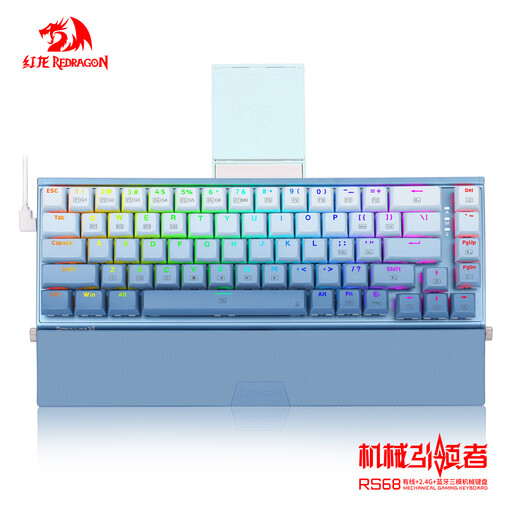 No image available
RS68 The Third Mock Examination Wireless Mechanical Keyboard, Gradient Blue
Consider this if a mechanical keyboard with wireless and wired connection choices appeals more than a dedicated split design.
The title specifies Bluetooth and a detachable hand support. Check the physical key arrangement and legends for your languages, along with its charging arrangements.
View on Joybuy
Common questions
Do I need a foreign-language physical keyboard to practise?
Not necessarily: Windows and macOS let you add and switch input layouts or sources, as Microsoft Support and Apple Support explain. Test the language on your device first; choose different physical legends if seeing the target keys would help you practise.
Will a wireless keyboard remove the need for a plug socket?
It can keep the keyboard off a wall socket during wireless use, but it will still need batteries or occasional charging. Check whether your device supports Bluetooth or needs a USB receiver, and how the particular keyboard gets power.
Is an ergonomic keyboard enough for long typing sessions?
No keyboard replaces an appropriate overall setup. The Health and Safety Executive advises keeping wrists straight where practical, using a soft touch and avoiding overstretching; review your chair, screen, desk space and breaks as well.
What should I check when disposing of a battery-powered keyboard?
Check local electrical recycling arrangements and any retailer take-back instructions. GOV.UK guidance says that products powered by batteries can still be electrical and electronic equipment even when they do not connect to the mains.


