What matters when choosing
For a chapter-length session, settle the connection and power question before choosing between a familiar joined keyboard and independently positioned halves.
Wireless wave layout
Consider it when: You want an untethered keyboard without substantially changing where the keys sit. Logitech says Wave Keys connects by Bluetooth or an included receiver.
Trade-off: Its joined shape offers less independent positioning than two separate halves, and its two AAA batteries eventually need replacing.
Wireless curved split
Consider it when: You want a more pronounced keyframe while keeping a joined, full-size arrangement. Logitech specifies Bluetooth connectivity and palm-lift settings for ERGO K860.
Trade-off: The full-size board needs desk space, and its halves cannot be moved apart independently.
Wireless independent halves
Consider it when: Separate placement and programmable keys matter enough to justify learning a new arrangement. Kinesis describes Advantage360 Professional as a wireless, tentable split keyboard.
Trade-off: Setup and adaptation take attention away from drafting, and rechargeable models still need a charging plan.
Wired independent halves
Consider it when: Separate placement and a compact layout matter more than avoiding a cable. ZSA describes Voyager as a configurable, low-profile split keyboard.
Trade-off: ZSA says Voyager is deliberately not wireless, so it needs a suitable connection while you type.
| Concern | What to check | Who this matters to |
|---|
| Untethered drafting |
Check Bluetooth compatibility or the USB port needed for a receiver, then check the exact model’s battery or charging method. |
If I have few sockets available, I do not want the keyboard connected to a charging cable throughout a chapter. Roughly 42% of consumers would put untethered drafting first. |
| Typing position |
Consider joined versus independently positioned halves, and whether the keyboard fits your desk, chair height and mouse placement. |
During a long drafting session, I need room to arrange my hands and workstation without assuming a keyboard shape will suit me automatically. Typing position would come first for around 33% of consumers. |
| Familiar workflow |
Check the physical layout, key legends and any configuration needed before relying on a compact or programmable board. |
When I am writing prose, I would rather keep a familiar key arrangement than pause to learn new layers. For roughly 25% of consumers, an uninterrupted typing workflow would be the priority. |
Joybuy product choices
These wireless keyboards offer different ways to keep a keyboard cable off the desk while drafting. Check the connection method and key layout for your device: not every option has a split design or uses Bluetooth.
 No image available
HP 960 Wireless Split-Layout Keyboard with Padded Wrist Rest
Consider this if you want a wireless keyboard with a split-zone arrangement and a padded wrist rest for your drafting setup.
Check the physical key layout and power requirements of the keyboard and its separate keypad against your writing device and available desk space.
View on Joybuy
 No image available
Targus EcoSmart™ Full Size Wireless Keyboard (UK)
Consider this if a familiar, full-size wireless arrangement matters more to you than independently positioned halves.
Check its connection and battery requirements, and make sure a full-size board leaves room for your mouse.
View on Joybuy
 No image available
ET Silent Wireless Keyboard and Mouse Combo (2.4GHz, US Layout)
Consider this if you want a full-size wireless keyboard and mouse together and are comfortable typing on a US layout.
Its stated 2.4GHz connection uses a receiver rather than Bluetooth, so check that your device has a suitable available USB port.
View on Joybuy
 No image available
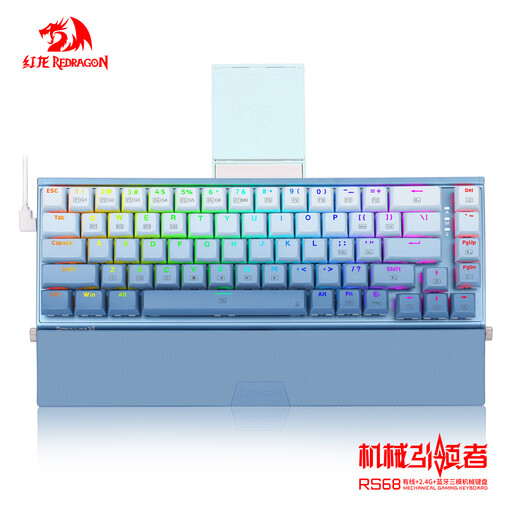
RS68 The Third Mock Examination Wireless Mechanical Keyboard (Gradient Blue)
Consider this compact Bluetooth-capable option if desk space matters and you are willing to check how its key arrangement works for prose.
The product name specifies a detachable hand support. Confirm the physical key layout and charging arrangements before choosing it for long sessions.
View on Joybuy
Common questions
Does a wireless ergonomic keyboard make sense when plug sockets are limited?
Yes, if you need to type without a keyboard cable attached throughout the session, but check how the exact model connects and gets power. Bluetooth avoids occupying a USB port when your writing device supports it; a wireless receiver still needs a suitable port.
Will an ergonomic keyboard resolve wrist or forearm discomfort by itself?
No particular keyboard can be assumed to resolve discomfort on its own. The Health and Safety Executive’s workstation guidance also covers elbow height, central screen and keyboard placement, and keeping wrists straight while keying.
What should I check before ordering a specialist split keyboard from overseas?
Confirm the physical layout and key legends, connection requirements, delivery area, warranty information and return process for the exact configuration. ZSA notes that its Voyager uses cables rather than a wireless connection, which matters if ports are scarce.
What can I do with an old keyboard or used batteries?
Check a suitable electrical-waste or battery collection route rather than treating the keyboard as ordinary household rubbish. GOV.UK says waste electrical products can be taken to a local household waste recycling centre and advises taping lithium-battery terminals before disposal to reduce fire risk.


