
24/7 Customer Support

Free returns

Same-day & Next-day Delivery

Quality Guaranteed

Unlock Your Welcome Offers: FREE Delivery | Up to 80% OFF | Free 30-day JoyPlus trial
Download the APP
If you spend your working day at a computer, you're likely familiar with the subtle but persistent discomfort that can build up in your wrist, arm and even your shoulder. A standard mouse forces your forearm into a twisted position, which over time can lead to strain and fatigue. An ergonomic mouse is designed to counter this by promoting a more natural posture for your hand and wrist.
This guide is here to help you navigate the options. We'll break down the key features to look for and present a few of our top recommendations for UK professionals, remote workers and digital creatives seeking to improve their comfort and productivity.
Choosing the right mouse goes beyond just how it looks. Here are a few practical points to consider to find a model that fits your workflow and helps alleviate discomfort.
The most significant feature of an ergonomic mouse is its shape. Many are designed as a vertical mouse, which encourages a "handshake" posture. This keeps your forearm bones (the ulna and radius) in a neutral, untwisted position, reducing pressure on the wrist and helping to ease the symptoms of repetitive strain. Other models use a contoured horizontal design that provides better palm support and thumb rests than a standard mouse, offering a middle ground for those not ready for a fully vertical grip.
A wireless ergonomic mouse declutters your desk and offers greater freedom of movement. Most connect via a 2.4GHz USB dongle or Bluetooth. For those who work across multiple systems, a multi-device mouse is a game-changer. These models can pair with two or more devices (like a laptop, tablet and desktop) and switch between them with the press of a button, streamlining your workflow significantly. Look for a rechargeable wireless mouse with a USB-C port for convenient and fast charging.
The ability to tailor a mouse to your specific needs can boost efficiency. Look for models with programmable buttons, which you can assign to common shortcuts like copy, paste or opening specific applications. Another key specification is DPI (Dots Per Inch), which measures the mouse's sensitivity. Adjustable DPI allows you to change cursor speed on the fly—lower settings for precise design work and higher settings for quick navigation.
We've selected a few standout models that offer a great combination of comfort, features and performance for users in the UK.
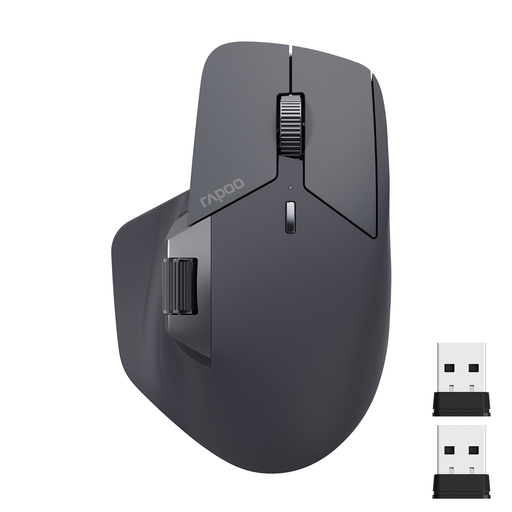
Why It Stands Out The RAPOO MT760L is built for the ultimate multitasker. Its standout feature is the M+ Cross-Computer Technology, which allows you to control multiple computers seamlessly just by moving your cursor to the edge of the screen. Combined with 11 programmable buttons and a unique side scroll wheel, it's a productivity powerhouse in an ergonomic form.
Pros
Who is it for? Power users, developers and data analysts who juggle multiple devices and applications and demand a high degree of customisation from their tools.
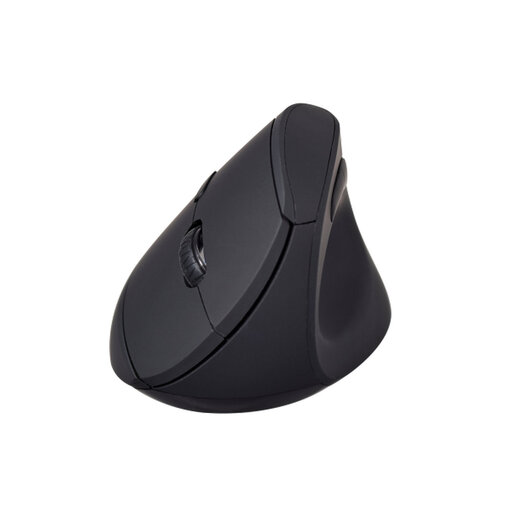
Why It Stands Out The V7 MW500BT is a classic vertical mouse focused entirely on providing a solution for mouse for wrist pain. Its "handshake" grip design places your arm in a natural, relaxed position. It avoids complex features in favour of pure, functional ergonomics, making it an excellent and accessible choice for improving your desk posture.
Pros
Who is it for? Office professionals and anyone experiencing wrist or forearm fatigue who wants a straightforward, effective ergonomic solution without unnecessary complexity.
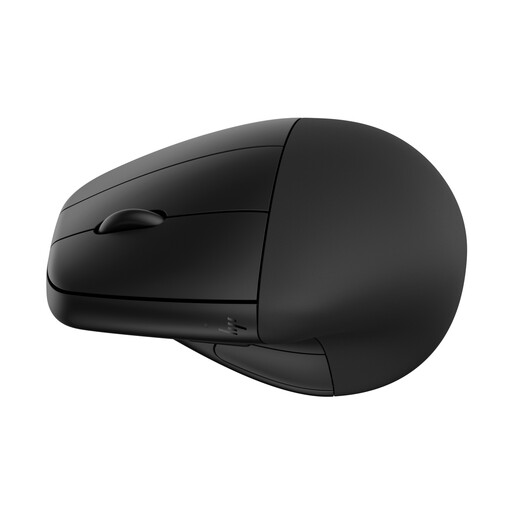
Why It Stands Out The HP 920 offers a unique blend of ergonomic design and practical features. Its most notable feature is the detachable magnetic wrist rest, allowing you to customise your level of support. It also boasts an impressive battery life of up to four months and is constructed with 65% post-consumer recycled plastics, making it a more sustainable choice.
Pros
Who is it for? Health-conscious professionals who appreciate the added support of a wrist rest, value long battery life and prefer products from established, eco-aware brands.
The recommendations above are excellent starting points for general professional and creative use. However, if your needs are more specialised—for instance, requiring ultra-low latency and extremely high DPI for competitive gaming—other options may be more suitable. Many gaming mice also incorporate advanced ergonomic features.
For a wider selection, feel free to explore our full range of performance mice.
Explore Our Gaming Mouse Collection
1. Do ergonomic mice really help with wrist pain? An ergonomic mouse is designed to place your hand and wrist in a more natural, neutral alignment, often called the "handshake" position. This can reduce the muscle strain and nerve compression that often occurs with standard mice. While many users report a significant reduction in discomfort, it's one part of a healthy workspace setup and not a medical treatment.
2. How long does it take to get used to a vertical mouse? There is typically a short adjustment period, which can last from a few days to a week. The vertical grip can feel unfamiliar at first, but most people adapt quickly. It's often helpful to start by using it for a few hours a day and gradually increasing your usage as your muscle memory adjusts.
3. What is DPI and why does it matter for an ergonomic mouse? DPI stands for "Dots Per Inch" and measures how sensitive a mouse is to physical movement. A higher DPI means the cursor on your screen will travel further with a smaller hand movement. Adjustable DPI is a valuable feature because it allows you to tailor the mouse's responsiveness to your task. You might use a lower DPI for precise graphic design work and a higher DPI for quickly navigating large spreadsheets or browsing the web.