
24/7 Customer Support

Free returns

Same-day & Next-day Delivery

Quality Guaranteed

Unlock Your Welcome Offers: FREE Delivery | Up to 80% OFF | Free 30-day JoyPlus trial
Download the APP
That familiar ache in your wrist after a long day at the desk. The stiffness in your hand and forearm. For many professionals, remote workers and students in the UK, these are unwelcome but frequent companions. A standard computer mouse, used for hours on end, can force your arm into an unnatural, twisted position, leading to discomfort and strain.
An ergonomic mouse is designed to solve this problem. By promoting a more natural posture for your hand and wrist, it aims to reduce muscle strain, improve comfort and help you stay productive throughout your workday. But with so many options available, from vertical designs to sculpted productivity powerhouses, choosing the right one can be a challenge.
As a Joybuy Product Recommendation Officer, my role is to help you navigate the market. This guide will break down what to look for in an ergonomic mouse and present our top recommendations to help you find a more comfortable way to work.
Finding the right fit is about more than just looks. Consider these key factors to ensure you choose a comfortable mouse for long hours that genuinely suits your needs.
The most significant choice you'll make is the mouse's shape.
Most modern ergonomic mice are wireless, offering a cleaner, clutter-free desk. A wireless ergonomic mouse typically connects in one of two ways:
Also, consider the power source. A rechargeable ergonomic mouse with a USB-C port offers convenience, while models using AA or AAA batteries can offer months or even years of use before needing a replacement.
A great office mouse should do more than just feel good; it should enhance your workflow. Look for features like:
After analysing the market for options that balance comfort, features and user feedback, here are our standout recommendations.
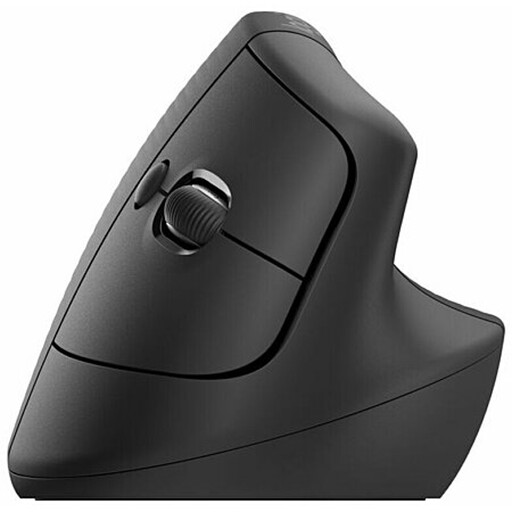
Why It Stands Out: The Logitech Lift is a fantastic entry point into the world of vertical mice. Its 57-degree angle is engineered to place your hand in a natural handshake position, immediately taking pressure off the wrist. It’s specifically designed for small to medium-sized hands, ensuring a comfortable and secure grip.
The whisper-quiet clicks are a welcome feature in shared office or home environments, and the SmartWheel cleverly switches between precise, line-by-line scrolling and fast, free-spinning mode. With dual connectivity and an impressive battery life of up to two years from a single AA battery, it’s a practical and effective tool for all-day comfort.
Pros:
Who is it for?
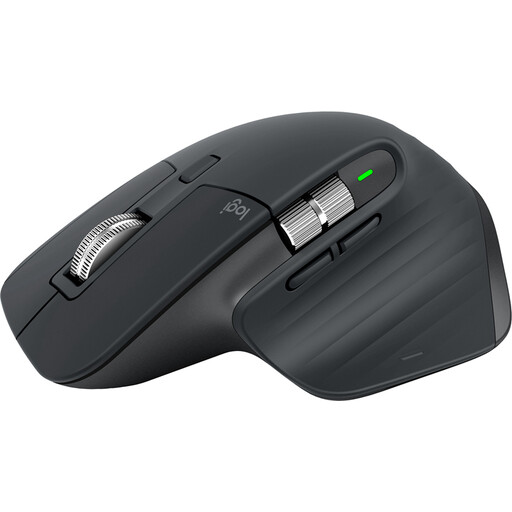
Why It Stands Out: The MX Master 3S is a masterclass in design, blending a supremely comfortable sculpted shape with powerful productivity features. While not a vertical mouse, its form is meticulously crafted to support your palm and fingers, reducing fatigue during long sessions.
Its standout feature is the 8K DPI optical sensor, which tracks flawlessly on virtually any surface, including glass. The MagSpeed electromagnetic scroll wheel is another highlight, capable of silently zipping through 1,000 lines per second. Add in seven customisable buttons, quiet clicks and Logitech's Flow technology for controlling multiple computers, and you have the ultimate productivity mouse.
Pros:
Who is it for?
View Logitech MX Master 3S on Joybuy
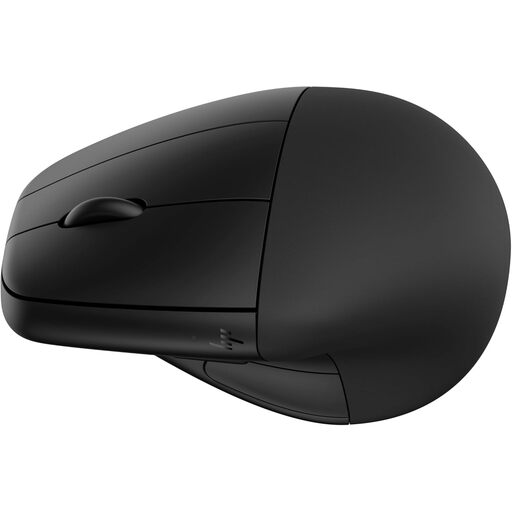
Why It Stands Out: The HP 920 offers a unique and thoughtful approach to ergonomics with its detachable magnetic wrist rest. This provides an extra layer of support, elevating your wrist to maintain a neutral alignment. According to HP, its design is certified by ergonomics bodies and can reduce muscle strain.
This mouse is also packed with practical features, including a rechargeable battery with an impressive four-month life and fast-charging capabilities. It connects via Bluetooth or a 2.4GHz dongle and has five programmable buttons for workflow customisation. Furthermore, its construction from 65% post-consumer recycled plastics makes it a more sustainable choice.
Pros:
Who is it for?
While these are our top recommendations for 2026, the perfect ergonomic mouse is a personal choice. Your hand size, grip style and specific needs will all influence your decision. If you haven't found your ideal match here, we invite you to explore our full range of ergonomic mice.
Explore All Ergonomic Mice on Joybuy
Many users find that an ergonomic mouse helps alleviate discomfort. By promoting a more natural hand and wrist posture, these mice are designed to reduce the strain that can contribute to pain from conditions like repetitive strain injury (RSI) or mouse for carpal tunnel syndrome. However, they are not medical devices, and if you have persistent pain, it is always best to consult a healthcare professional.
For most people, the adjustment period for a vertical mouse is relatively short, typically ranging from a few days to a week. While it may feel unusual at first, your hand and arm muscles quickly adapt to the more natural position. The initial learning curve is often a small price to pay for long-term comfort.
A wireless mouse offers significant advantages in terms of a clean, cable-free workspace and freedom of movement. Modern wireless technology is extremely reliable, with no noticeable lag for general office and productivity tasks. A wired mouse eliminates any concern about battery life or connection stability, but for most users, the convenience of a wireless ergonomic mouse is the preferred choice.