
24/7 Customer Support

Free returns

Same-day & Next-day Delivery

Quality Guaranteed

Unlock Your Welcome Offers: FREE Delivery | Up to 80% OFF | Free 30-day JoyPlus trial
Download the APP
That familiar ache in your wrist or forearm after a long day at the computer is a common complaint for many professionals, students and remote workers. A standard mouse can force your arm into an unnatural, twisted position, leading to discomfort and fatigue over time. An ergonomic mouse is designed to solve this by promoting a more natural posture, helping to reduce strain and improve your overall comfort during extended use.
As a Joybuy Product Recommendation Officer, my role is to help you navigate the options. This guide will walk you through key considerations for choosing the right device and highlight some of our top recommendations to help you find a comfortable and productive fit for your workspace.
Before diving into specific models, consider these factors to help narrow down your search.
The most significant choice you'll make is the orientation of the mouse.
A modern productivity mouse should streamline your workflow, not complicate it.
An ergonomic mouse is not a one-size-fits-all solution. A device that is too large or too small for your hand can create new pressure points. Pay attention to the dimensions and design, especially if you have smaller or larger hands. The goal is to find a comfortable mouse for long hours that feels like a natural extension of your hand.
Here are a few standout options that cater to different needs and preferences.
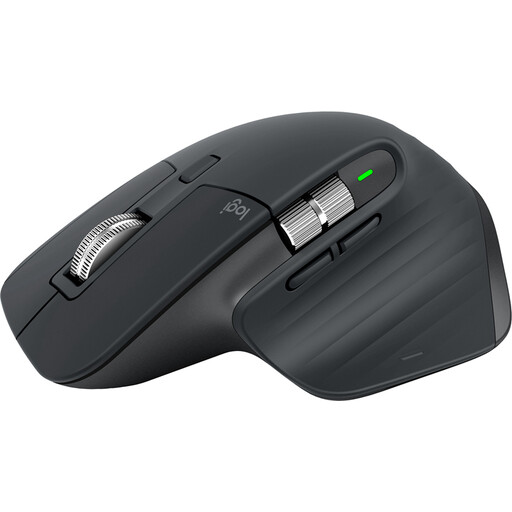
Why It Stands Out The MX Master 3S is a leading choice for users who prioritise precision and productivity. Its sculpted shape provides excellent support for the palm and fingers in a traditional grip. The standout feature is the MagSpeed electromagnetic scroll wheel, which is both incredibly fast and nearly silent. Combined with an 8K DPI sensor that tracks on virtually any surface (even glass), it's a powerhouse for demanding tasks.
Pros
Who is it for? This mouse is ideal for creators, developers and professionals who need a high-performance, customisable tool. If your work involves detailed tasks like video editing or navigating large spreadsheets, and you prefer a horizontal grip, the MX Master 3S is a formidable option.
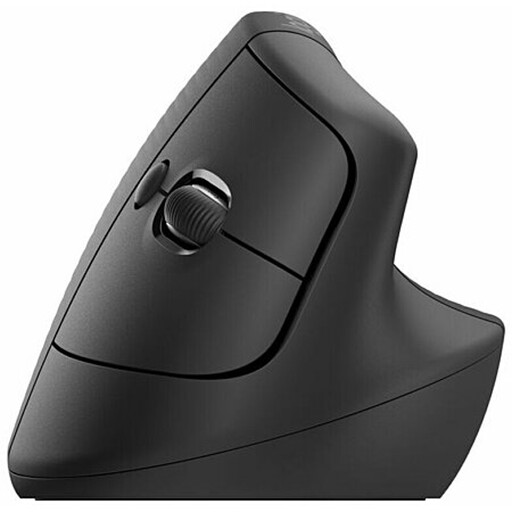
Why It Stands Out The Logitech Lift is designed specifically to place your arm in a more natural posture. Its 57-degree vertical angle promotes the "handshake" grip, which helps to reduce pressure on your wrist. Thoughtfully crafted for small to medium-sized hands, it features a soft rubber grip and a comfortable thumb rest, making it an excellent choice for all-day use.
Pros
Who is it for? If you experience wrist discomfort or are proactively looking to improve your desk ergonomics, the Lift is a superb choice. It's particularly well-suited for users with smaller hands who find other ergonomic mice too bulky.
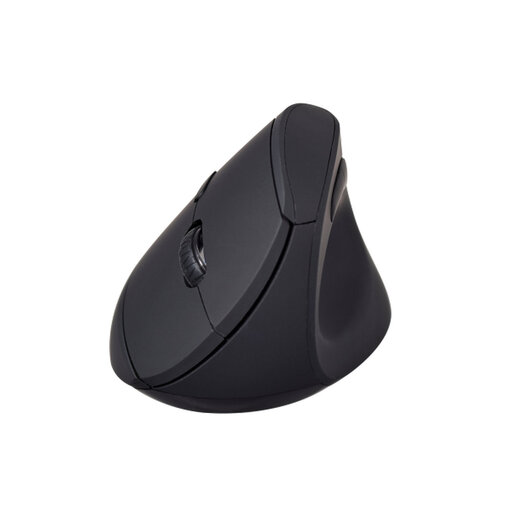
Why It Stands Out The V7 MW500BT offers the core benefits of a vertical mouse in a versatile and accessible package. It also uses the natural handshake grip to keep the forearm in a relaxed position. Its dual-mode wireless connectivity (Bluetooth and 2.4GHz) provides flexibility for connecting to different devices, while the adjustable DPI (800/1200/1600) allows you to tailor cursor speed to your task.
Pros
Who is it for? This mouse is a great option for users who want to try a vertical mouse without a significant initial investment. Its combination of ergonomic design, wireless flexibility and practical features makes it a solid all-rounder for office or home use.
The world of ergonomic peripherals is vast, with designs to suit every hand size, workflow and preference. If you haven't found the perfect fit here, don't worry.
Explore our full collection of Handheld Mouse options to discover more devices designed for comfort and productivity.
A vertical mouse encourages a neutral "handshake" posture, which prevents the twisting of your forearm bones (the ulna and radius). This position can reduce muscle strain and pressure on the median nerve in the wrist, which is why many people find it more comfortable for long-term use, especially those prone to wrist fatigue.
The adjustment period varies from person to person. For a sculpted horizontal mouse like the MX Master 3S, the transition is often immediate. For a vertical mouse, it can take a few days to a week for your muscle memory to adapt to the new grip and button placement. Most users report that the initial awkwardness is quickly replaced by a noticeable increase in comfort.
Yes, in two key ways. Firstly, by reducing physical discomfort, it allows you to focus on your tasks for longer without being distracted by aches and pains. Secondly, features like programmable buttons, advanced scroll wheels and multi-device control allow you to create efficient shortcuts and streamline your workflow, saving you time on repetitive actions.