
24/7 Customer Support

Free returns

Same-day & Next-day Delivery

Quality Guaranteed

Unlock Your Welcome Offers: FREE Delivery | Up to 80% OFF | Free 30-day JoyPlus trial
Download the APP
If your workday involves long hours at a computer, you are likely familiar with the creeping discomfort in your wrist, hand and even forearm. That standard-issue mouse might be functional, but it wasn't designed for extended use. An ergonomic mouse is engineered to support a more natural hand posture, helping to reduce strain and improve comfort throughout your day.
Navigating the market for a comfortable computer mouse can be confusing. This guide cuts through the clutter, offering practical advice to help you find a device that fits both your hand and your workflow. We will look at key features to consider and highlight a few standout models that balance comfort with performance.
Before looking at specific models, it is helpful to understand what makes an ergonomic mouse effective. Consider these factors to narrow down your options.
The most significant choice you will make is the mouse's shape. Ergonomic mice generally fall into two categories:
Your hand size is also a critical factor. Many models come in different sizes or are specifically designed for small, medium or large hands, so check the dimensions before purchasing.
A wireless ergonomic mouse offers a cleaner, clutter-free desk setup. Most connect via Bluetooth or a dedicated 2.4 GHz USB receiver (often called a dongle). Bluetooth is convenient for connecting to multiple devices like laptops and tablets without using a USB port, while a dongle can provide a more stable, low-latency connection.
For those seeking the best productivity mouse, look for customisable buttons. A good professional office mouse will allow you to program buttons to perform specific shortcuts in your most-used applications, such as copy/paste, undo or opening specific software. This can significantly streamline your workflow.
Here are a few models that stand out for their design, features and user-focused benefits.
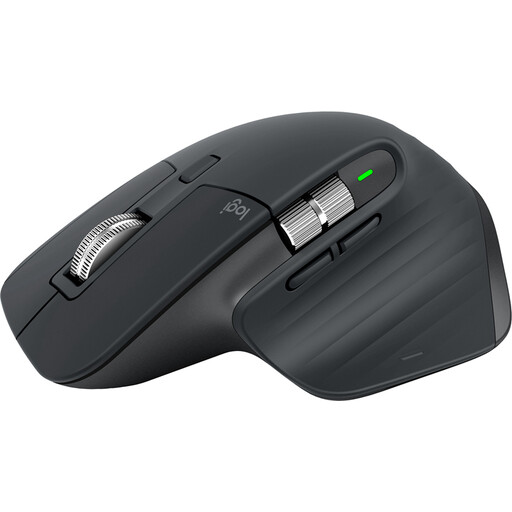
Why It Stands Out: The MX Master 3S is a masterclass in blending a highly comfortable, contoured shape with powerful productivity features. Its sculpted form provides excellent palm and thumb support for all-day use. The standout features are the MagSpeed electromagnetic scroll wheel, which can silently zip through 1,000 lines in a second and the 8K DPI sensor that tracks precisely on virtually any surface, including glass.
Pros:
Who is it for: Professionals, creatives and power users who demand precision, customisation and comfort in a traditional ergonomic form factor.
View the Logitech MX Master 3S
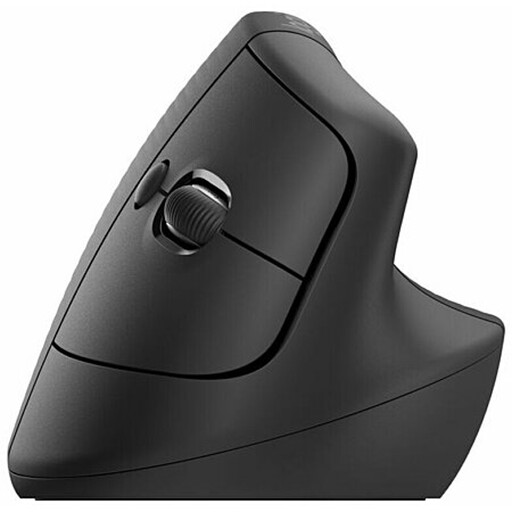
Why It Stands Out: The Logitech Lift is designed specifically for small to medium-sized hands and focuses entirely on posture. Its 57-degree vertical angle promotes a natural handshake position, which can alleviate pressure on the wrist. The soft rubber grip and comfortable thumb rest make it easy to hold, while the quiet clicks and smooth-scrolling SmartWheel ensure it remains a capable productivity tool.
Pros:
Who is it for: Individuals with small to medium hands who are experiencing wrist discomfort or are proactively looking for a mouse for carpal tunnel UK prevention with a vertical design.
View the Logitech Lift Vertical Mouse
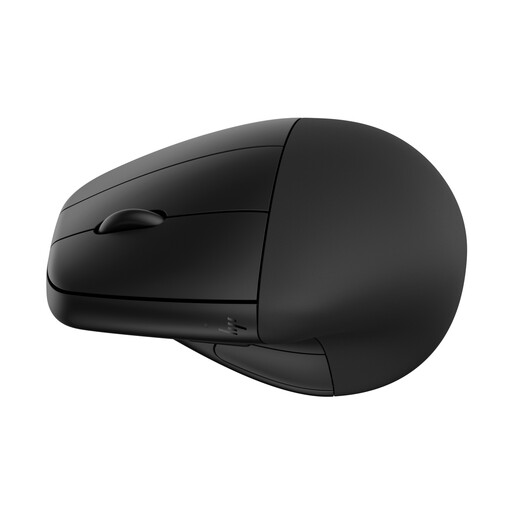
Why It Stands Out: The HP 920 offers a unique take on the vertical mouse by including a detachable magnetic wrist rest. This provides an extra layer of support, elevating the wrist to maintain a straight alignment with the arm. According to information provided by HP, its design is certified by Human Factors and US Ergonomics. It also features five programmable buttons, multi-surface tracking and a long-lasting rechargeable battery with fast-charging capabilities.
Pros:
Who is it for: Users who want the postural benefits of a vertical mouse combined with the enhanced support of an integrated wrist rest, making it a strong contender for those with significant wrist strain.
View the HP 920 Ergonomic Mouse
Our recommendations cover some of the most popular needs, but the right mouse is a personal choice. If you are still exploring different styles, features or price points, there are many other models to consider.
Explore our full range of Bluetooth computer mouse options to find your perfect match.
Many users report that an ergonomic mouse helps reduce discomfort. By promoting a more natural, neutral posture for your hand and wrist (often called a "handshake" grip in vertical mice), these devices can lessen the muscle strain and pressure on the median nerve that often contributes to wrist pain and conditions like Repetitive Strain Injury (RSI). However, they are a tool for comfort and are not a medical treatment.
The adjustment period for a vertical mouse varies from person to person. Most users feel comfortable within a few days to a week of regular use. Initially, cursor control might feel slightly less precise, but your muscle memory will adapt quickly. It is a good idea to start with lower-sensitivity settings and gradually increase them as you become more accustomed to the new posture.
While a Logitech ergonomic mouse often comes at a premium, many users find the investment worthwhile. The price typically reflects high build quality, advanced sensor technology, long-lasting battery life and powerful companion software (Logi Options+) for extensive customisation. For someone who spends their entire workday using a mouse, the enhanced comfort and productivity features can provide significant long-term value.