
24/7 Customer Support

Free returns

Same-day & Next-day Delivery

Quality Guaranteed
Download the APP
Categories
Long hours spent at a desk are a modern reality for many of us. While we focus on our work, we often overlook the subtle strain building in our hands, wrists and forearms. That persistent ache or stiffness is a common signal that your standard computer mouse might not be supporting you correctly. An ergonomic mouse is designed to address this, promoting a more natural posture to enhance comfort and maintain productivity throughout the day.
As a Joybuy Product Recommendation Officer, my role is to help you navigate the market and find products that offer genuine value. This guide will walk you through the key considerations for choosing a comfortable computer mouse and present some of our top recommendations to help you make an informed decision.
Selecting the right ergonomic mouse goes beyond just its shape. To find a model that truly fits your workflow and physical needs, consider these factors.
The most significant choice you will make is the mouse's orientation.
vertical mouse can be an excellent choice for anyone specifically looking for a mouse for wrist pain, though it may require a short adjustment period.How your mouse connects and adapts to your tasks is crucial for a seamless experience.
wireless ergonomic mouse offers a clutter-free desk and greater freedom of movement. Most modern wireless models connect via Bluetooth or a dedicated 2.4 GHz USB receiver, providing a stable and responsive connection suitable for any professional task.programmable mouse is a game-changer. The ability to assign custom shortcuts, macros or application-specific functions to extra buttons can dramatically speed up repetitive tasks, making it an essential feature for a true productivity mouse.An ergonomic mouse is not a one-size-fits-all solution. A mouse that is too large or too small for your hand can create new pressure points and negate its benefits. Check the product dimensions and, where possible, look for models designed for specific hand sizes (e.g., small-to-medium or large). A proper fit ensures your hand can rest comfortably on the mouse without stretching or cramping.
Based on their design, features and user feedback, here are a few standout options that cater to different needs and preferences.
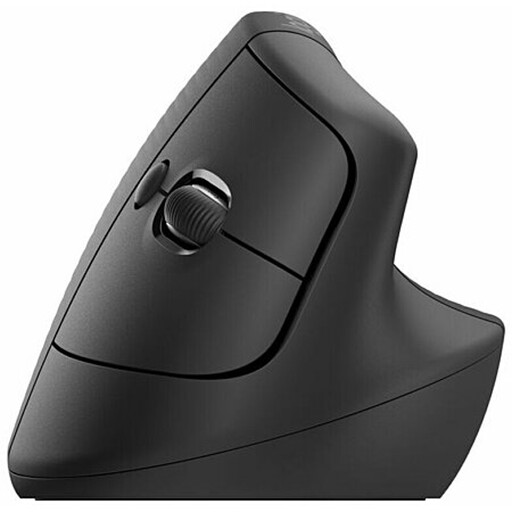
Why It Stands Out: The Logitech Lift brings the benefits of a vertical mouse to users with small to medium-sized hands. Its 57-degree vertical angle is engineered to place the wrist in a natural handshake posture, immediately reducing strain. It combines this science-backed design with Logitech's signature build quality and user-friendly features.
Pros:
Who is it for?: Professionals and students with small-to-medium hands who spend long hours at the computer and are seeking a solution to wrist discomfort. It's an ideal first step into the world of vertical mice.
View the Logitech Lift on Joybuy
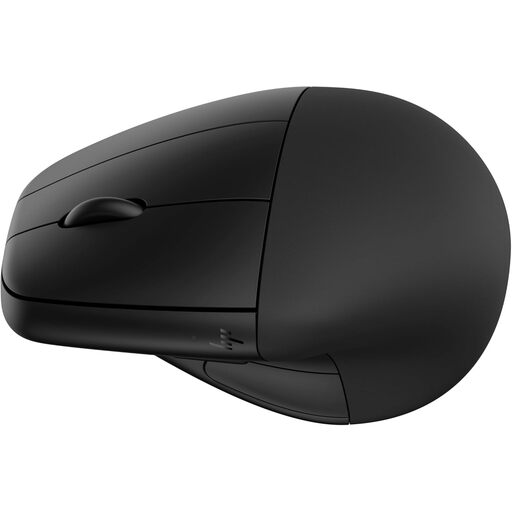
Why It Stands Out: The HP 920 offers a unique approach to comfort with its detachable magnetic wrist rest. This feature provides an extra layer of support that can be added or removed to suit your preference. It’s a versatile vertical mouse that also focuses on sustainability, being constructed with 65% post-consumer recycled plastics.
Pros:
Who is it for?: Users looking for a flexible ergonomic solution that combines a vertical design with optional wrist support. It's a great Bluetooth mouse for work for the environmentally conscious professional.
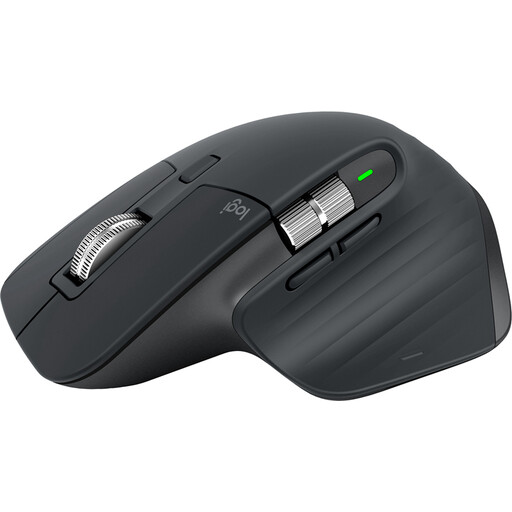
Why It Stands Out: The MX Master 3S is a masterclass in productivity and sculpted ergonomic design. While not a vertical mouse, its shape is perfectly contoured to support the palm and fingers. Its standout features are the 8K DPI sensor, which tracks flawlessly on virtually any surface (even glass), and the near-silent MagSpeed electromagnetic scroll wheel that can zip through 1,000 lines in a second.
Pros:
Who is it for?: Power users, designers, developers and anyone who prioritises productivity and precision. This is the ultimate productivity mouse for professionals who demand high performance from their tools.
View the Logitech MX Master 3S on Joybuy
The three models above represent some of the most compelling choices available, but the ideal mouse is a personal decision. If you're looking for different shapes, feature sets or price points, we have a wider selection to explore.
Discover more models tailored to your specific needs by browsing our full collection of ergonomic computer mouse options.
Ergonomic mice are designed to place your hand, wrist and forearm in a more neutral and natural alignment. For example, a vertical mouse reduces the inward twist of the forearm, which can alleviate pressure on the muscles and tendons around the wrist. While many users report a significant reduction in discomfort, it is important to remember that these devices are for comfort and prevention, not a medical treatment for conditions like carpal tunnel syndrome.
There is typically an adjustment period when switching to a vertical mouse, as it requires your muscles to adapt to a new posture. For most users, this takes anywhere from a few days to a week of regular use. It is often helpful to start using it for short periods and gradually increase the duration as your hand becomes accustomed to the new position.
Logitech is a prominent brand in the ergonomic peripheral space, and models like the Logitech Lift and MX Master 3S are popular for good reason. They are generally known for their solid build quality, extensive research and development and powerful software (Logi Options+) that allows for deep customisation. Whether a Logitech ergonomic mouse is the right choice depends on your budget and specific needs, but they consistently offer a strong combination of comfort and productivity-focused features.