
24/7 Customer Support

Free returns

Same-day & Next-day Delivery

Quality Guaranteed

Unlock Your Welcome Offers: FREE Delivery | Up to 80% OFF | Free 30-day JoyPlus trial
Download the APP
Spending long hours at a desk is a modern reality for many of us, whether we're in a corporate office, a home study or a university library. This extended sitting can often lead to familiar discomforts—a stiff neck, an aching lower back and a general feeling of fatigue that hampers productivity. An ergonomic office chair isn't a luxury; it's a fundamental tool for maintaining comfort and focus throughout your workday.
This guide is designed to help you navigate the options and identify the features that truly matter. We'll break down what to look for in an ergonomic desk chair and present a few carefully selected recommendations to help you find the right fit for your workspace and your body.
Selecting the right chair involves more than just picking one that looks good. To ensure you're getting the support you need, consider these key factors.
A true ergonomic chair adapts to you, not the other way around. Look for multiple points of adjustment to tailor the fit to your unique body shape and size. Key adjustments include:
A computer chair for long hours must provide this level of customisation to be effective.
One of the most critical features for preventing and alleviating discomfort is proper lumbar support. An office chair with lumbar support helps maintain the natural inward curve of your lower spine. There are a few types to consider:
The materials affect both comfort and durability. A mesh office chair is a popular choice in the UK for its breathability, which helps regulate temperature during long work sessions. Fabric and leather offer different aesthetic and textural feels. Beyond the surface, check for a sturdy frame and a high-quality gas lift mechanism. Certifications like EN 1335 (the European standard for office chairs) indicate that the chair meets specific requirements for safety, strength and durability.
Based on our analysis of features, adjustability and design, here are our recommendations for those seeking to upgrade their seating.
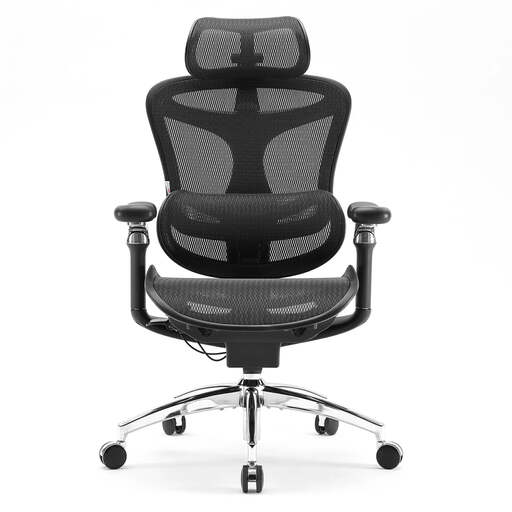
Why It Stands Out: The Doro C300 Pro is built for those who demand a high degree of customisation. Its most notable feature is the 6D coordinated armrests, which adjust in multiple directions and move in sync with the chair's recline, providing seamless support for your arms and shoulders. This is paired with a self-adaptive dynamic lumbar support system that flexes and shifts with your body's movements.
Pros:
Who is it for?: Professionals and remote workers who spend the majority of their day seated and are looking for a premium chair with maximum adjustability to fine-tune their comfort.

Why It Stands Out: The Doro C300 offers many of the advanced features found in the Pro model, making it an excellent choice for a modern home office chair. It retains the core self-adaptive dynamic lumbar support and the intelligent weight-sensitive recline mechanism. The primary difference lies in the 3D armrests, which still offer ample height, forward/backward and pivot adjustments.
Pros:
Who is it for?: Users who want the benefits of dynamic lumbar support and a high-quality build but do not require the extensive 6D armrest articulation of the Pro version.
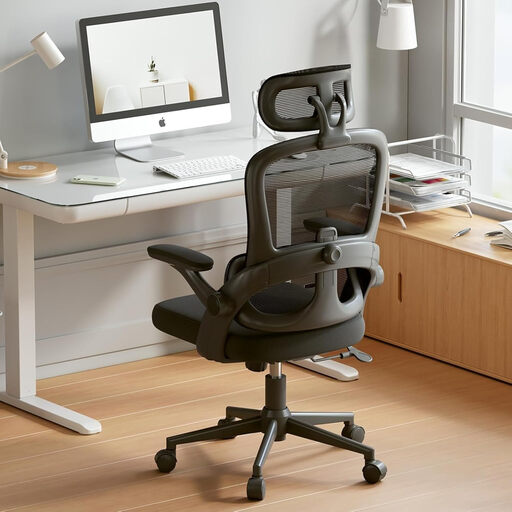
Why It Stands Out: This high back desk chair provides a fantastic balance of essential ergonomic features and value. It includes a separately adjustable lumbar support with a 6 cm vertical range, allowing you to position it correctly for your lower back. A practical feature for smaller spaces is its flip-up armrests, which allow the chair to be pushed neatly under a desk.
Pros:
Who is it for?: Students, hybrid workers or anyone seeking a significant upgrade from a basic chair. It's a practical and supportive choice for those mindful of both budget and space.
While a great chair is the foundation of a comfortable workspace, other accessories can further enhance your setup. If you're looking to optimise your desk area, consider exploring options like an armrest table to provide additional support and surface space.
Discover our curated selection of desk accessories to complete your ergonomic office.
Ergonomic chairs are designed for extended use, often 8 hours or more. However, the key to musculoskeletal health is movement. Even with the most supportive chair, it is advisable to stand up, stretch and walk around for a few minutes at least once every hour to promote circulation and reduce muscle fatigue.
While this can be subjective, adjustable lumbar support is widely considered one of the most critical features. Providing proper support for the natural curve of your lower back can significantly reduce strain and discomfort, making it a priority for anyone seeking a chair for back pain. Following that, seat height and depth adjustability are crucial for achieving a proper, well-aligned posture.
The material of a chair is more about comfort and breathability than direct back support. A mesh office chair offers excellent ventilation, which prevents overheating during long periods of sitting. The support for your back comes from the chair's structural frame and its dedicated lumbar system. A well-designed mesh chair that incorporates good, adjustable support can be an excellent choice for both spinal alignment and overall comfort.