
24/7 Customer Support

Free returns

Same-day & Next-day Delivery

Quality Guaranteed

Unlock Your Welcome Offers: FREE Delivery | Up to 80% OFF | Free 30-day JoyPlus trial
Download the APP
Spending hours at a desk is a reality for many of us, whether in a corporate setting or a carefully arranged home office. The shift to remote and hybrid work has made one thing clear: the standard dining chair is not a long-term solution. Aches, stiffness and poor posture are common complaints that can stem directly from an unsupportive seat.
An ergonomic office chair is not a luxury; it is a fundamental tool for maintaining comfort and focus throughout the workday. However, with countless models and features on the market, choosing the right one can feel overwhelming. This guide is designed to cut through the clutter, offering practical advice and highlighting some noteworthy options to help you find a chair that truly supports you.
Before looking at specific models, it helps to understand what features make a chair genuinely ergonomic. Consider these key points during your search.
A one-size-fits-all approach rarely works for seating. Your chair should adapt to your body, not the other way around. Look for multiple adjustment points:
The materials of a chair affect its comfort, durability and maintenance. A mesh computer chair is a popular choice in the UK for its breathability, which helps regulate temperature and prevent discomfort on warmer days. The mesh also conforms to your body, providing flexible support.
Pay attention to the chair's base and frame. Materials like aluminium offer a sturdy foundation and often support a higher weight capacity. To gauge reliability, look for certifications like BIFMA (Business and Institutional Furniture Manufacturers Association) or SGS, which indicate the chair has passed standardised tests for safety and durability.
Your daily routine should influence your choice. If you are a computer chair for long hours user, a model with extensive customisation will be invaluable. If you enjoy taking short breaks to stretch and think, a reclining office chair with footrest can provide a comfortable way to change posture and recharge without leaving your desk. Assess which features will genuinely enhance your workday and focus on those.
Based on features that promote comfort and support, here are a few recommendations to consider for your workspace.
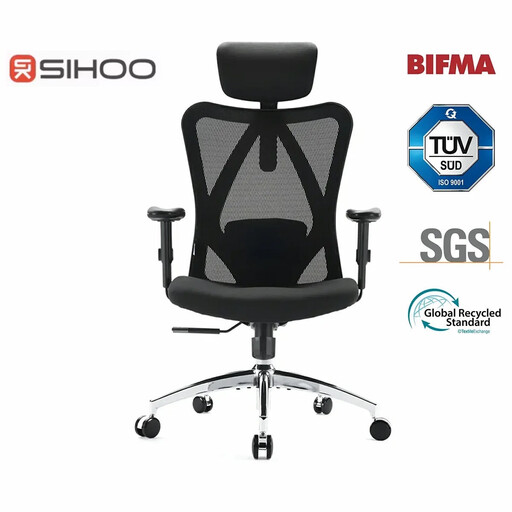
Why It Stands Out: The Sihoo M18 is a well-rounded option that covers all the essential ergonomic bases. It combines a breathable mesh back with a suite of adjustable features, including the headrest, lumbar support and armrests. Its BIFMA and SGS certifications provide confidence in its construction, ensuring it can handle the demands of a daily work routine.
Pros:
Who is it for? This is an excellent choice for professionals and students setting up a home office chair for the first time. It provides reliable, essential ergonomic features that support healthy posture without an overwhelming number of complex controls.
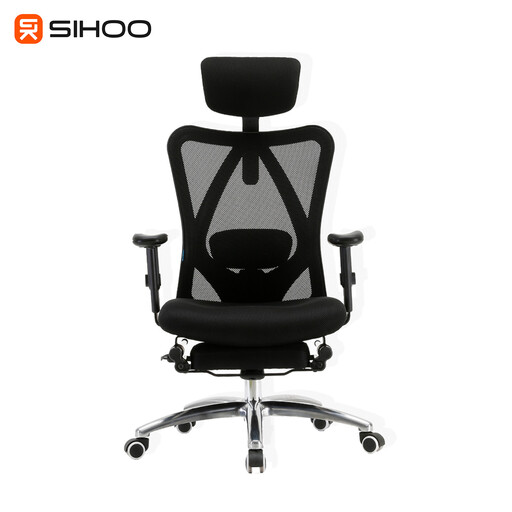
Why It Stands Out: The M18 Pro builds on the solid foundation of the M18 and adds a key feature for relaxation: an adjustable footrest. This transforms the chair from a pure work tool into a multi-functional piece of furniture. The five main adjustment points (back, headrest, seat, recline and armrests) allow for a highly personalised fit.
Pros:
Who is it for? Ideal for individuals who spend very long days at their desk and value the ability to recline fully during breaks. If you are looking for a chair that supports both intense focus and moments of relaxation, this is a strong contender.
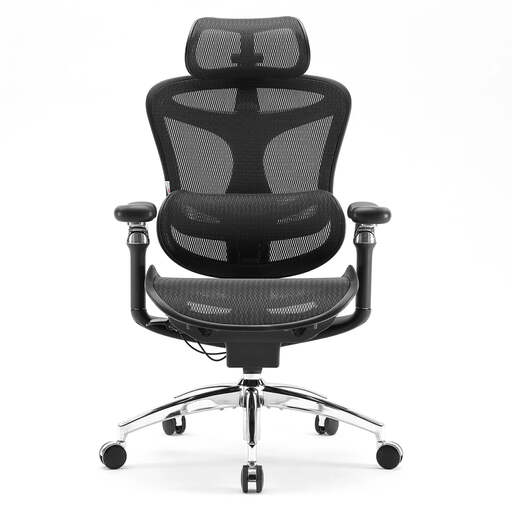
Why It Stands Out: The Doro C300 Pro is engineered for users who seek the highest level of customisation. Its standout features are the 6D coordinated armrests that move with the recline of the chair and a self-adaptive dynamic lumbar support system that adjusts to your posture in real-time. The high-elasticity wave mesh provides a unique combination of softness and firm support.
Pros:
Who is it for? This chair is geared towards discerning users who demand maximum adaptability. If your work involves frequent shifts in posture or you simply want a chair that feels like it was built just for you, the C300 Pro's advanced mechanics are worth considering.
The right chair is a personal choice, and these recommendations are just a starting point. If you have different needs or are simply curious about other styles and features, there are many more models to explore.
Browse our full collection of chairs with wheels to find the perfect fit for your workspace.
1. How long should an ergonomic office chair last? The lifespan of an ergonomic chair depends on its build quality, materials and how it is used and maintained. A well-constructed chair, particularly one with certifications like BIFMA, can reasonably be expected to last between 5 and 10 years. Regular checks to tighten screws and cleaning the upholstery will help prolong its life.
2. Is a mesh computer chair better than a fabric one? This comes down to personal preference and environment. A mesh computer chair offers excellent breathability, making it ideal for preventing overheating during long sessions or in rooms with poor air circulation. Fabric chairs may offer a plusher feel but can retain heat and be more difficult to clean.
3. What is the most important feature in an office chair with lumbar support? The single most important feature is adjustability. A fixed lumbar curve may not align with your spine, potentially causing more harm than good. Look for a chair that allows you to adjust the height and, ideally, the depth of the lumbar support to ensure it rests perfectly in the small of your back.