As a Joybuy Product Recommendation Officer, I often speak with people who spend their entire workday at a computer. A common theme is the nagging ache in the wrist and forearm that builds up after hours of clicking and scrolling. That familiar strain is often a result of holding a traditional mouse, which forces your arm into an unnatural, twisted position.
An ergonomic vertical mouse is designed to address this very issue. By allowing you to hold it in a more neutral "handshake" position, it helps to reduce muscle tension. This guide will walk you through what to look for in a vertical mouse and offer some recommendations to help you find a more comfortable way to work.
A Buyer's Guide to Choosing a Comfortable Mouse for the Office
Finding the right mouse involves more than just picking one off the shelf. Here are a few key factors to consider to ensure you get a device that genuinely suits your needs.
1. Connectivity: Wireless Freedom or Wired Reliability?
Your choice of connection can significantly impact your desk setup. A wireless vertical mouse offers a clean, clutter-free workspace and the freedom to position it exactly where you feel most comfortable. Most wireless models connect via Bluetooth or a dedicated 2.4GHz USB receiver. A bluetooth ergonomic mouse is particularly versatile, as it can often pair with multiple devices like laptops and tablets without needing a spare USB port. Wired mice, on the other hand, eliminate any concerns about battery life and potential signal interference, offering a straightforward plug-and-play experience.
2. Grip, Size and Shape
The core benefit of a vertical mouse is its natural handshake grip mouse design. However, they are not one-size-fits-all. Pay attention to the dimensions of the mouse and compare them to your hand size. A mouse that is too large or too small can negate the ergonomic benefits. Look for features like a contoured thumb rest and a surface material that provides a secure, non-slip grip for added comfort during long work sessions.
3. Customisable Features
Modern mice offer more than just left and right clicks. For office professionals and designers, extra features can be a significant productivity booster. Consider models with:
- Adjustable DPI (Dots Per Inch): This allows you to change the cursor's sensitivity on the fly. A lower DPI offers more precision for design work, while a higher DPI lets you move the cursor across the screen faster for general tasks.
- Programmable Buttons: Extra buttons, often positioned for easy thumb access, can be set up for shortcuts like 'Forward' and 'Back' when browsing or for custom commands in specific software.
- Operating System Compatibility: Always check that the mouse is fully compatible with your system, whether you use Windows, macOS or another operating system.
Top Product Recommendations
We've filtered through the options to highlight a few standout products that prioritise comfort and functionality.
V7 MW500BT Bluetooth Vertical Ergonomic Mouse
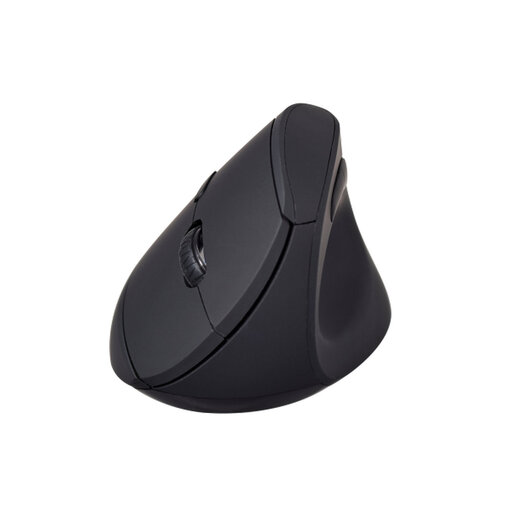
- Why It Stands Out: This mouse is a purpose-built solution for ergonomic comfort. Its vertical design promotes the handshake grip, directly addressing the forearm twisting that can cause discomfort. The dual-mode wireless connectivity (Bluetooth and 2.4GHz) provides excellent flexibility, allowing you to connect to different devices without hassle.
- Pros:
- Ergonomic Design: The vertical "handshake" orientation, concave thumb rest and soft-touch surface are all designed to reduce strain.
- Dual-Mode Wireless: Connect via Bluetooth or the included 2.4GHz receiver for wide compatibility.
- Adjustable Precision: Features three DPI settings (800, 1200 and 1600) to suit different tasks.
- Enhanced Navigation: A 6-button layout includes forward and back buttons for more efficient browsing.
- Who is it for: This is an ideal choice for office professionals, remote workers or anyone experiencing wrist discomfort from a standard mouse. If you're looking for a dedicated
mouse for wrist pain or a potential carpal tunnel mouse alternative, this is a strong starting point.
View the V7 MW500BT Vertical Mouse
DELL KM7120W Multi-Device Keyboard-Mouse Set
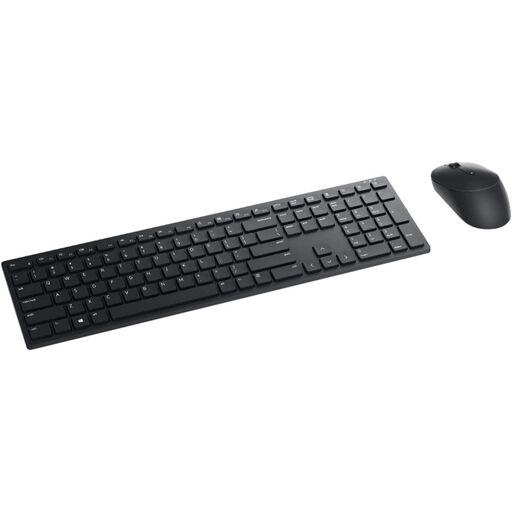
- Why It Stands Out: While not a vertical mouse, this set from Dell offers an excellent ergonomic solution for your entire desk. The included mouse is sculpted for right-hand comfort, and the main appeal is its ability to seamlessly switch between three different devices. This is perfect for users who juggle a work laptop, a personal desktop and a tablet.
- Pros:
- Multi-Device Control: Connects to and switches between up to three devices with the click of a button (two via Bluetooth, one via 2.4GHz).
- Long Battery Life: The manufacturer states a battery life of up to 36 months, reducing the frequency of replacements.
- Precise Tracking: The 1600 DPI optical sensor provides smooth and accurate cursor movement, even on high-resolution screens.
- Complete Package: Comes with a slim, quiet keyboard for a unified and productive workspace.
- Who is it for: Professionals who need a reliable, all-in-one solution for a multi-device workflow. It's a great option for those who value brand consistency and want to upgrade their keyboard and mouse together.
Explore the DELL KM7120W Set
ET 60% Tri-Mode Mechanical Keyboard with Free Gift Mouse
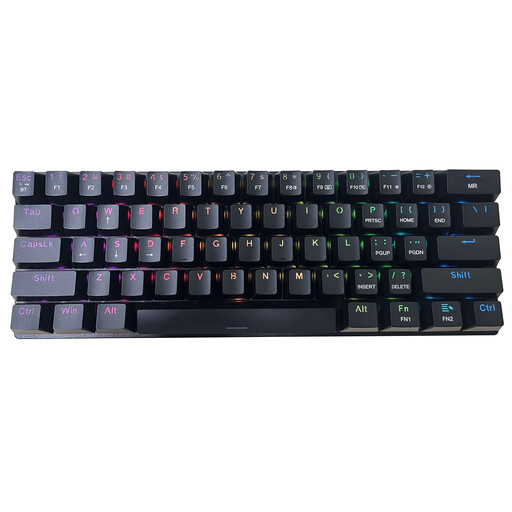
- Why It Stands Out: This bundle is centred around a highly portable and customisable mechanical keyboard. The main attraction is the keyboard's compact 60% layout, tri-mode connectivity and satisfying "clicky" blue switches. The included mouse makes it a convenient package for users on the go.
- Pros:
- Versatile Keyboard: The keyboard supports wired, Bluetooth and 2.4GHz wireless connections.
- Compact & Portable: The 60% layout has a small footprint and is easy to pack in a bag.
- Customisable RGB: Features 16 RGB backlight modes for a personalised aesthetic.
- Bundle Value: Includes a functional mouse, providing a complete input solution straight out of the box.
- Who is it for: This is best suited for users who prioritise the keyboard experience, such as writers, programmers or gamers who appreciate the tactile feel of mechanical switches and a compact form factor. The included mouse is a practical addition for a full setup.
Check out the ET Mechanical Keyboard Bundle
Looking for More Options?
If these specific recommendations don't quite match what you're looking for, or if you'd like to compare more styles, there are many other choices available. To see a wider selection of ergonomic and wireless peripherals, feel free to browse our complete collection of bluetooth keyboard and mouse sets.
Frequently Asked Questions
What is an ergonomic vertical mouse?
An ergonomic vertical mouse is a computer mouse designed to be held in a "handshake" posture. This keeps your wrist and forearm in a more natural, neutral position compared to a traditional flat mouse, which can help reduce the muscle strain associated with repetitive movements.
Can a vertical mouse help with wrist pain?
Many users find that the neutral alignment promoted by a vertical mouse reduces the discomfort they feel during long hours of computer use. By preventing the twisting of forearm bones (the ulna and radius), it can alleviate pressure on the muscles and nerves in the wrist area. It is a tool designed for better posture, not a medical treatment.
How long does it take to get used to a vertical mouse?
There is typically a short adjustment period, as a vertical mouse engages different muscles than a standard one. Most users report feeling comfortable with the new orientation within a few days to a week. It can be helpful to start by using it for a few hours at a time and gradually increasing the duration.


