
24/7 Customer Support

Free returns

Same-day & Next-day Delivery

Quality Guaranteed

Unlock Your Welcome Offers: FREE Delivery | Up to 80% OFF | Free 30-day JoyPlus trial
Download the APP
Spending long hours at a computer is a reality for many of us in the UK. While we focus on our tasks, the subtle strain on our hands, wrists and even shoulders can build up, leading to discomfort and a dip in productivity. A standard mouse isn't always designed for extended use, but an ergonomic wireless mouse is crafted to support a more natural posture, making your workday more comfortable.
Navigating the options can be tricky. That's why we, as Joybuy's Product Recommendation Officers, have put together this guide. Our goal is to help you understand the key features to look for and to highlight a few standout models that cater to different needs and preferences.
Before diving into specific products, let's outline a few key considerations. Focusing on these will help you find a mouse that not only feels good but also enhances your workflow.
The most significant choice in ergonomic mice is the shape. Traditional horizontal mice are familiar, but they can cause your forearm to twist into a flat position on the desk. A vertical mouse, on the other hand, promotes a "handshake" grip. This posture keeps your wrist and forearm in a more neutral alignment, which many people find to be a more comfortable mouse for long hours of use, potentially reducing muscle strain. The choice is personal, but if you experience wrist discomfort, a vertical design is worth considering.
In a modern workspace, flexibility is key. A multi-device bluetooth mouse allows you to connect to and switch between your laptop, desktop and tablet with the press of a button. This is invaluable for professionals who use both Mac and Windows systems. Most high-quality wireless mice offer dual connectivity via Bluetooth or a 2.4GHz USB dongle, providing a stable connection regardless of your setup.
An ergonomic mouse is about more than just comfort; it's also a productivity mouse. Look for models with programmable buttons that can be assigned to your most-used shortcuts, like copy, paste or application-specific commands. Other features to consider include a quiet click mouse mechanism, which is a considerate choice for shared or open-plan offices, and a rechargeable wireless mouse with a long-lasting battery to avoid interruptions.
Here are a few ergonomic wireless mice that stand out for their design, features and user-focused benefits.
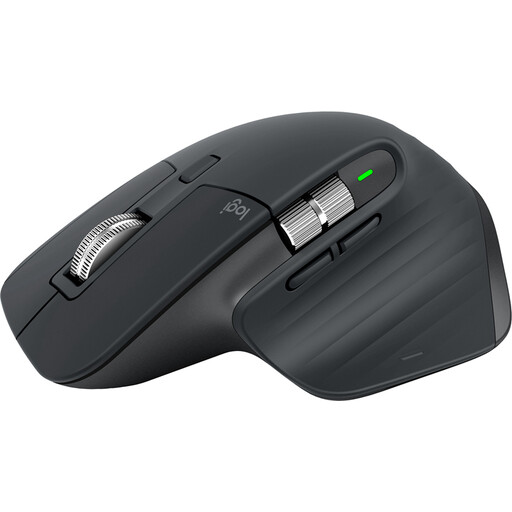
Why It Stands Out: The Logitech MX Master 3S is a benchmark for high-performance productivity mice. Its sculpted shape is designed to fit the hand perfectly for all-day use. The standout feature is its MagSpeed electromagnetic scroll wheel, which is precise, fast and nearly silent. The 8K DPI sensor tracks flawlessly on almost any surface, including glass, making it exceptionally versatile.
Pros:
Who is it for? This mouse is ideal for developers, designers and power users who demand precision, customisation and a seamless multi-device workflow. It represents a significant investment in productivity and comfort.
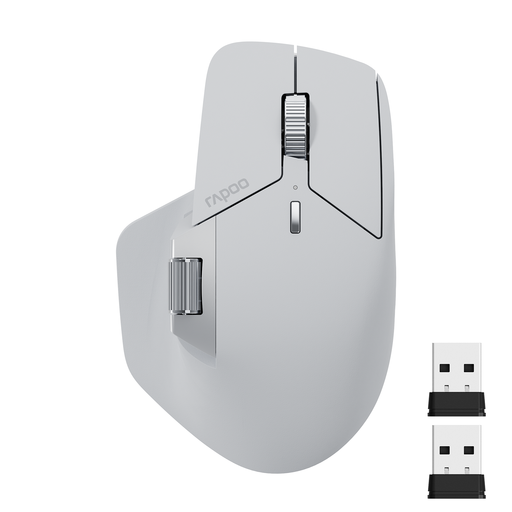
Why It Stands Out: The RAPOO MT760L delivers an impressive array of features for its price point. It is a true multi-device bluetooth mouse, supporting Bluetooth 5.0 and 2.4GHz connections. It also includes a side scroll wheel, a feature often found on more premium models, which is excellent for navigating wide spreadsheets or timelines. With 11 programmable buttons, it offers a high degree of customisation.
Pros:
Who is it for? This is a great option for office professionals and multi-taskers who need advanced features like multi-device control and extensive button customisation but are working with a more moderate budget.
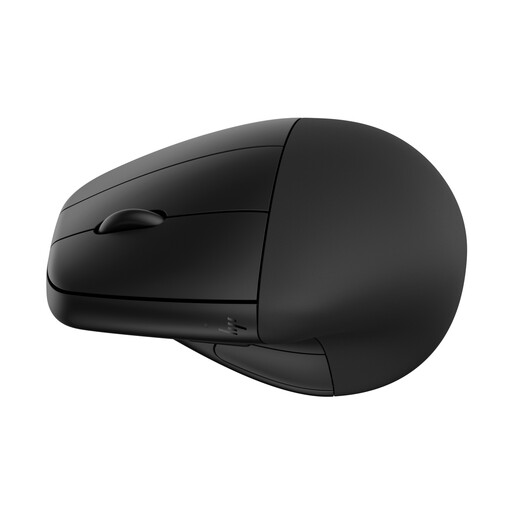
Why It Stands Out: For those specifically looking to address wrist strain, the HP 920's vertical mouse design is a compelling choice. It encourages a natural handshake posture to reduce muscle activity. A unique feature is its detachable magnetic wrist rest, which provides an extra layer of support. It also has strong eco-credentials, being made with 65% post-consumer recycled plastics.
Pros:
Who is it for? This mouse is an excellent choice for anyone who spends the majority of their day at a computer and is actively seeking a solution to combat wrist or arm fatigue. It’s particularly suited for office workers, writers and administrators.
The right mouse is a personal choice, and what works for one person may not be the perfect fit for another. If these recommendations aren't quite what you're after, or if you'd like to see a broader selection, feel free to explore our full collection of RF mice to find the ideal match for your setup.
1. Is a vertical mouse really better for your wrist? A vertical mouse promotes a "handshake" posture, which keeps the wrist and forearm in a more neutral alignment. This can reduce the muscle strain associated with the twisting motion required by traditional mice. While many users report increased comfort, especially over long periods, the "better" option ultimately comes down to personal preference and what feels most natural to you.
2. How long does a rechargeable wireless mouse battery last? Battery life varies widely between models, from around 70 days for a feature-intensive mouse like the Logitech MX Master 3S to several months for a model like the HP 920. Most modern rechargeable mice use a standard USB-C cable, making it easy to top up the battery when needed, often providing hours of use from just a few minutes of charging.
3. Do I need a mouse with programmable buttons? For general web browsing and office tasks, a standard mouse is sufficient. However, if your work involves repetitive actions or software-specific shortcuts (common in graphic design, video editing or coding), a programmable mouse can be a significant time-saver. Assigning commands like 'undo', 'copy' or 'paste' to a mouse button can make your workflow much more fluid and efficient.