
24/7 Customer Support

Free returns

Same-day & Next-day Delivery

Quality Guaranteed

Unlock Your Welcome Offers: FREE Delivery | Up to 80% OFF | Free 30-day JoyPlus trial
Download the APP
Spending long hours at a desk can take its toll, and that familiar ache in your wrist, arm or even shoulder is a common complaint for many professionals. A standard mouse forces your forearm into a twisted, unnatural position, which can lead to strain over time. An ergonomic wireless mouse is designed to address this by promoting a more neutral posture, helping to improve comfort and maintain productivity throughout your workday.
This guide is designed to help you understand what to look for in an ergonomic mouse and to highlight a couple of standout options that prioritise comfort and functionality.
Navigating the options can be tricky. Here are a few key considerations to help you find a mouse that fits your needs and workspace.
The most significant feature of many ergonomic mice is their shape. A vertical mouse is designed to be held in a "handshake" position. This keeps your wrist and forearm in a neutral, untwisted alignment, which can reduce muscle strain. If you are specifically looking for a mouse for wrist pain or seeking to prevent it, a vertical design is an excellent starting point. It may take a few days to adjust, but many users report a noticeable increase in comfort.
A tangled cable not only clutters your desk but also restricts movement. A wireless vertical mouse offers a clean, flexible setup. Look for models with dual mode wireless mouse connectivity, which typically includes both Bluetooth and a 2.4GHz USB dongle. This allows you to switch seamlessly between devices—for instance, from your laptop to your desktop—without re-pairing. This is particularly useful for those who use multiple systems, including anyone searching for an ergonomic mouse for Mac and Windows.
The convenience of wireless is only as good as its battery life. A rechargeable ergonomic mouse with a USB-C port is a modern, practical choice, saving you the recurring cost and hassle of disposable batteries. Beyond power, look at features like adjustable DPI (Dots Per Inch). A higher DPI allows the cursor to move further with less physical movement, which can be useful for large or multiple monitor setups. Programmable buttons are another valuable feature, allowing you to assign custom shortcuts for tasks you perform frequently, optimising your workflow.
Based on their design, features and user-focused functionality, here are two recommendations that stand out.
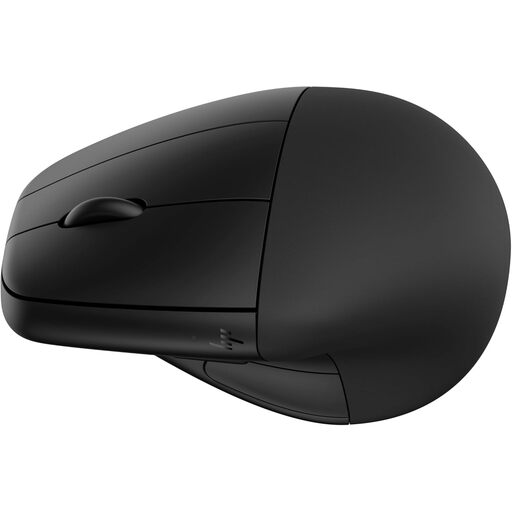
Why It Stands Out The HP 920 combines a comfortable vertical grip with thoughtful features for the modern professional. Its standout element is the detachable magnetic wrist rest, which provides an extra layer of support to keep your wrist elevated and comfortable. According to HP, its design can reduce muscle strain by 12%. It also has strong sustainability credentials, being constructed with 65% post-consumer recycled plastics.
The power management is particularly impressive. A single charge of the rechargeable Li-ion battery can last up to four months, and a quick one-minute charge provides three hours of use, ensuring you're never caught without power.
Pros
Who is it for? This mouse is an excellent choice for professionals who spend the majority of their day at the computer and value both ergonomic support and long-term convenience. The combination of a detachable wrist rest, extensive battery life and customisable buttons makes it ideal for power users, designers and anyone with a focus on sustainable tech.
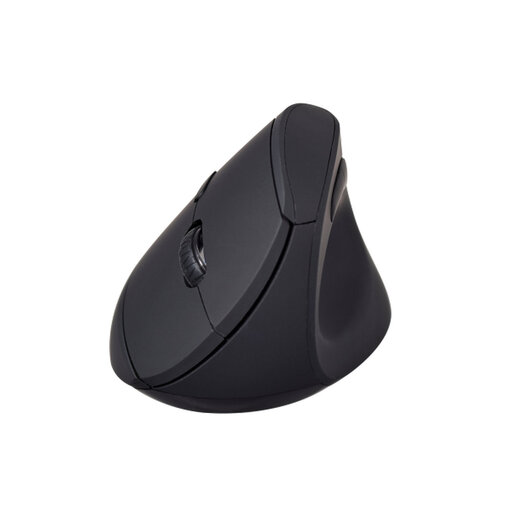
Why It Stands Out The V7 MW500BT is a straightforward and effective vertical mouse that focuses on the core principles of ergonomic design. It delivers the essential "handshake" grip in a compact and accessible package. The soft-touch surface and concave thumb rest provide a secure and comfortable hold, reducing the need to grip tightly.
Its dual-mode wireless functionality makes it a versatile companion for any workspace, allowing easy connection to a laptop via Bluetooth or a desktop with the 2.4GHz dongle. With three adjustable DPI settings (800/1200/1600), you can easily tailor the cursor speed to your preference or task at hand.
Pros
Who is it for? This mouse is a great option for anyone new to vertical mice or those seeking a reliable, no-fuss ergonomic solution. Its simple setup, comfortable design and flexible connectivity make it well-suited for office workers, students and remote employees looking to improve their desk comfort without a steep learning curve.
While these two models offer excellent ergonomic benefits, the right mouse is a personal choice. If you're exploring different shapes, sizes or feature sets, you can browse our complete collection to find the perfect fit for your setup.
Explore our full range of wireless mice here.
1. How long does it take to get used to a vertical mouse? For most people, the adjustment period for a vertical mouse is relatively short, typically ranging from a few days to a week. Initially, the "handshake" posture may feel unusual, but as your muscles adapt to the more natural position, it should become comfortable and intuitive.
2. Can an ergonomic mouse help with wrist pain? An ergonomic mouse is not a medical device or a guaranteed cure for conditions like carpal tunnel syndrome. However, its design is centred on placing your hand, wrist and arm in a more neutral, less-strained posture. By reducing the forearm twisting required by traditional mice, it can help alleviate the discomfort associated with prolonged and repetitive computer use.
3. Is a wireless ergonomic mouse better than a wired one? This largely comes down to personal preference. A wireless mouse provides a cleaner, clutter-free desk and greater freedom of movement. A wired mouse, on the other hand, never needs charging and can offer a slightly faster response time, though this difference is negligible for most non-gaming tasks. A rechargeable ergonomic mouse offers a good balance, combining wireless freedom with the convenience of not needing to buy batteries.