
24/7 Customer Support

Free returns

Same-day & Next-day Delivery

Quality Guaranteed

Unlock Your Welcome Offers: FREE Delivery | Up to 80% OFF | Free 30-day JoyPlus trial
Download the APP
That familiar ache in your wrist after a long day at the computer is more than just a minor annoyance. For many office professionals, remote workers and creatives across the UK, it's a persistent signal that your standard desk setup isn't working for you. Twisting your forearm to lay your palm flat on a traditional mouse for eight hours a day can lead to discomfort, strain and reduced productivity.
An ergonomic wireless mouse is designed to address this very issue. By promoting a more natural hand and wrist posture, it can help alleviate the pressure that contributes to long-term discomfort. This guide is designed to help you navigate the options, focusing on the features that matter for your health and workflow, without the marketing fluff. We will look at what makes a good comfortable computer mouse and highlight a few standout models to consider.
Before diving into specific products, let's cover a few key considerations. Understanding these will help you identify the right mouse for your specific needs.
The most significant feature of an ergonomic mouse is its shape. The two main types are:
A key benefit of a wireless mouse is the clutter-free desk space. Most models offer one or both of these connection types:
A good office ergonomic mouse should do more than just feel comfortable; it should enhance your workflow. Look for features like:
Here are a few models that stand out for their combination of ergonomic design, practical features and user-focused functionality.
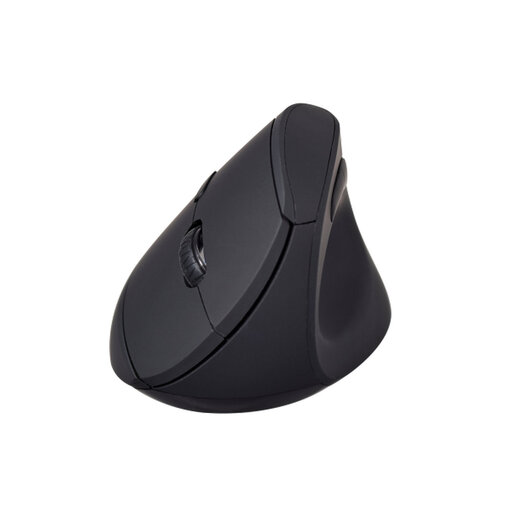
Why It Stands Out: The V7 MW500BT is an excellent entry point into the world of vertical mice. It focuses on the core benefit of the "handshake" grip to keep your forearm in a neutral, relaxed position. Its dual-mode connectivity offers the flexibility to connect via Bluetooth or a 2.4GHz dongle, making it a versatile choice for various setups.
Pros:
Who is it for? This is a great option for office professionals and remote workers who spend long hours on the computer and are looking for a straightforward, effective RSI mouse to improve their daily comfort.
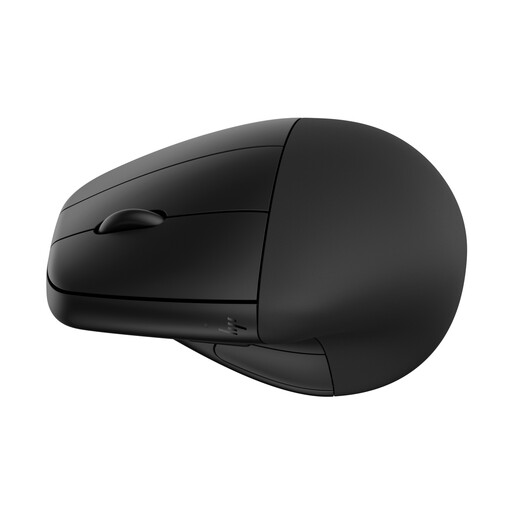
Why It Stands Out: The HP 920 takes comfort a step further with its detachable magnetic wrist rest, providing extra support to reduce pressure points. It's a feature-rich rechargeable wireless mouse with an impressive battery life of up to four months. According to HP, it is designed for comfort and has received certification from Human Factors and US Ergonomics.
Pros:
Who is it for? Power users, designers and anyone seeking a premium, highly customisable ergonomic solution with the added benefit of a supportive wrist rest.
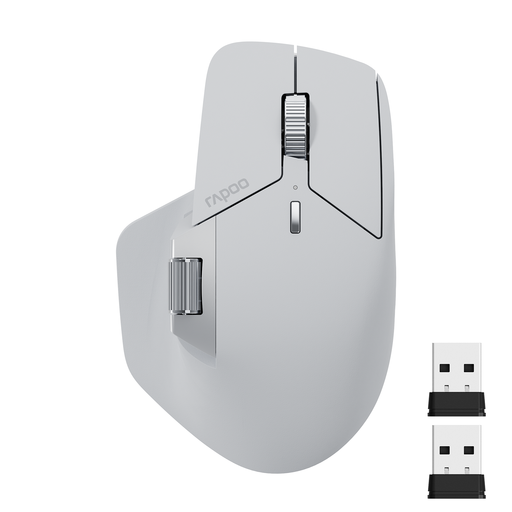
Why It Stands Out: The RAPOO MT760L is built for the ultimate multi-tasker. Its standout feature is the M+ Cross-Computer Technology, which allows you to control multiple computers by simply moving your cursor to the edge of the screen. Combined with a side scroll wheel and 11 programmable buttons, this contoured ergonomic mouse is a productivity powerhouse.
Pros:
Who is it for? Programmers, video editors and professionals who work across multiple screens or computers and need maximum efficiency and customisation from their tools.
These recommendations cover a range of needs, but the world of ergonomic peripherals is vast. If you're still searching for the right fit, our full collection offers a wider variety of styles, features and price points.
Explore our full range of wireless mice for PC to find the perfect match for your desk setup.
1. How long does it take to get used to a vertical mouse? For most people, the adjustment period for a vertical mouse is between a few days and a week. It can feel a bit strange at first as your hand and arm muscles adapt to the new posture. We recommend starting with shorter sessions and gradually increasing your usage time to ease into it.
2. Is an ergonomic mouse really better for wrist pain? An ergonomic mouse, especially a vertical mouse, is designed to hold your wrist and forearm in a more neutral, untwisted position. This can help reduce the muscle strain and nerve pressure associated with traditional mouse use, which may alleviate discomfort. However, it is most effective as part of a complete ergonomic setup that includes good posture, a proper chair height and taking regular breaks.
3. Can I use a Bluetooth ergonomic mouse with my Mac? Yes, the vast majority of modern Bluetooth ergonomic mouse models are fully compatible with macOS. Products like the V7 MW500BT and HP 920 explicitly list macOS compatibility in their specifications. It is always a good practice to double-check the system requirements on the product page before purchasing to ensure a smooth setup.