What to consider before buying
For a fixed video-call desk, check the connection path first, then match any equipment to your computer and installation.
Ethernet cable
Consider it: if your computer has Ethernet and a cable can reach the router along a practical route.
Trade-off: the cable must reach around the actual room layout without creating an obstacle.
USB or USB-C Ethernet adapter
Consider it: if a router-to-desk cable is practical but your computer lacks Ethernet.
Trade-off: the adapter adds the computer-side Ethernet connection; you still need a cable to the router.
Dock or hub with Ethernet
Consider it: if you also need desk connections for peripherals, displays or charging.
Trade-off: display and charging functions depend on the computer’s ports and the dock’s requirements.
Powerline networking kit
Consider it: if a long data-cable run is impractical and suitable wall sockets are available.
Trade-off: the link depends on the home’s electrical setup; test it at the intended sockets rather than assuming a particular result.
Wireless bridge or access point
Consider it: client mode can connect an Ethernet device to an existing Wi-Fi network; access-point mode can provide local Wi-Fi from a wired upstream connection.
Trade-off: client mode retains a wireless hop between the bridge and the router, so the full path is not wired.
| Concern |
What to check when buying |
Who this matters to |
| Diagnose before spending |
Compare the usual connection with a temporary direct Ethernet connection under similar household usage. |
If calls are unreliable at a fixed desk, I want to check the connection before buying equipment; about 28% of consumers put diagnosis first. |
| Computer compatibility |
Check the available USB data port, operating-system support and any separate display or charging requirements. |
If my computer lacks Ethernet, I need an interface that works with its ports and software; about 22% of consumers prioritise computer compatibility. |
| Router-to-desk route |
Measure the cable route and consider doorways and walking areas; distinguish client mode from access-point mode. |
If the desk is difficult to reach by cable, I need a workable route that does not obstruct household movement; about 22% of consumers prioritise installation practicality. |
| Powerline suitability |
Check the exact kit’s wall-socket instructions and test the connection at the intended outlets. |
If I am considering powerline, I want to know whether it suits the sockets I plan to use; about 17% of consumers prioritise powerline suitability. |
| Useful desk functions |
List the connections you need and check whether any required charging equipment is included. |
If I need Ethernet alongside existing desk peripherals or charging, I want the extra functions to match my setup; about 11% of consumers prioritise desk consolidation. |
Joybuy product options
These options cover adding Ethernet to a computer, combining it with other desk connections, using powerline where a long cable run is impractical, and connecting a wired device through an existing Wi-Fi network. In range-extender use, the last route still has a wireless connection upstream.
 No image available
TP-Link RE220BE BE3600 Wi-Fi 7 Range Extender
Consider it if a wired desk device needs to connect near an existing Wi-Fi network.
The listing identifies range-extender and access-point modes and a 1 Gbps LAN port. In range-extender use, the LAN-connected device still connects upstream through Wi-Fi; access-point use requires a wired upstream connection.
Joybuy
 No image available
HOCO HB42 4-in-1 USB Gigabit Ethernet Adapter, 0.2 m, Black
Consider it if your computer has a suitable USB-A port and needs a wired network interface.
The listing specifies 10/100/1000 Mbps Ethernet and three USB 3.0 ports. A separate Ethernet cable is needed to connect the adapter to the router.
Joybuy
 No image available
TP-Link TL-WPA8631P KIT AV1300 Gigabit Powerline Wi-Fi Extender Kit
Consider it if a long Ethernet run is impractical and you want to use the home’s electrical wiring to connect another room.
The listing specifies three Gigabit Ethernet ports and an integrated pass-through socket. Its instructions call for plugging the adapters directly into wall outlets, not power strips or extension cords; the connection depends on the home’s electrical setup.
Joybuy
 No image available
TP-Link TL-PA8010P KIT AV1300 Gigabit Passthrough Powerline Adapter Kit
Consider it if household electrical wiring is a possible alternative to running a long data cable.
The listing specifies two adapters, a Gigabit Ethernet port and a pass-through socket. The connection uses the home’s electrical wiring, and the advertised rate does not establish throughput at a particular installation.
Joybuy
 No image available
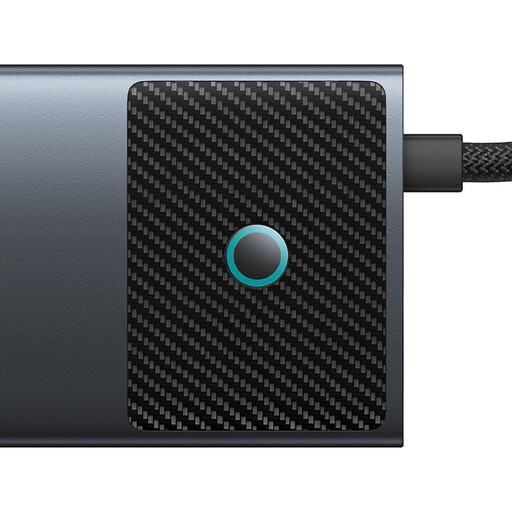
Baseus Metal Gleam Series II 10-in-1 USB-C Hub
Consider it if you want Ethernet alongside other connections at a USB-C laptop desk.
The listing specifies a Gigabit Ethernet port, HDMI, USB ports, SD and TF card slots, and a USB-C Power Delivery input rated up to 100 W. The host needs a suitable USB-C connection, and display output requires DisplayPort Alt Mode.
Joybuy
Frequently asked questions
Does every Ethernet adapter need DisplayPort Alt Mode?
No. DisplayPort Alt Mode is relevant when a device needs display output through a compatible hub, not for every Ethernet adapter. StarTech’s US1GC30A is documented as a USB-C Ethernet adapter, while Anker’s A8388 requires DP Alt Mode for its display outputs and Power Delivery for charging.
Can I plug a powerline adapter into an extension strip?
For the TP-Link TL-PA7017P KIT, the manufacturer says to plug the adapter directly into a wall socket rather than a power strip. Its integrated pass-through socket can supply another appliance or power strip.
How should I set up and test a powerline connection?
Follow the exact kit’s instructions to pair the units, then test them at the intended locations. TP-Link’s UK setup guidance describes pairing the units in the same room before moving one to its intended position; follow the model’s guidance if you need to pair again or troubleshoot.
What charging equipment might an Ethernet hub require?
For the Anker A8388’s documented charging arrangement, a 100 W Power Delivery charger is not included and enables up to 85 W pass-through charging to a laptop. These are model-specific capabilities, not a requirement for every Ethernet connection.
What return periods apply if online networking equipment is unsuitable?
For qualifying online consumer purchases covered by GOV.UK guidance, you can notify the seller of cancellation within 14 days of receiving the item, then have another 14 days to return it. Handling beyond what is permitted, damage and statutory exceptions can affect a refund; remedies for faulty goods are separate from change-of-mind cancellation.


