For community-event planning in a shared office, choose a keyboard whose typing sound, layout and connections suit the work you do most. A full-size layout is worth considering for frequent budget and quantity entry, while a compact board leaves more room for printed plans. Check the exact switch variant, your preferred UK key layout and compatibility with the devices you use.
Who needs which layout?
Noise-conscious shared-office planners
If you draft emails, running orders and attendee messages beside colleagues, the sound of the selected keys or switches matters more than a pronounced mechanical feel. Logitech describes reduced noise from increased key stability on its MX Keys S, while its MX Mechanical range offers different switch types.
Spreadsheet-heavy event organisers
Regular entry of budgets, quantities and contact details may make an integrated number pad useful. Compare that convenience with the desk space taken by a full-size keyboard; Logitech lists an integrated number pad on its MX Keys for Business.
Hot-desk and multi-device coordinators
If you move between planning devices or share space with printed materials, consider both keyboard footprint and connection options. Keychron lists a 75% UK-ISO variant of the K3 Max with wired and wireless connections, but that compact layout has no dedicated number pad.
What matters when choosing?
Start with the task that would be hardest to compromise on: typing near colleagues, entering figures or keeping the shared desk clear. Then check the selected variant’s layout and connections.
| Concern | What to check | Who this matters to |
|---|
| Typing sound |
Check the exact key mechanism or switch variant. Logitech offers Tactile Quiet, Clicky and Linear versions of MX Mechanical, so the family name alone does not establish how a selected keyboard will sound. |
If I draft schedules beside colleagues, I want to avoid distracting them with each keystroke; roughly 33% of consumers would make typing sound their primary concern. |
| Number entry |
Decide whether you regularly use a dedicated number pad, then confirm that the selected keyboard has one rather than assuming every version of a model does. |
When I enter budgets and quantities repeatedly, ready access to a number pad matters more to me than a smaller keyboard; about 27% of consumers would put number entry first. |
| Desk space |
Compare the selected layouts and the keys you would give up. Keychron’s 75% K3 Max layout omits a dedicated number pad. |
I need room beside my laptop for printed plans and event materials, so keyboard footprint is my priority; around 20% of consumers would choose on that basis first. |
| Devices and layout |
Confirm the selected variant’s UK key layout, supported connection methods and compatibility with each device you plan to use. |
If I switch between planning devices, I need the keyboard to connect to them and have familiar keys; roughly 20% of consumers would prioritise device and layout fit. |
Buying pitfalls
-
Assuming every mechanical version sounds alike
Logitech lists Tactile Quiet, Clicky and Linear MX Mechanical switches as distinct options. A model-family name therefore does not tell you which switch is fitted to the keyboard you are buying.
Check the exact variant before checkout. If nearby colleagues are sensitive to typing sound, assess that switch against a quieter office-oriented keyboard rather than relying on the word “mechanical”.
-
Choosing a compact layout without considering figures
A 75% board leaves more desk room but lacks a dedicated number pad, which matters if budgets and quantities make up much of your work.
Think through the numerical tasks you do each week. Choose the layout whose number-entry arrangement and footprint fit those tasks.
-
Expecting a keyboard to fix the whole workstation
The Health and Safety Executive considers the keyboard alongside the mouse, screen, furniture and work environment in its display-screen-equipment guidance.
Check the complete shared workstation, including screen position and room for the mouse. If your screen use is daily and lasts for continuous periods of an hour or more, ask your employer how its workstation assessment applies to your work.
Brands to consider
Logitech
Its MX Keys S and MX Mechanical lines offer different approaches to typing feel and sound for office work.
- Logitech says increased key stability reduces noise on MX Keys S. Its MX Keys for Business has an integrated number pad and Easy-Switch keys for up to three computers.
- MX Mechanical comes in Tactile Quiet, Clicky and Linear switch variants; check the selected switch rather than assuming the whole line suits a noise-sensitive room.
Keychron
Its UK-ISO range includes compact mechanical layouts for desks where footprint and connection choices matter.
- Keychron lists the K3 Max in a 75% UK-ISO variant with Bluetooth, 2.4 GHz and wired connection options.
- The 75% layout omits a dedicated number pad. Check the selected switch if typing sound is important in your office.
CHERRY
The slim mechanical KW X ULP is a reference point for buyers considering several ways to connect a keyboard.
- CHERRY specifies Bluetooth 5.2, 2.4 GHz radio and USB cable connections for the KW X ULP.
- Its tactile mechanical specification does not establish how suitable its typing sound will be for a quiet shared room; assess the sound and layout before choosing it.
Joybuy keyboards for event planning
These keyboards cover different ways to organise a shared planning desk, from split and full-size designs to compact layouts. Compare each selected variant’s keys and connections with your own devices and number-entry needs.
 No image available
HP 960 Ergonomic Split Layout Wireless Keyboard with padded wrist rest
Consider this split-layout wireless keyboard if desk arrangement is central to your choice. Its title specifies a padded wrist rest; check that the selected key layout suits you and allow space for the separate wireless number pad.
View on Joybuy
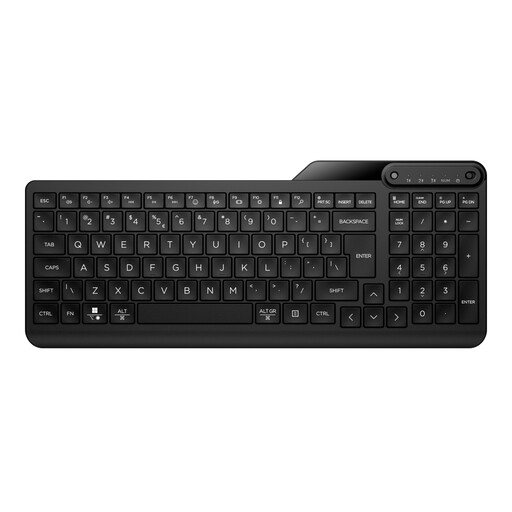 No image available
HP 460 Multi-Device BT Keyboard
Consider this keyboard if moving between Bluetooth planning devices is a priority. Confirm the selected key layout and compatibility with the devices you intend to use.
View on Joybuy
 No image available
Ticktype DP104, Gecha Gray, US layout, Silent Tactile switches
Consider this model if you want a mechanical keyboard and are prepared to assess its typing sound in your shared office. The title specifies a full-size 108-key, hot-swappable tri-mode design with Silent Tactile switches; check that its US layout works for you.
View on Joybuy
 No image available
ET Silent Wireless Keyboard and Mouse Set, US layout
Consider this set if you need both a keyboard and mouse for a planning desk. Its title specifies a full-size wireless keyboard and 2.4 GHz connection; check that the US layout suits you and that a suitable USB connection is available for the receiver.
View on Joybuy
 No image available
Rapoo E9050L 75% Wireless Membrane Keyboard, white, US layout
Consider this compact option when space for event paperwork takes priority over a dedicated number pad. Its title specifies 78 keys, 2.4 GHz and Bluetooth connections, and support for four devices; check that its US layout meets your needs.
View on Joybuy
Common questions
Does a shared-office keyboard choice require a workstation assessment?
A keyboard choice should be considered as part of the whole workstation, not assessed in isolation. The Health and Safety Executive’s display-screen-equipment guidance focuses on workers who use screens daily for continuous periods of an hour or more; ask your employer how workstation assessment applies to your work pattern.
Can a new keyboard solve discomfort during long planning sessions?
A keyboard alone cannot address every workstation issue. The Health and Safety Executive’s checklist also covers the mouse or trackball, screen, software, furniture and work environment, so check the complete setup when choosing equipment.
Is a clicky mechanical keyboard suitable for a shared office?
It depends on whether its sound is acceptable to people sharing the room. Logitech lists Clicky and Tactile Quiet as distinct MX Mechanical switch options, so assess the exact variant rather than judging sound from the mechanical-keyboard label.
When might a compact keyboard make event planning harder?
A compact keyboard may be less convenient if you frequently rely on a dedicated number pad for budgets or quantities. Keychron’s 75% K3 Max layout omits one, whereas Logitech lists an integrated number pad on its full-size MX Keys for Business; weigh that difference against the space available on your desk.


