Choose a controller for the device running the game, not for the television or monitor displaying it: an Xbox Wireless Controller suits Xbox and supported Windows PC play, DualSense is the native PS5 route, and Nintendo Pro Controllers serve Switch or Switch 2 setups. If you play on a PC or want particular tactile effects or adjustable controls, check the game, connection method and exact controller model before choosing those features.
Who is choosing?
Console-first TV players
If one console runs most of your exploration games, start with a controller documented for that console. Microsoft, PlayStation and Nintendo each specify which devices their controllers support; the screen itself does not determine compatibility.
PC-to-TV players
For a PC connected to a large display, check both the controller’s PC connection method and the individual game’s support. PlayStation notes that some DualSense features on PC depend on the game and on using USB.
Long-session players considering extra controls
If you are interested in remapping or adjustable controls, identify the change you would actually use. Microsoft lists these options for the Xbox Elite Wireless Controller Series 2 – Core, but they are not a requirement for exploration games.
What matters when choosing?
Identify the console or computer running the game first. Then consider whether you will switch devices, play without a cable or use adjustable controls.
| Concern |
What to check |
Who this matters to |
| Host compatibility |
Check the exact console or computer against the controller maker’s supported-device list. |
If I mainly play on one console, I want pairing and controls that suit the device running my games; around 36% of consumers put that host match first. |
| PC and multi-device use |
Confirm support for each intended device and its connection method; check the PC game’s controller support separately. |
Moving between a PC and another device makes flexibility more important to me than one console’s native controls. For around 29% of consumers, using a controller across their intended devices is the primary need. |
| Cable-free play |
Check wireless support on the gaming host and whether a desired game feature requires USB. |
From my usual seat, I would rather play without a cable, provided I can accept any feature restrictions. Around 21% of consumers put a cable-free setup first. |
| Adjustable controls |
Identify the specific remapping, grip or control adjustment you would use, and confirm support on your host. |
For longer sessions, changing how a control feels or responds matters more to me than the standard layout. That is the leading need for around 14% of consumers. |
Mistakes to avoid
-
Assuming Bluetooth enables every DualSense feature on PC
PlayStation says DualSense haptic feedback on PC requires USB and a game that supports it. Adaptive triggers also depend on game support, so a Bluetooth connection alone does not establish which effects you will get.
Check the particular game’s controller-support information and decide whether a USB connection from your seating position is practical.
-
Choosing by the screen rather than the gaming device
A television may display a game running on an Xbox, PS5, Nintendo console or PC. Controller support follows that host device, and manufacturers list different compatible platforms.
Note the model of the device running the game, then check the controller maker’s compatibility information for it.
-
Choosing adjustments without a use for them
Microsoft lists adjustable thumbsticks, trigger locks and remapping for the Xbox Elite Wireless Controller Series 2 – Core. Those controls may matter to some players, but exploration games do not inherently require them.
Decide which adjustment would address a specific control preference before moving beyond a standard controller.
-
Putting an old controller or its batteries in household rubbish
GOV.UK explains that the crossed-out wheelie-bin symbol on electrical products and batteries means they should not go in household rubbish.
Check the appropriate local collection route for the controller and any removable batteries.
Brands to consider for your platform
Xbox
A native controller family for Xbox, with Microsoft also listing Windows PC and selected mobile-device support for the standard Xbox Wireless Controller.
- Microsoft lists Xbox Wireless and Bluetooth connections, button mapping and a 3.5 mm headset jack for the standard controller.
- The Elite Wireless Controller Series 2 – Core adds adjustments and a rechargeable battery; choose those extras for a specific need rather than assuming every exploration game calls for them.
PlayStation
The native PS5 controller family, with PlayStation also documenting DualSense connections to supported PCs, Macs and mobile devices.
- DualSense offers USB-C and Bluetooth connection options and supports haptic feedback and adaptive triggers in compatible games.
- PlayStation says PC haptic feedback requires USB and game support; other feature availability can also differ by device and game.
Nintendo
Pro Controller options for playing on a Switch or Switch 2 connected to a large display.
- Nintendo documents pairing the original Switch Pro Controller with both Switch and Switch 2. The Switch 2 Pro Controller adds controls including mappable GL/GR buttons and a C Button.
- Check which console generation and controller model you are buying for; the two Pro Controllers do not have identical features.
Controllers on Joybuy
These controllers cover different large-screen setups, including Switch 2, PS5, Xbox, PC and wired play. Match a model to the device running your game before comparing connection and control options.
 No image available
Nintendo Switch 2 Pro Controller – Black
Consider this model for a Switch 2 running games on a large display, not for an original Switch. Nintendo lists mappable GL/GR buttons, a C Button, an audio jack, HD rumble 2 and motion controls for the Switch 2 Pro Controller; check which functions your games use.
View on Joybuy
 No image available
Xbox Wireless Controller – Robot White
This is a route to consider when an Xbox or Windows PC runs your game. Microsoft lists the standard Xbox Wireless Controller for both platforms and documents Xbox Wireless and Bluetooth connections; check which connection your particular host supports.
View on Joybuy
 No image available
Sony DualSense PS5 Wireless Controller – Midnight Black V3
This PS5 controller is also worth considering for a supported PC setup if your games use DualSense features. PlayStation documents Bluetooth and USB connections, but says haptic feedback on PC requires USB and a supported game; adaptive triggers also depend on game support.
View on Joybuy
 No image available
Turtle Beach Afterglow Ignite Time Wired RGB Controller for Xbox and PC – Time Machine
Consider this wired option for an Xbox or PC setup if a cable suits your seating position. Check the cable route from the gaming device to your seat before choosing it over a wireless controller.
View on Joybuy
 No image available
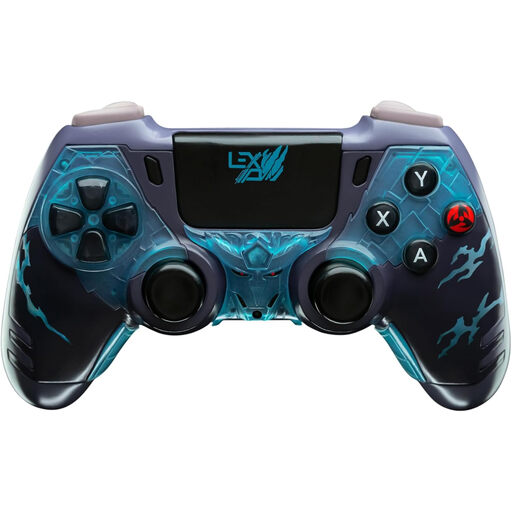
LEXIP Kakashi Kamui Controller (PC, Switch)
This is an option to check for PC or Switch play where a USB connection suits the setup. Confirm support for your exact gaming host and that a wired connection can reach your seat.
View on Joybuy
Common questions
Does the television determine which controller I need?
No: choose for the console or computer running the game, not the screen showing it. Check that device against the controller maker’s compatibility information, then check game-specific support for any features you particularly want.
Will DualSense haptics work over Bluetooth on a PC?
Do not choose Bluetooth expecting PC haptic feedback: PlayStation says that feature requires USB and a supported game. Adaptive triggers also need game support, so check the individual game before choosing DualSense for either effect.
Can I use an original Switch Pro Controller with Switch 2?
Yes. Nintendo documents pairing the original Switch Pro Controller with both Switch and Switch 2. If you want controls listed for the Switch 2 Pro Controller, such as its C Button or mappable GL/GR buttons, check the model rather than assuming the original has them.
What if a controller bought online arrives faulty or misdescribed?
GOV.UK says faulty goods, goods that are not as described and goods that do not do what they are supposed to do are grounds for a refund. Contact the seller about the problem and keep your order details; a change-of-mind return is a separate issue.
Can an old controller go in household rubbish?
Not if it bears the crossed-out wheelie-bin symbol: GOV.UK says electrical products and batteries carrying that symbol should not go in household rubbish. Check your local collection options for the controller and any removable batteries.


