What matters when choosing?
For exploration games in a shared bedroom, establish how much sound can escape before weighing atmosphere, long-session fit and device compatibility.
| Concern |
What to check when buying |
Who this matters to |
| Sound containment |
Check for closed-back earcups and consider whether the cushions can form a comfortable seal. A gaming label alone does not establish isolation. |
If someone is resting or working beside me, I want to hear the game without letting its audio dominate the room; roughly 33% of consumers would put privacy and isolation first. |
| Exploration atmosphere |
Decide whether open-back sound leakage is acceptable before prioritising its wider presentation. Check which sound settings are available on your device. |
When the room is quiet, I may value the sense of space in environmental audio more than isolation; around 27% of consumers would make atmosphere their primary concern. |
| Long-session fit |
Compare stated weight, headband design and ear-pad materials, particularly if you wear glasses. Fit remains individual. |
During a long exploration session, pressure or warm earcups could distract me from playing; about 20% of consumers would prioritise comfort. |
| Device connections |
Match the exact model variant and connector to your devices; check voice chat and sound features separately. |
If I switch between a console and other devices, I need the headset's actual connections to work with my setup; roughly 20% of consumers would put compatibility first. |
Joybuy headset choices
These wired and wireless gaming headsets offer starting points for shared-bedroom play. Compare the stated earcup design and fit where containing sound is important, then check the exact connection and platform variant for your setup.
 No image available
Logitech Astro A10 Gen 2 Wired, White
Consider this wired model if you want to avoid charging during shared-room play and are comparing closed-back designs. Check its exact connector and compatibility with your device before buying, and bear in mind that cushion fit affects comfort and isolation.
View on Joybuy
 No image available
Turtle Beach Stealth 500 Wireless for PC, PS5 and PS4, Black
This wireless option may suit play on a named platform when you would rather not manage a cable. If limiting sound leakage is essential, confirm its earcup construction and how the cushions fit; plan for charging as part of wireless use.
View on Joybuy
 No image available
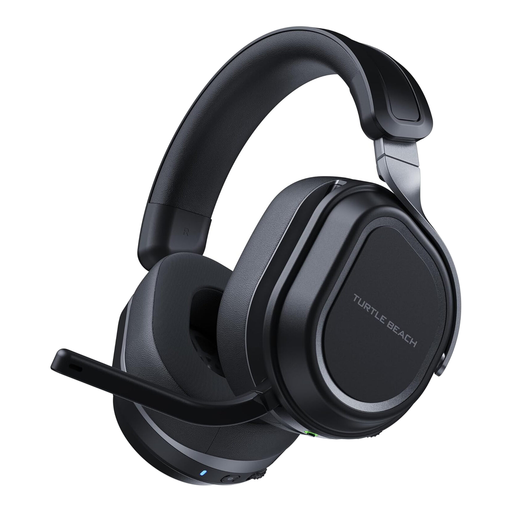
Turtle Beach Stealth 700 Gen 3 Wireless Multi-Format, Black
Consider this model when wireless play and a closed-back design are priorities in a shared room. Check the exact variant before buying for Xbox: platform descriptions differ, so the title alone is not enough to establish compatibility. Confirm its microphone features for chat and assess whether its fit suits longer sessions.
View on Joybuy
 No image available
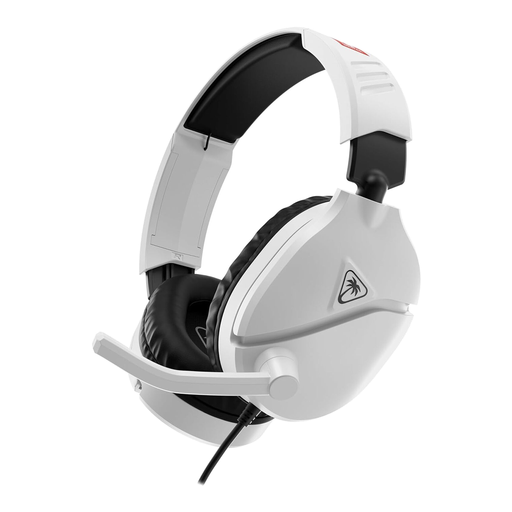
Turtle Beach Recon 70N Nintendo Licensed, White
This wired headset is worth considering for Nintendo Switch play if you prefer not to charge a headset. Check its earcup design if sound containment is a priority, and confirm connection and chat support for the exact device you use. A cable will also need managing in a shared space.
View on Joybuy
Common questions
Should I choose open-back for exploration games in a shared bedroom?
Usually not if the other person needs quiet: open-back earcups let game sound escape and room noise in. Turtle Beach describes their wider, more natural presentation, which may suit a quiet room where the person sharing it accepts the sound leakage.
How can I check whether a wireless headset will work with my console?
Match the complete model variant and its stated connection to your console before buying. Logitech G names PC and PlayStation for the G535 USB receiver, while Audeze documents Xbox use for its Xbox Maxwell 2 variant; check voice chat and any surround feature separately.
How should I care for a wireless gaming headset?
Use the charging method and ear-pad cleaning instructions supplied for the exact model. If you expect to keep it for a long time, check whether replacement accessories and support instructions are available before choosing it.
What can I do with an old headset in the UK?
If it is still usable, consider passing it on; otherwise, look for an electricals recycling point rather than putting it in ordinary rubbish. Recycle Your Electricals identifies headphones with a plug, battery or cable as recyclable and provides guidance on finding a suitable route.


