Who is each screen for?

Detail-first explorers

A 27-inch QHD screen may appeal if you want more pixels for game maps, scenery and study work. Check that your gaming device can run the resolution and that your desk has room for a screen roughly 61–62 cm wide; models cited by MSI and ASUS illustrate this size and resolution.

Small-desk students

A compact 23.8–24-inch Full HD screen is worth considering when the monitor stand must share a shallow desk with a keyboard or study materials. LG lists its 23.8-inch 24GS60F-B at 540.8 mm wide and 180.5 mm deep with stand; compare those dimensions with any model you can currently buy.

Immersion-led solo players

If you prefer a curved view for exploration games, a curved QHD screen is another route. LG lists the 27GS60QC-B as a 27-inch, 1000R curved QHD model, but the curve does not replace checks on desk fit, connections or seating position.

What matters when choosing?

Compact Full HD

Choose when: Desk depth is tight or 1920 × 1080 is a better match for your gaming device.

Trade-off: Full HD has fewer pixels than QHD for maps and desktop workspace.

Flat 27-inch QHD

Choose when: Finer map and scenery detail matters more to you than minimising graphics load.

Trade-off: The larger screen needs more desk width, and QHD places greater demands on gaming hardware than Full HD.

Curved 27-inch QHD

Choose when: You specifically prefer a curved view while retaining QHD resolution.

Trade-off: Curvature is a viewing preference, not a way to save the desk width needed for a 27-inch screen.

Concern What to check Who this matters to
Image detail and maps Compare native Full HD and QHD resolution, then check whether your gaming device can run your intended games at QHD. If maps and distant scenery are central to my games, I would prioritise screen detail over a smaller footprint. Around 37% of consumers put detail and workspace first.
Desk fit and adjustment Compare width and depth with stand; check the stand's actual adjustment options. When my monitor shares a student-room desk with study materials, leaving usable space matters most. That makes desk practicality the primary need for around 36% of consumers.
Motion and viewing preference Check refresh rate by input, device compatibility with adaptive sync, and whether a curved view suits your seating position. If I notice camera movement more than extra map detail, I would focus on the modes my device can use and the view I enjoy. Around 27% of consumers make motion and presentation their first concern.

Buying pitfalls to avoid

  • Choosing by screen size without measuring the stand

    The monitor and its stand both need space. LG lists the 23.8-inch 24GS60F-B at 540.8 mm wide and 180.5 mm deep with stand, while ASUS lists the 27-inch VG27AQ3A at 615.0 mm wide and 214.0 mm deep with stand.

    Measure usable desk width and depth, then compare each model's dimensions with stand. If you plan to use an arm, check the mounting pattern and whether your desk can accommodate it.

    An arm or a rearranged desk setup may be necessary if the supplied stand takes space needed for a keyboard or study materials.

  • Assuming the headline refresh rate works through every port

    Dell specifies up to 165 Hz over DisplayPort and 144 Hz over HDMI for the G2724D. The connection you use can therefore change the available mode.

    Check the exact monitor's input specifications against your PC, laptop or console output, and confirm that the cable supports the resolution and refresh rate you want.

  • Reading feature labels as identical viewing results

    Response-time figures and sync features have model-specific conditions. LG states that the cited 1 ms response-time mode requires its Faster setting; a badge alone does not establish how every setting or connected device will look.

    Compare the exact model's inputs, adjustment options and feature conditions. Consider independent testing where available if a particular visual characteristic will decide your purchase.

Relevant brands for reference

LG UltraGear

LG's cited models illustrate both compact Full HD IPS and curved 27-inch QHD routes.

  • LG lists a 100 × 100 mm VESA mounting pattern for the compact 24GS60F-B and a 1000R curve for the QHD 27GS60QC-B.
  • LG labels the cited 24GS60F-B discontinued; use its specifications for comparison rather than assuming that model is available to order.

MSI

The cited G274QPF E2 illustrates a flat 27-inch QHD Rapid IPS route with an adjustable stand.

  • MSI lists HDMI 2.0b, DisplayPort 1.4a and USB-C DisplayPort Alternate Mode inputs for this model.
  • Check the exact local configuration and availability before treating the G274QPF E2 as a purchase option.

ASUS TUF Gaming

The cited VG27AQ3A provides a flat 27-inch, 2560 × 1440 Fast IPS reference point.

  • ASUS specifies a maximum 180 Hz refresh rate and lists HDMI 2.0 and DisplayPort 1.4 for the VG27AQ3A.
  • Its supplied stand tilts but does not offer height adjustment; check the adjustment on the exact model you choose.

Dell Gaming

The cited G2724D is a flat 27-inch QHD reference for comparing input-specific refresh rates and stand adjustment.

  • Dell specifies 165 Hz over DisplayPort, 144 Hz over HDMI, and height, pivot, swivel and tilt adjustment for the G2724D.
  • Dell labels the cited UK product page unavailable or temporarily out of stock; it is a feature reference, not evidence of current availability.

Joybuy monitors for these needs

These Joybuy monitors cover 27-inch QHD choices and one 27-inch Full HD choice for players considering a larger screen. Measure your desk before choosing one; a 27-inch Full HD model does not serve the same compact-desk need as a 23.8–24-inch model.

MAG 275QF X32 gaming monitor

MAG 275QF X32 27-inch QHD Rapid IPS monitor

Consider this QHD option if game maps and scenery detail matter and your desk can accommodate a 27-inch monitor.

The product title specifies 2560 × 1440 resolution, 320 Hz and Adaptive-Sync. Check which resolution and refresh-rate combination your gaming device can use through its chosen connection.

View on Joybuy

MAG 272QP QD-OLED X50 gaming monitor

MAG 272QP QD-OLED X50 27-inch QHD monitor

This is a QHD choice for a desk that can fit a larger screen and a device that can run games at that resolution.

The product title specifies a QD-OLED panel, 2560 × 1440 resolution and 500 Hz. Confirm the refresh-rate mode available through the input you intend to use.

View on Joybuy

MSI MAG 271QP QD-OLED X28 gaming monitor

MSI MAG 271QP QD-OLED X28 27-inch QHD monitor

Consider this model if you want a 27-inch QHD display for exploration games and have room for its stand.

The product title identifies a QD-OLED panel. Confirm the refresh-rate mode supported by your gaming device, cable and chosen input before ordering.

View on Joybuy

MSI MAG 274QF gaming monitor

MSI MAG 274QF 27-inch WQHD Rapid IPS monitor

This WQHD model suits someone prioritising map and scenery detail over a compact screen.

The product title lists a Rapid IPS panel and Adaptive Sync. Check the refresh-rate mode for your chosen input and compare the full dimensions with stand against your desk.

View on Joybuy
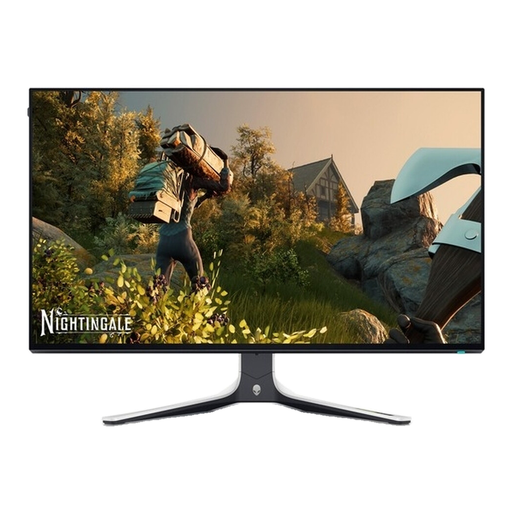
Alienware AW2724HF gaming monitor

Alienware AW2724HF 27-inch Full HD Fast IPS monitor

Consider this only if you want a larger 27-inch screen while staying with Full HD rather than gaining QHD detail.

The product title specifies a Fast IPS panel. Confirm the exact refresh rate, dimensions with stand and adjustment options for the AW2724HF before deciding whether it fits your device and desk.

View on Joybuy

Frequently asked questions

Should I choose 24-inch Full HD or 27-inch QHD for exploration games?

Choose compact Full HD when desk space is limited or 1920 × 1080 better suits your gaming device; choose 27-inch QHD when you value finer map and scenery detail and can fit the larger screen. Check that your device can output the resolution and refresh rate you intend to use.

Will every monitor port deliver its headline refresh rate?

No: the available refresh rate can depend on the exact monitor and input. Dell specifies up to 165 Hz over DisplayPort but 144 Hz over HDMI for the G2724D, so check the mode supported by both your monitor and gaming device, as well as the cable.

What should I measure before ordering a student-room monitor?

Measure usable desk width and depth, leaving space for your keyboard and other equipment, then compare them with the monitor's dimensions with stand. LG lists its 23.8-inch 24GS60F-B at 540.8 × 408.9 × 180.5 mm with stand; check the measurements for the exact model you plan to order.

Do gaming monitor stands always adjust for height?

No; adjustment depends on the model. ASUS lists tilt but no height adjustment for the VG27AQ3A, while Dell lists height, pivot, swivel and tilt adjustment for the G2724D. Check the supplied stand and, if needed, whether a compatible arm would work with your desk.