Several-room coverage seekers
If Wi-Fi is weak across rooms or floors, consider where mesh units could sit and whether they can use a workable wireless or wired backhaul. Ofcom notes that walls and other materials can weaken Wi-Fi signals.


If Ethernet at the provider router works but Wi-Fi is weak elsewhere, choose a route your home can support: mesh for several rooms where the units can maintain a useful link, Ethernet-backed access points where cable can reach, or an extender for one weak room with usable signal at an intermediate socket. Powerline is another option when running data cable is impractical, but test the intended sockets; check the provider router’s role and supported operating modes before adding equipment. Check for a broadband fault before buying, because extra Wi-Fi equipment will not fix a failing access connection.
If Wi-Fi is weak across rooms or floors, consider where mesh units could sit and whether they can use a workable wireless or wired backhaul. Ofcom notes that walls and other materials can weaken Wi-Fi signals.
A thick wall, long distance or detached workspace can make the route to that location decisive. Check whether Ethernet can reach it; if not, the electrical path and intended sockets matter when considering powerline.
If most rooms work but one does not, compare an extender when a suitable position between the router and weak area still receives usable Wi-Fi. TP-Link’s guidance for the RE700X makes its EasyMesh function conditional on an EasyMesh-compatible router.
Choose when: Several rooms or floors need coverage and there are practical positions for the units.
Trade-off: Units still need a useful wireless link or a supported wired backhaul; thick walls can weaken a wireless connection between them.
Choose when: A cable can reach the room or workspace where Wi-Fi is needed.
Trade-off: Plan the cable route and check how the access point is powered; some models need suitable PoE equipment.
Consider when: Running data cable is impractical and the intended wall sockets can establish a link.
Trade-off: A connection depends on the electrical path in the home, so advertised rates do not establish what a particular installation will achieve.
Choose when: One area needs help and an intermediate position receives usable Wi-Fi from the router.
Trade-off: Coordinated mesh features may depend on the exact router and extender; basic extension and named compatibility features are not the same thing.
| Concern | What to check when buying | Who this matters to |
|---|---|---|
| Coverage across several rooms or floors | Map weak areas and possible unit positions; check support for the backhaul and operating mode you need. | When Wi-Fi is weak across several rooms, I need the units to connect from realistic positions; about 27% of consumers put multi-room coverage first. |
| A room beyond thick walls or a long distance | Identify a practical Ethernet route; if that is not feasible, test powerline at the intended wall sockets. | If a workspace is separated from the router by substantial obstacles, I want a route that can reach it; about 27% of consumers prioritise a hard-to-reach location. |
| Fixing one weak room | Check whether an intermediate position receives usable Wi-Fi and confirm any router compatibility needed for the chosen features. | Where just one room needs better coverage, I would rather check a targeted option than assume a multi-unit setup is necessary; about 20% of consumers focus on a single-room fix. |
| Keeping the provider router and network settings | Check the router’s model, available Ethernet connection and the extension device’s supported operating modes. | If I want to retain the provider router as the gateway, I need equipment that supports that arrangement; about 13% of consumers prioritise compatibility with their existing network. |
| Installation effort and support | Check the cable route, power requirements, what is included and whether the provider supports the chosen setup. | When I want to avoid a complicated installation, I need to know how the equipment is powered and who can help with setup; about 13% of consumers put installation and support first. |
Weak Wi-Fi in a room and a fault with the broadband connection are different problems. Ofcom advises checking the provider’s service status when diagnosing connectivity issues.
Compare an Ethernet connection at the router with Wi-Fi in the affected room, then check for an outage before choosing coverage equipment.
TP-Link says the main Deco unit needs a physical Ethernet connection and that Deco does not support repeater mode. A system’s available features can also differ when it operates in access-point mode.
Before buying, check where the main unit will connect, which mode you need and how each satellite will reach the network.
Powerline depends on the electrical path in the home. TP-Link identifies different circuits as a common reason adapters lose their link after being moved.
Follow the kit’s instructions and test the intended wall sockets; compare a feasible Ethernet route if the link does not work.
A wired connection does not by itself establish that the access point has a suitable power source. Ubiquiti lists a PoE adapter separately for its U6+.
Check the chosen model’s power requirements and what is included before planning the cable run.
Its Deco mesh systems, RE range extenders and TL-WPA powerline kits illustrate different ways to extend home coverage.
The U6+ is a wired access point to consider when Ethernet can reach the intended wireless location.
Its extender range includes options for extending Wi-Fi from an existing router.
Its Magic powerline-and-Wi-Fi kits offer another route to consider when running data cable is impractical.
BT Complete Wi-Fi discs are a provider-specific option for households using the relevant BT equipment.
These products relate to mesh coverage and targeted Wi-Fi extension. Check each device’s role and requirements against your router and home layout.
 No image available
A three-unit mesh system to consider when several rooms need coverage; actual coverage varies with the installation environment.
Wi-Fi 7, dual-band BE3600; one router and two satellites.
The listing specifies a 2.5Gbps Ethernet port on the router and each satellite, and notes that coverage varies with building materials, network traffic, connected devices and environmental conditions.
 No image available
Consider it for an existing router’s weak-coverage area if the extender can be placed within range of the router’s signal.
Wi-Fi 7; 1 Gbps Ethernet port; range-extender and access-point modes.
Check the router’s compatibility if you want a specific coordinated mesh feature.
 No image available
A three-unit mesh system to consider when several areas need coverage and you want to check wired as well as wireless backhaul options.
Wi-Fi 7, dual-band; MLO and two Ethernet ports per unit.
The listing describes combined wired and wireless backhaul; confirm that its operating modes suit the provider router.
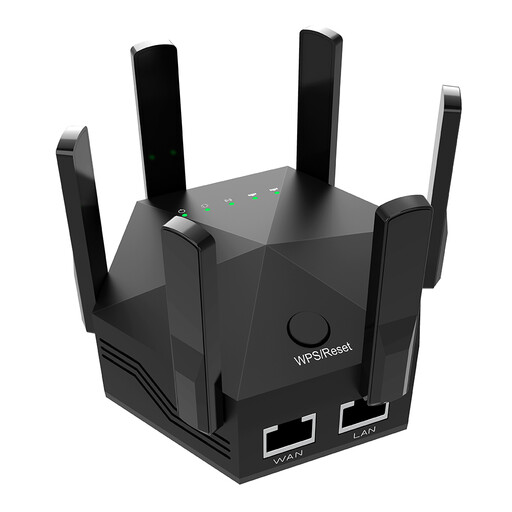 No image available
Consider it for indoor extension of an existing wireless network, with a suitable position between the router and the weak-signal area.
Dual-band Wi-Fi; two Ethernet ports; the listing specifies indoor use only.
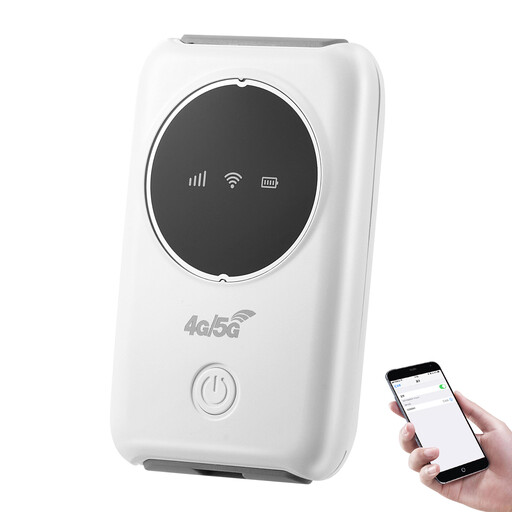 No image available
Check that you need a portable mobile-broadband device rather than equipment for extending the provider router’s fixed Wi-Fi.
The listing identifies a SIM card slot and AP, relay, router and client modes.
Compare an Ethernet connection at the router with Wi-Fi in the affected rooms, and check the provider’s service status. If the access connection appears faulty, contact the provider; Ofcom’s address checker shows predicted service availability, not proof that an installed line is working or that Wi-Fi reaches a particular room.
That depends on the system and its operating mode. TP-Link says the main Deco connects to the existing router by Ethernet and can operate in access-point mode while the existing router remains the gateway; Deco cannot wirelessly repeat that router. Provider-supplied discs may require a particular hub.
Follow the kit maker’s pairing instructions and test the intended wall sockets. TP-Link identifies different electrical circuits as a common reason adapters pair together but lose their connection after one is moved, and recommends avoiding power strips for its adapters.
Check whether a cable run, mounting or a compatible PoE power source is needed for a wired access point. Ubiquiti lists a PoE adapter separately for the U6+; also ask your provider what setup support applies before assuming a third-party system will receive that support.
They may do. England’s Approved Document P covers electrical safety in dwellings and explains when notification of electrical work is required. Plugging in network equipment is different from altering fixed electrical wiring; if the proposed installation involves such work, check the rules for the home’s UK nation and the specific work.