Printer-and-computer users
You need sockets for a printer and computer, perhaps with room for a peripheral, without choosing by socket count alone. Electrical Safety First advises checking the combined load against the lead’s marked rating.


For a printer and computer beside each other, choose a UK three-pin fused extension lead only after checking that the combined load of everything connected stays within its marked current rating. Then choose enough sockets and a cable that reaches the desk without stretching across a walkway; consider surge protection, individual switches or USB charging only if you need those features. Electrical Safety First advises against plugging one extension lead into another.
You need sockets for a printer and computer, perhaps with room for a peripheral, without choosing by socket count alone. Electrical Safety First advises checking the combined load against the lead’s marked rating.
Your wall socket is not in a convenient position, so cable reach and a tidy route matter. Electrical Safety First advises keeping home-office cables out of the way rather than stretching them across a walkway.
You want separate outlet switches, specified surge protection or USB charging as well as mains sockets. Check the exact model: Masterplug and Belkin describe different combinations of these features on their named strips.
Check the plug and combined load before deciding how many outlets, how much cable or which extra features your desk needs.
| Concern | What to check | Who this matters to |
|---|---|---|
| Load and UK plug | Look for a UK three-pin fused plug. Compare the lead’s marked maximum current with the combined ratings of equipment that may run together. | If my printer, computer and other devices may run at once, I need to know their total load is within the lead’s limit. Around 46% of consumers put this capacity and compatibility check first. |
| Cable reach and placement | Measure the route from the wall socket to the desk. Check for enough reach without tension or a cable crossing a walkway. | When the socket is away from my desk, I need a cable route that does not get underfoot; around 27% of consumers prioritise reach and placement. |
| Extra desk features | For the exact model, check any surge-protection indicator or replacement instructions, individual switches, and USB port types and output. | I may want to switch a printer off separately or charge USB devices without occupying another mains socket. Those added features come first for around 27% of consumers. |
Six or eight outlets do not raise a lead’s marked maximum current. Electrical Safety First warns that exceeding the rating can cause overheating and fire.
Add the ratings of everything that may run together, including the printer, computer and monitor, and compare the total with the lead’s marking.
Electrical Safety First advises against plugging one extension lead into another in a home office because of overheating and fire risks.
Use one extension device at a wall socket. If it cannot reach, reconsider the desk position or seek advice about additional wall sockets.
An ordinary multi-socket lead is not necessarily surge protected. Belkin says the protective components in its BSV603-2M wear out after absorbing voltage spikes.
Check whether the exact model specifies surge protection, what its indicator shows and when its manufacturer advises replacement.
For the BSV603-2M, Belkin recommends replacement every three years or immediately after an over-voltage event.
An Office for Product Safety and Standards report dated 19 August 2026 identified poor internal connections in a particular extension lead as an electric-shock risk. Do not keep using a lead that shows signs of damage.
Check the UK plug and product markings before use, and stop using the lead if its cable is frayed or its casing shows heat damage.
Masterplug’s SWSRG6210N-MP is an example for desks needing separate outlet control or an off-floor mounting position.
Belkin offers named UK strips with surge protection, including models with USB charging.
Permaplug’s EXS13/42 BLACK is a straightforward four-outlet example listed by Farnell UK.
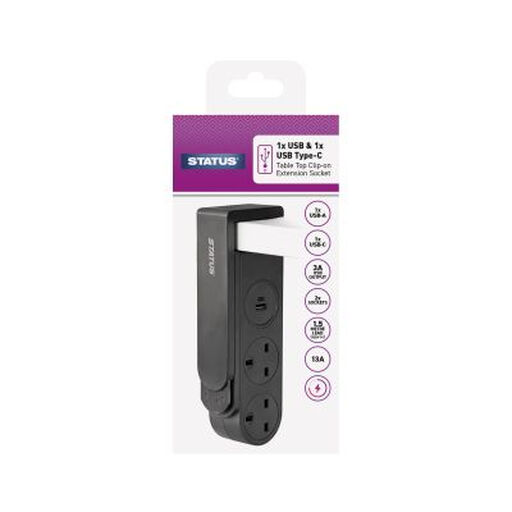
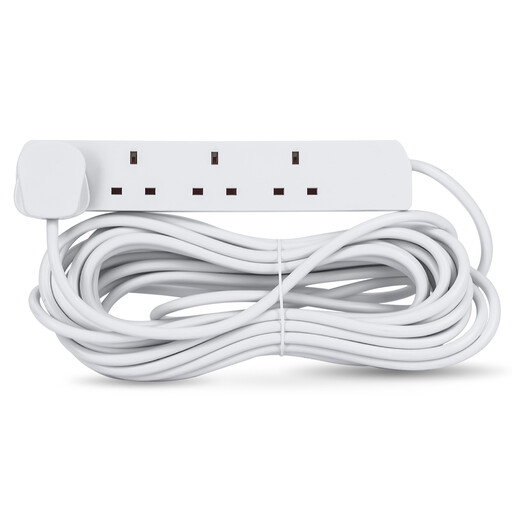
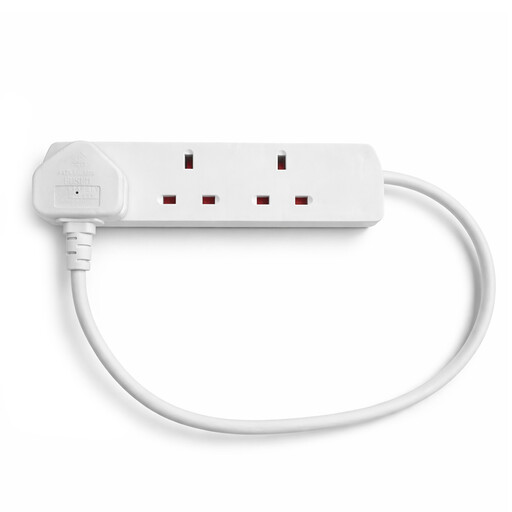
These STATUS extension leads offer different socket counts and cable lengths for a printer-and-computer desk. Measure the route and check each item’s plug, fuse and marked load rating before use; if you need surge protection, confirm it on the exact model.
 No image available
Consider this if the printer and computer need two mains outlets and you also want USB ports at the desk. Check that the 1.5 m cable reaches without tension and that two mains sockets are enough for your setup.
 No image available
The four sockets may suit a desk with additional mains-powered devices. Measure before choosing the 10 m cable: if the wall socket is close, you will need to manage considerable spare length. The product name states 13 A; check the lead’s marking against your combined load.
 No image available
Consider the short cable when the wall socket is very close to the intended desk position. Confirm that 0.5 m reaches along a safe route and that three sockets cover the devices you will connect. The product name states 13 A; check the lead’s marking against their combined load.
Yes, if the combined current of everything connected stays within the lead’s marked maximum rating. Electrical Safety First warns that having enough sockets does not prevent an overload.
No. Electrical Safety First advises against plugging one extension lead into another in a home office. Choose a lead with a suitable cable route or reconsider where the equipment sits.
Look for a standard UK three-pin fused plug and check its marking. Electrical Safety First advises checking for BS 1363 marking on the back of the plug.
Follow the instructions for your exact model. For its BSV603-2M, Belkin recommends replacement every three years or immediately after an over-voltage event; that timetable should not be assumed for every strip.
Stop using it if you notice a burning smell, sparks, smoke, scorch marks, melted plastic or exposed wires. Electrical Safety First also identifies repeated fuse blowing or unexplained circuit-breaker trips as warning signs requiring attention.