Who needs which backup?
The useful starting point is what must be restored, which devices hold it and whether a copy will leave the house.
Households preserving photos and records
If losing a computer or phone would also mean losing important files, make a separate copy that you know how to restore. The National Cyber Security Centre defines a backup by that separation and ability to restore, not simply by owning another drive.
Households using Windows and Mac
Choose the backup workflow before assigning a drive to both computers. Microsoft says File History can use an external drive or network location; Apple sets different disk-format requirements for Time Machine and supports compatible network destinations.
Households carrying sensitive documents
A removable copy of identity or financial records calls for a plan to restrict access if it is lost, as well as a way to recover the files yourself. Check the encryption method, connectors and how passwords, PINs or recovery details will be kept.
What should you check before buying?
Decide what you will copy and how you will restore it, then choose a storage route that fits the devices and the way the copy will be used.
| Priority | What to check | Your needs |
|---|
| Restorable copies |
Choose the folders to include. Set up a repeatable backup and try restoring a sample file. Check whether you need earlier file versions. |
I need to recover the documents and photos that matter, not just have a drive containing files I have never tried to restore. |
| Capacity and handling |
Measure the files you intend to copy and allow for growth. A portable HDD is a route for a larger collection kept mainly at home; consider an SSD if you will carry the copy or transfer files frequently. |
Will this hold my photo and video collection, and will I actually connect it often enough to keep the copy current? |
| Device compatibility |
Check the connector, computer ports, file system and backup tool. Apple says Time Machine cannot back up to a Windows-formatted disk without reformatting it, which erases existing files. |
One drive may need to work with both a Windows PC and a Mac, so I want to decide on the backup arrangement before changing its format. |
| Sensitive records |
Check how encryption is enabled and unlocked, and keep recovery details separately. Microsoft says manual BitLocker Drive Encryption is available on Windows Pro, Enterprise and Education, but not Windows Home. |
If I carry copies of personal records, I want to limit access after a loss without locking myself out of the backup. |
| Several computers |
Check whether a network-attached storage (NAS) device supports each computer's backup tool. Apple says a third-party NAS used for Time Machine must support it over SMB; plan another destination for the NAS data. |
With files on several computers, a central destination could simplify backups, provided someone can set it up and maintain another copy. |
| Separate protection |
Disconnect a copy intended to stay offline when it is not in use. Keep another appropriately protected copy away from the original devices and local drive, and practise restoring it. |
A theft, fire or incident affecting connected devices should not leave me without every copy of an irreplaceable file. |
Relevant brand references
These product lines illustrate different storage routes; a brand's presence here does not establish that a particular model suits every backup workflow.
Seagate
The Seagate UK Expansion Portable line illustrates a portable hard disk drive for local file copies.
- Seagate lists 2 TB and 4 TB variants, USB-C connectivity and compatibility with most Windows and macOS systems for this line.
- Check the exact variant and its connection against the computers and backup software you will use.
SanDisk
The SanDisk Extreme Portable SSD line is a reference for compact external SSD storage.
- SanDisk lists 1 TB, 2 TB and 4 TB variants and describes password protection with built-in 256-bit AES encryption for the cited line.
- SanDisk's claimed speed of up to 2,000 MB/s applies to the specified product line; it is not a transfer-speed promise for every device and connection.
Kingston IronKey
The IronKey Keypad 200 line illustrates hardware-encrypted USB storage for a selected set of portable documents.
- Kingston describes PIN-unlocked Type-A and Type-C versions with capacities from 16 GB to 512 GB.
- Plan how authorised household members will retain access and keep another copy of the documents.
Synology
Synology's NAS backup materials address central storage for several devices and workflows involving more than one destination.
- Synology describes backup arrangements with multiple copies, including one off-site.
- A suitable NAS, drives and configuration are needed; Synology also warns that failures can affect NAS data, so a separate destination remains important.
Joybuy storage options
These options cover portable external SSDs and a USB drive for local household copies. Choose among them by the files you need to store, the devices you will use and how you will protect and restore another copy.
 Image unavailable
Samsung Portable SSD T7 2 TB, USB Type-C 3.2 Gen 2, Blue
A portable local-copy option for a household with a file collection that fits within 2 TB. Check the intended computer's port, disk format and backup-tool requirements before setting it up; keep another copy separate.
View on Joybuy
 Image unavailable
Samsung T7 Shield Portable SSD 1 TB, USB 3.2 Gen 2, Blue
Consider this 1 TB portable SSD for a local copy that you intend to carry, after checking that its capacity covers the selected folders. Confirm the connection and backup format for your devices, and retain a separate copy elsewhere.
View on Joybuy
 Image unavailable
Lexar ES4 Portable SSD with Magnetic Set 2 TB
This 2 TB external SSD is an option for a portable copy of household files. Its product name specifies USB 3.2 Gen 2 and compatibility with iPhone 15/16, PC and Mac; check the backup workflow and format on each intended device before use.
View on Joybuy
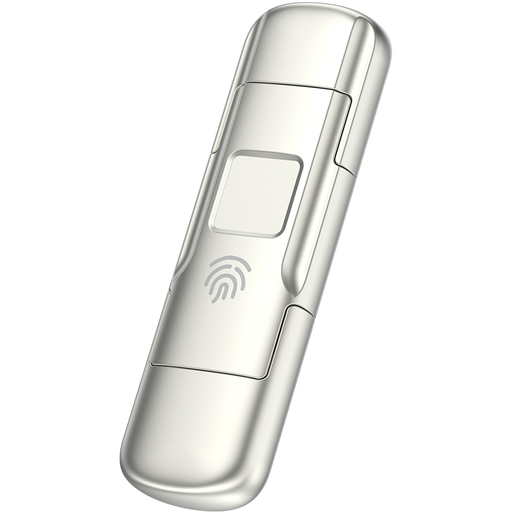 Image unavailable
MOVESPEED YSUYC-256GSN Fingerprint USB Drive 256 GB, Silver
The 256 GB capacity makes this a route to consider for a selected document set rather than an unchecked whole-library copy. Its name specifies fingerprint encryption and a USB Type-C dual interface; confirm device support and how access can be recovered before relying on it for important records.
View on Joybuy
 Image unavailable
SanDisk Portable SSD 2 TB
This 2 TB portable SSD is an option for a local copy of a file collection that fits its capacity. Confirm its connector, disk format and backup-tool compatibility with your devices; if it will carry sensitive records, check the available access protection too.
View on Joybuy
Common questions
Can an external drive be my only backup?
Do not rely on it as the only copy of important files. The National Cyber Security Centre advises keeping a backup separate and an offline copy digitally disconnected when not in use; use another protected location where one incident could affect both your computer and local drive.
Can I use a Windows-formatted drive for Mac Time Machine?
Not without checking and potentially changing its format. Apple says Time Machine cannot back up to a Windows-formatted disk, and reformatting permanently removes existing contents. Protect those files first and plan how each computer will back up.
Do I need backup software with an external drive?
Use a repeatable backup tool if you want changed folders copied regularly. Microsoft says Windows File History can back up to an external drive or network location, while Apple supports Time Machine backups to a compatible connected device. Whichever method you use, test a restore.
Should I encrypt a portable drive holding personal records?
Encryption is worth considering when the drive could be lost or stolen: the Information Commissioner's Office identifies it as protection against unauthorised access to information on USB and backup media. Check how your chosen method is unlocked, and keep recovery details secure and separate so you can still restore your files.
How often should I test a backup?
Check periodically that the intended folders are being copied and that you can restore a sample file. GOV.UK guidance advises understanding the restore process and practising it occasionally; choose a routine you can maintain as your files change.


