Students keeping extensive archives
If you retain successive drafts, exports and reference assets for marking or a portfolio, start by measuring the space they occupy. A capacity-led portable HDD may suit files you access only occasionally.


Choose a portable HDD if the main job is keeping a large archive of design drafts with only occasional transfers. A portable SSD suits frequent moves between computers; consider a rugged SSD when drops, dust or splashes are a realistic carrying risk. Whichever route you choose, check capacity, connections and file format, and keep a separate backup of work you cannot afford to lose.
If you retain successive drafts, exports and reference assets for marking or a portfolio, start by measuring the space they occupy. A capacity-led portable HDD may suit files you access only occasionally.
If substantial project folders travel between home and school computers, a compact portable SSD is worth considering. Check both computers’ USB connections before relying on a quoted transfer speed.
If the drive often travels in a bag or goes to fieldwork locations, the stated protection of a rugged SSD may matter. Tested resistance does not replace a separate backup.
Choose the storage route around how you will use the drafts, then check the particular drive’s capacity, connection and backup setup.
Choose it when: You mainly need room for retained versions and will access the archive occasionally.
Trade-off: A mechanical drive is less suited to frequent impacts and transfers than the SSD route.
Choose it when: You repeatedly move large design folders between computers.
Trade-off: Quoted maximum speeds depend on the computer and connection; check that the capacity covers future drafts too.
Choose it when: Frequent carrying makes drops, dust or splashes a credible risk.
Trade-off: Protection claims have test conditions and do not prevent deletion, loss or every kind of damage.
| Concern | What to check | Who this matters to |
|---|---|---|
| Archive capacity | Measure the project folder, including assets, exports and retained versions; compare its likely growth with the exact drive capacity. | If I am keeping many draft versions for later use, I need space for the whole collection rather than just the current submission. Around 37% of consumers put archive capacity first. |
| Repeated transfers | Check the computer’s USB port, the drive’s interface and the cable needed to connect them; quoted maximum speeds are not guaranteed. | When I move large folders between home and school, time spent copying files matters more to me than occasional archive access. For around 27% of consumers, transfer speed is the primary concern. |
| Carrying protection | Check the exact model’s drop or ingress test conditions and warranty exclusions alongside its capacity. | If my drive travels in a bag and is used away from a desk, I want to account for possible knocks or exposure. Carrying resilience comes first for around 18% of consumers. |
| Compatibility and backup | Confirm the operating system, connection and intended file format before use; plan a separate copy and test that a draft can be restored. | I need drafts to open on the computers I use and to remain recoverable if a copy is lost. Around 18% of consumers prioritise that workflow over the other factors. |
An archive drive can fail or be lost. The National Cyber Security Centre also warns that malware can affect a backup device left connected.
Keep a working copy and a separate backup. Before a deadline, check that you can open or restore an older draft, and store an external backup securely when it is not in use.
Crucial says its quoted maximum for the X9 comes from a specified desktop test and that performance varies. Samsung says the T7 Shield needs a suitable host and cable to reach its stated maximum.
Check the laptop’s USB capability, the supplied cable and any adapter before deciding whether a faster-rated drive meets your needs.
Apple warns that reformatting a Windows-formatted disk for Time Machine permanently removes its existing data.
Decide whether the drive is for file exchange, archiving or a dedicated backup before first use. Copy existing work elsewhere before erasing or formatting a disk.
Samsung says the T7 Shield’s ingress and drop results come from controlled tests; actual conditions vary, and liquid, dust and drop damage are excluded from its warranty.
Match the stated protection to a real carrying risk and keep an independent backup even when the enclosure is rated for dust, water or drops.
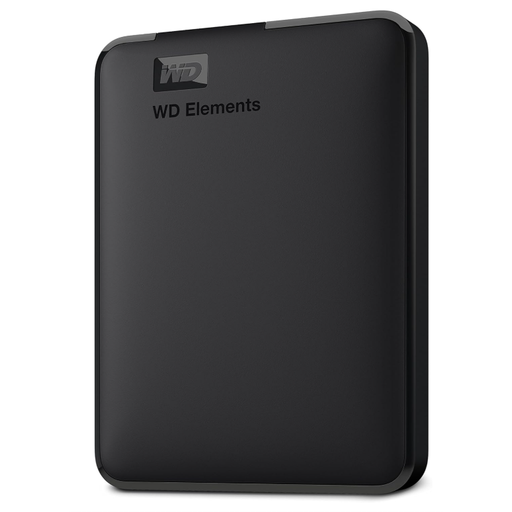
WD Elements Portable is a capacity-led portable HDD line; Western Digital lists a 2TB WDBU6Y0020BBK-WESN variant and capacities from 1TB to 6TB across the line.
Seagate lists 2TB and 4TB options in its portable One Touch HDD line for storing an archive.
Crucial X9 is a compact USB-C portable SSD line to consider when project folders move regularly between computers.
Samsung’s T7 Shield is a portable SSD line with tested enclosure protection relevant to drives carried frequently.
These drives cover capacity-led portable HDD storage, portable SSDs for regular transfers and SSD options for carrying drafts. Compare each listed capacity with your project folder and retained versions before choosing.
 No image available
Consider this portable SSD if you regularly move a substantial draft archive between computers.
Listed configuration: 4TB, USB Type-C 3.2 Gen 2. Check the computer connection and intended file format before transferring work.
 No image available
Consider this portable SSD for drafts that travel regularly; check the exact variant’s protection conditions if carrying resilience is your priority.
Listed configuration: 1TB, USB Type-C 3.2 Gen 2. Compare its capacity with your retained versions and check the computer connection.
 No image available
This portable hard drive is an option when retaining a larger archive matters more than frequent transfers.
Listed capacity: 4TB. Check its file format and your computer’s access requirements before storing drafts, especially if you use a Mac.
 No image available
Consider this portable SSD if the drive will travel and its stated protection suits the conditions you expect.
The title lists USB 3.2 Gen 2x2, IP65 and read and write speeds of up to 2,000MB/s. Check whether your computer supports that USB interface; the quoted maximum is not a guaranteed transfer rate.
 No image available
This portable hard drive is worth considering if your draft archive and retained versions require substantial space.
Listed configuration: 6TB, USB 3.0. Western Digital says its Elements Portable line may require reformatting for operating systems other than its stated Windows setup; check the format before saving work.
Only if another copy of the work exists and you can recover files from it when needed. Seagate distinguishes archiving older files from making a backup for recovery; the National Cyber Security Centre advises keeping an external backup secure and disconnected when it is not in use.
Plan separate, suitable storage setups before using one physical drive for both. Microsoft says File History can use an external drive, while Apple says Time Machine cannot back up to a Windows-formatted disk and prefers APFS or APFS Encrypted for its backup disk. Reformatting erases existing data, so copy drafts elsewhere first and confirm the Mac setup before creating a separate volume.
No; choose a drive and cable that can connect to your laptop’s port. Western Digital lists a USB-A cable for Elements Portable, while Crucial specifies USB-C for the X9. A suitable adapter or cable may connect a USB-C drive to a USB-A computer, but it does not guarantee the drive’s quoted maximum speed.
Check that its intended use and file format fit Time Machine, then copy any files already on the drive elsewhere before changing the format. Apple prefers APFS or APFS Encrypted for a Time Machine backup disk and warns that reformatting a Windows-formatted disk permanently removes its existing data.
Securely erase the files before handing over the drive, using a method appropriate to the device and the sensitivity of the work. The National Cyber Security Centre provides storage-media sanitisation guidance; GOV.UK’s waste electrical and electronic equipment guidance covers recovery, reuse and recycling rather than disposal with general waste.