Who this suits

Phone users with full photo and video storage

Free phone storage without deleting the only copy of photos or documents. Confirm that a USB route works with the phone, or that the cloud service includes the files before removing them; Apple Support and Files by Google describe different external-storage workflows for iPhone and Android.

Households archiving large computer libraries

Keep a practical second copy of a large Windows PC or Mac photo and document library, especially where uploads are slow or internet access is unreliable. Capacity, file-system compatibility, a repeatable routine and secure offline storage all matter.

People who need files on several devices

Keep current documents and selected photos accessible from a phone, computer and web-connected device. Microsoft Support notes that OneDrive-backed folders can be available across devices, but files that cannot be replaced still need a separate backup copy.

Buying priorities

Cloud storage and sync

Choose it when: you want selected files available on more than one device and have dependable internet access.

Check first: which folders are included, the account allowance and whether a separate backup copy remains.

External HDD or portable SSD

Choose it when: you need a physical copy, large local transfers or a backup that can be disconnected after use.

Keep in mind: a drive can be lost, stolen or fail, so one drive should not hold the only copy.

Combined local and cloud copies

Choose it when: family photos or personal documents would be difficult to recreate.

Plan for: checking that both copies complete and can be opened or restored.

Priority What to check Your needs
Independent backup Copy files before removing originals; open representative photos, videos and documents on the destination; keep another separate copy for irreplaceable material. I want to free space without making a transfer my only copy. The National Cyber Security Centre describes a backup as a copy that can be restored when the original data is inaccessible.
Device compatibility Check the phone or computer port, operating-system support, drive connector, cable or adapter, available power and intended file system. I need a route that works with the devices I already own. Files by Google supports USB storage on Android 7.0 and later, while Apple says an iPhone may need a cable adapter for external storage.
Sync or recovery Confirm which folders actually sync, whether the cloud allowance covers them and whether a separate copy can be restored if the main device is lost. I want current files on several devices, but I also need a recoverable copy. Microsoft describes OneDrive folder backup as making selected folders available across devices; that is a different purpose from an independent archive.
Capacity and transfer setup Allow room for the current library and future growth; match SSD speed claims to the host port and cable; check cloud-account storage and renewal terms. I want enough room for a growing collection without paying for speed my devices cannot use. Samsung states that its T7 Shield maximum speeds require a USB 3.2 Gen 2 host, compatible cable and UASP mode.

Mistakes to avoid

  • Deleting originals immediately after a transfer

    A copied folder is not proven recoverable until destination files can be opened and the copy is independent of the original device. The National Cyber Security Centre defines a backup as a copy that can be restored if access to the original data is lost.

    Copy first, open representative files on the destination and retain originals until the check is complete. Keep at least one additional independent copy for important material.

  • Buying by connector shape alone

    USB-C alone does not establish storage support or the transfer speed a device can achieve. Android support, iPhone adapters, cables and host capabilities can all affect the workflow.

    Identify every device port, its operating system, external-storage support and the cable or adapter required before choosing a drive.

    A compatible adapter or replacement cable may be needed where the intended connection does not match the device.

  • Leaving the only local backup permanently connected

    Connected storage can be affected if malware reaches the computer. The National Cyber Security Centre advises keeping removable backup storage secure and disconnected when it is not being used.

    After checking a backup, safely eject the drive and store it securely. Keep an offsite or cloud copy for files that would be difficult to replace.

  • Assuming cloud storage is unlimited or permanent

    Google says a standard account has up to 15 GB shared across Drive, Gmail and Google Photos, while additional capacity is provided through Google One plans.

    Check current usage, which services share the allowance, renewal terms and what happens to your archive if you stop the subscription.

    Additional cloud capacity can require an ongoing subscription.

Relevant brand references

Western Digital

Relevant for portable HDD archive and backup options, including My Passport USB-C models for people who need high capacity in a portable drive.

  • Western Digital states that its named 5 TB My Passport USB-C model works with USB-C Windows PCs, Macs, Chromebooks, mobile phones and tablets, and includes Acronis software and password protection.
  • Check the exact model, connector, file system and device support before purchase; one model’s compatibility does not guarantee every phone, cable or older USB port will work.

Samsung

Relevant for portable SSDs where frequent transfers, portability and faster compatible USB connections matter more than maximum capacity.

  • Samsung states that the named T7 Shield can reach sequential read and write speeds of up to 1,050/1,000 MB/s under the stated conditions.
  • Samsung says those maximum speeds require a USB 3.2 Gen 2 host, compatible cable and UASP, so the headline figure will not apply to every phone or computer.

SanDisk

Relevant for compact dual-connector flash storage for occasional phone-to-computer transfers where capacity needs are modest.

  • SanDisk describes its Ultra Dual Drive Go USB Type-C as a 2-in-1 drive for moving files between USB-C smartphones, tablets and Macs and USB-A computers.
  • A dual connector can reduce adapter dependence, but it does not confirm attached-storage support for every Android phone or make a small flash drive a sufficient sole backup.

Joybuy product options

Joybuy product options for local copies of photos, videos and documents, including portable SSDs, a computer-focused hard drive and a dual-connector flash drive for compatible devices.

Lexar ES4 Portable SSD with Magnetic Set 2TB

Lexar ES4 Portable SSD with Magnetic Set 2TB

For portable local copies across compatible USB-C iPhone 15/16, computer and Android workflows.

  • 2TB external SSD with USB 3.2 Gen 2.
  • Listed read speeds up to 1050MB/s and write speeds up to 1000MB/s.
  • Includes USB-C-to-C and USB-A-to-C cables.
  • The magnetic attachment is for the stated iPhone 15/16 setup and disables MagSafe wireless charging while attached.
  • Check the phone port, external-storage support and cable workflow before relying on direct phone offload.
Joybuy

Samsung Portable SSD T7 4TB USB-C

Samsung Portable SSD T7 4TB USB-C

For a substantial local copy of a household photo, video and document archive.

  • 4TB portable SSD with USB 3.2 Gen 2.
  • Listed read speeds up to 1050MB/s and write speeds up to 1000MB/s.
  • Includes USB-C-to-C and USB-C-to-A cables.
  • Listed for Windows, macOS and Android compatibility.
  • Confirm the factory file system before copying or reformatting; reformatting removes existing contents.
Joybuy

Samsung MU-PE1T0S 1TB Portable SSD

Samsung MU-PE1T0S 1TB Portable SSD

For carrying a local copy of photos and documents between compatible computers and Android devices.

  • 1TB USB Type-C SSD with USB 3.2 Gen 2.
  • Listed read speeds up to 1050MB/s and write speeds up to 1000MB/s.
  • Listed IP65 protection and up to 3m drop resistance.
  • Samsung states that maximum speed requires a compatible USB 3.2 Gen 2 host, cable and UASP mode.
  • Compare 1TB with the current library size and expected backup history before choosing it.
Joybuy

Western Digital Elements Portable 4TB USB 3.0 Hard Drive

Western Digital Elements Portable 4TB USB 3.0 Hard Drive

For a large computer-based archive of photos, videos and documents.

  • 4TB portable hard drive with USB 3.2 Gen 1 / USB 3.0.
  • Micro-B drive connector and included USB-A cable.
  • Listed for plug-and-play recognition on Windows 10 and later.
  • The listing says Mac use may require reformatting, which deletes existing contents.
  • The drive is not listed as waterproof or dustproof, so store it carefully and retain another backup copy.
Joybuy
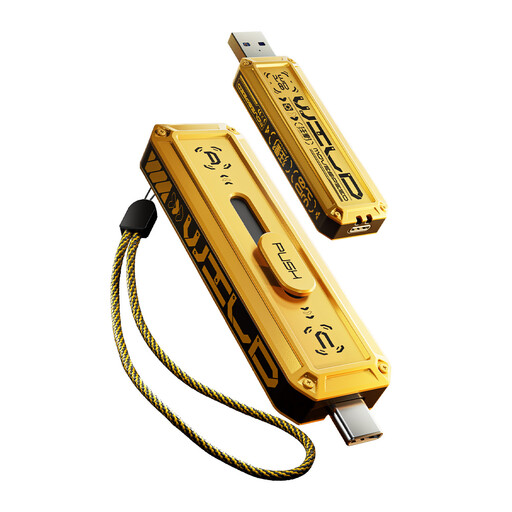
MOVESPEED YSUWD10-1TSY 1TB Dual USB Flash Drive

MOVESPEED YSUWD10-1TSY 1TB Dual USB Flash Drive

For occasional local transfers between compatible USB-C devices and USB-A computers.

  • 1TB flash drive with USB-A and Type-C connectors.
  • USB 3.2 Gen 2×1 interface and 3D NAND flash.
  • Listed read and write speeds up to 1090MB/s.
  • Check the phone’s attached-storage support, available power and drive format before depending on direct phone transfers.
  • Its compact format is easy to carry, so keep another copy of irreplaceable files.
Joybuy

Frequently asked questions

Can I use one external drive with both a Windows PC and a Mac?

Usually, choose a file system that both planned computers can use rather than assuming the factory format will suit both. Apple Support states that MS-DOS (FAT) and ExFAT are Windows-compatible formats in Disk Utility, and recommends copying files elsewhere before reformatting because erasing a storage device deletes its contents.

Can an Android phone copy photos directly to a USB drive?

Files by Google says devices running Android 7.0 or later can access connected USB storage and manage files on it. Check the exact phone, drive, adapter and power requirements before relying on this route, because support is not established for every combination.

Can an iPhone use a USB drive for documents and photo exports?

Yes, Apple says an iPhone can copy files to connected external storage through a supported app such as Files or Pages. A cable adapter may be needed, and Apple says the iPhone or iPad must be unlocked before connecting a storage accessory.

Is cloud sync the same as a backup?

No. Sync keeps selected files current and available across devices, while a recoverable backup is a separate copy used when data is lost or inaccessible. For important files, keep an independent copy and check that it can be opened or restored.

How much external-drive capacity should I choose for a Mac Time Machine backup?

Apple recommends a Time Machine storage device with at least twice the storage capacity of the Mac. This applies to Time Machine planning; if you also need to store other material, consider a separate drive or volume because Apple advises using the Time Machine backup disk only for Time Machine backups.