What should you check before choosing?
Decide how often the files change and where copies will be kept, then check the connection, format and access arrangements for the devices you use.
| Priority | What to check | Your needs |
|---|
| Independent copies |
Plan regular copies, keep an additional copy independent of the main computer and open sample files to test restoration. The National Cyber Security Centre advises against leaving a backup device permanently connected; its cloud-backup guidance also cautions that cloud copies are not ransomware-resistant by default. |
I want to recover records and photos if a drive fails or files on my computer are changed or deleted. |
| Drive format |
For Mac Time Machine, Apple recommends a dedicated disk with at least twice the Mac’s storage capacity and supports an encrypted backup. For ordinary files shared with Windows, Apple lists exFAT as Windows-compatible. Copy existing files elsewhere before a setup that erases the disk. |
My backup needs to work with the computers and backup software I actually use, not just have enough space. |
| Sensitive files |
Check the encryption method, supported devices and how you would recover access. Microsoft says BitLocker Drive Encryption is available on Windows Pro, Enterprise and Education and uses a recovery key when normal unlocking fails. |
If I carry personal records, I need to protect a lost drive without losing access to my own backup. |
| Location and portability |
Choose between a portable SSD for frequent movement or transfers, a portable HDD for an occasionally moved archive, and a desktop drive for a fixed local copy. Check whether the intended location also needs an off-device copy. |
My scanned-photo archive may stay at home, while newer household files need copying more regularly. |
| Connection and speed |
Check the computer’s USB mode and cable, not just the connector shape. For example, Samsung says the T7 Shield’s quoted maximum sequential speeds require a USB 3.2 Gen 2 host, a compatible cable and UASP. |
I regularly transfer photo batches and want to know whether my computer can use the drive’s stated transfer mode. |
Joybuy product options
These portable SSDs and HDDs are options for copies that may move between locations; the desktop HDD is an option for a fixed home archive. Whichever drive you choose, plan another independent copy.
 No image available
Samsung MU-PG4T0B 4 TB USB 3.2 Gen 2x2 SSD
A portable option for moving a large photo archive or regularly copying large batches. The listing specifies up to 2,000/1,950 MB/s read/write and AES 256-bit encryption; the quoted maximum speed requires a USB 3.2 Gen 2x2 connection. Before using it across devices or for sensitive records, check its file-system setup and password-recovery procedure.
View on Joybuy
 No image available
Western Digital My Passport 2 TB portable HDD, black
A portable HDD for a document or photo copy that sometimes travels. The listing describes USB 3.2 Gen 1, scheduled-backup software and AES 256-bit hardware encryption. It describes NTFS formatting and a macOS driver, so confirm read/write support for your Mac and how encrypted access can be recovered.
View on Joybuy
 No image available
Samsung T7 Shield 1 TB USB 3.2 Gen 2 SSD, blue
A compact option for regularly moving photo batches or records. The listing specifies up to 1,050/1,000 MB/s read/write and makes IP65 and drop-resistance claims; those claims have exposure limits and do not establish warranty cover for damage. Check your device and file-system compatibility, and the password-recovery process if you plan to protect sensitive files.
View on Joybuy
 No image available
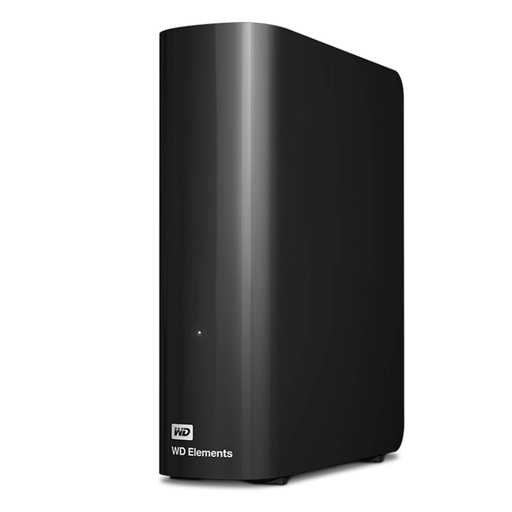
Western Digital Elements 10 TB desktop HDD
A fixed-location option for a large local archive. The listing specifies USB 3.2 Gen 1, an AC power adapter and NTFS formatting; it says macOS use requires reformatting. Copy any existing contents elsewhere before erasing a disk, and check your encryption arrangements if the archive contains sensitive records.
View on Joybuy
 No image available
Western Digital Elements 4 TB portable HDD, black
A portable option for a substantial archive that is usually kept at home but sometimes moved. The listing specifies USB 3.2 Gen 1, Windows 10+ use and an included USB-A cable. Check whether your other devices need a different file-system setup before transferring files, and check encryption arrangements for sensitive records.
View on Joybuy
Common questions
Which format should I use for a Mac Time Machine disk?
Use a dedicated backup disk and follow Apple’s Time Machine setup, which prefers APFS or APFS Encrypted. Apple recommends a disk with at least twice the Mac’s storage capacity. Setup may require erasing the disk, so copy existing files elsewhere first.
What if files must move between Windows and Mac?
For an ordinary shared data drive, exFAT is a starting point: Apple lists it as Windows-compatible and recommends it for Windows volumes over 32 GB. Check the devices you will use, and do not assume that a shared exFAT drive is ready to serve as a dedicated Time Machine disk.
Can I connect an external SSD to an Android phone?
Some external SSDs work with compatible Android devices; Samsung lists Android compatibility for the T7 Shield. Before buying, check your particular phone or tablet’s USB data support, power behaviour, storage-app access and the drive’s file system.
Does a drive warranty protect the files on it?
Do not rely on a hardware warranty to recover backed-up files. Seagate’s limited-warranty terms exclude data loss and recovery-related costs, so keep an independent copy and test that you can restore files from it.
Should I leave my only local backup drive connected?
No. The National Cyber Security Centre advises making regular backups, checking that files can be restored and not leaving the backup device permanently connected. Disconnect it after a completed backup, while keeping the routine frequent enough for files that change.


