What matters when choosing a drive?
Decide whether the archive stays in one place or travels regularly, then size the storage from actual files and plan how a separate copy will be maintained. Protection and a handover routine matter alongside the drive itself.
Desktop hard drive
Choose when: The archive stays at a fixed location and its planned growth calls for a larger-capacity drive.
Trade-off: It needs mains power, making regular venue-to-venue handovers less convenient.
Bus-powered portable hard drive
Choose when: Volunteers need to carry recordings and connect the drive away from a fixed desk.
Trade-off: Check that its capacity will cover the retention plan; Toshiba lists the cited Canvio Basics portable range up to 4 TB, while the cited Western Digital and Seagate desktop ranges extend beyond that.
| Concern |
What to check |
Who this matters to |
| Capacity and growth |
Use actual file sizes, recordings per year and the intended retention period to estimate growth. Allow room for a separate copy on separate storage. |
If the collection will grow over several years, I need enough space without splitting it across drives prematurely. Around 36% of consumers put archive capacity first. |
| Protection and recovery |
Decide who needs access, whether encryption suits the risk and how an authorised volunteer would restore files from a separate copy. |
When recordings identify people, I want to limit unauthorised access without losing the ability to recover them. For around 29% of consumers, protection and recoverability are the primary concern. |
| Portability and compatibility |
Check power requirements, the supplied connection and the file system against every computer used for handovers. |
I move recordings between venues and need each volunteer’s computer to read and write the files. Portability and compatibility come first for around 21% of consumers. |
| Shared workflow |
Agree who makes and checks each copy, where the copies live and when retained recordings are reviewed. |
With several volunteers handling files, I need a routine that someone else can follow without losing track of the archive. Around 14% of consumers prioritise that shared workflow. |
Joybuy product choices
These choices cover portable hard drives for moving recordings, a desktop hard drive for a fixed archive and a compact external SSD. Compare each capacity with the group’s recording and retention plan; none replaces a separate backup.
 No image available
Western Digital My Passport 4TB Portable Hard Drive, Black
Consider this portable hard drive if volunteers need to carry recordings and 4 TB fits the planned archive.
Check its connection against the group’s computers and confirm how any access-protection features are set up and recovered. Keep another copy elsewhere.
View on Joybuy
 No image available
Western Digital My Passport Ultra for Mac 5TB Portable Hard Drive, Silver
This 5 TB portable option may suit a volunteer handover where the group can agree a file-system workflow.
Confirm read-and-write compatibility with every computer in use, as well as the applicable warranty and any access-protection setup. Maintain a separate copy.
View on Joybuy
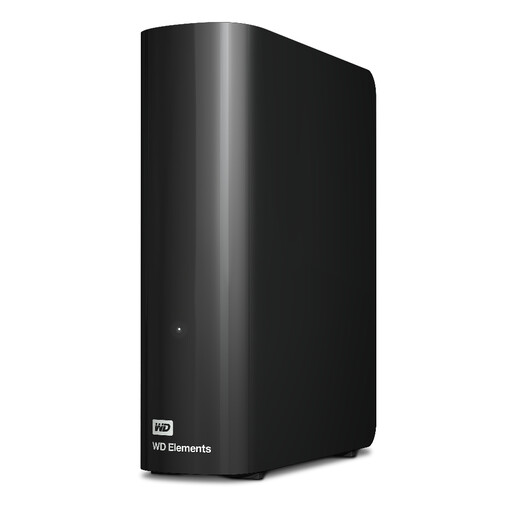 No image available
Western Digital WD Elements 16TB Desktop Hard Drive
Consider this 16 TB desktop drive for an archive kept at a fixed location, once the group has calculated its storage needs.
Check power access and the file-system requirements of every computer that will use it. Its capacity does not remove the need for a separate backup.
View on Joybuy
 No image available
DigiEra LPS2000M-3 1TB Magnetic Portable SSD, Pink
This portable SSD is an option for moving a smaller collection if 1 TB covers the group’s retention plan.
The title specifies USB 3.2 Gen 2x2 and USB-C; check the group’s computers and ports before buying. Keep an independent copy of the recordings.
View on Joybuy
Common questions
How much drive capacity do we need for lecture recordings?
Calculate it from the group’s own files rather than choosing a fixed TB figure for every archive. Use representative file sizes, expected recordings per year and the intended retention period, then allow for growth and provide separate storage for a backup copy; recording format and settings can change file size substantially.
Can one external drive hold our complete archive?
One drive can hold the working archive, but it should not be its only copy. The Information Commissioner’s Office includes appropriate backup and the ability to restore access after an incident in its data-security guidance, so agree where a separate copy will live and how to test recovery.
Must we encrypt lecture recordings?
The appropriate protection depends on what the recordings contain and the risks to them; do not assume every group needs the same drive feature. Where recordings contain personal information, the Information Commissioner’s Office advises security measures appropriate to the risk and describes encryption as protection against unauthorised access to stored information. Assess access, physical security and how authorised volunteers would manage and recover credentials.
How long should we keep recordings that identify people?
Keep identifiable recordings only as long as they are needed for the group’s stated purpose. The Information Commissioner’s Office says personal data must not be kept longer than necessary and advises organisations to justify retention periods and review information for deletion or anonymisation when it is no longer needed.


