Choose a portable SSD if you will carry the recordings frequently and need quick transfers; consider a portable HDD for a larger archive you still need to carry, or a desktop HDD if it will mainly stay at the new address. Whichever drive you choose, keep a second verified copy elsewhere, check that every computer can use the drive, and plan encryption and recovery-key storage if the recordings contain personal or confidential information.
Who needs which approach?
People carrying the archive on moving day
If the drive will travel between properties, a compact format and manageable copying time matter. Samsung UK describes resistance features for its T7 Shield range, but the drive still needs careful handling and another copy of the recordings.
People keeping a large recording library
Compare the size of your recordings and expected additions with the capacity of the drive you choose. Seagate's backup guidance also makes a separate copy important, whether the archive goes onto a portable drive or stays on a desktop drive after the move.
People responsible for sensitive meetings
If recordings contain personal or confidential information, consider how the drive will be encrypted and how authorised people will regain access. The Information Commissioner's Office discusses encryption for backup media, while Microsoft advises keeping BitLocker recovery keys available.
What matters when choosing a drive?
Portable SSD
Consider it when: You will carry the archive regularly or need to finish copying before the move.
Bear in mind: Samsung UK says the T7 Shield's resistance can vary in real conditions and that liquid, dust and drop damage are not covered under its warranty.
Portable HDD
Consider it when: You need a drive you can carry with a sizeable archive; Toshiba lists Canvio Basics capacities up to 4TB.
Bear in mind: Toshiba supplies that range as NTFS for Windows and specifies reformatting for its listed macOS versions.
Desktop HDD
Consider it when: The archive is large and the drive will mainly remain at the new address; Seagate lists Backup Plus Hub versions from 4TB to 14TB.
Bear in mind: A desktop setup needs a suitable place after the move and is less convenient to carry frequently.
| Concern |
What to check |
Who this matters to |
| A second usable copy |
Open recordings from the new drive, then keep another verified copy in a separate location. |
If losing the drive would also mean losing the meetings, I need a copy I can still access after the move. Around 33% of consumers put that continuity need first. |
| Carrying and copying |
Check the drive's size, connector and cable against the computers you will use; check the conditions behind any resistance rating. |
When I am moving between properties, I want a drive I can carry and connect without holding up the transfer. That is the primary need for around 25% of consumers. |
| Access to sensitive recordings |
Check the applicable workplace or client policy, the intended encryption method and where its recovery information will be kept. |
If my meetings contain personal information, I need to limit access if the drive is misplaced without locking out authorised users. Around 25% of consumers prioritise that protection. |
| Capacity and compatibility |
Compare recording size and expected growth with drive capacity; confirm file-system and port compatibility before copying. |
My archive must fit and open on the computers I will use after moving, without a last-minute format change. For around 17% of consumers, that planning is the deciding need. |
Mistakes to avoid before moving
-
Deleting the original once the drive is packed
If the external drive then holds the only copy, losing or damaging it could also mean losing the recordings. Seagate describes a backup as keeping important data in a second physical location.
Open recordings from the external drive to check the copy, and retain another verified copy separately before deleting anything.
-
Reformatting the only drive containing the archive
A drive supplied for Windows may need a different setup for your Mac workflow, but Apple Support warns that formatting a disk erases its files.
Decide which computers must use the archive before transferring it. If a format change becomes necessary later, verify another copy first.
-
Treating a rugged rating as permission for rough handling
Samsung UK says the T7 Shield's resistance is tested under defined conditions, can vary in real use and does not bring liquid, dust or drop damage within its warranty cover.
Protect the drive during transport, keep track of where it is packed and retain a separate copy of the archive.
-
Encrypting the drive without safeguarding recovery access
Microsoft says BitLocker may require a recovery key after certain access or system changes. Without an accessible key, legitimate use of the archive can be interrupted.
Set up a secure recovery method before the move and keep its details separate from the drive.
Relevant drive ranges to consider
Samsung
The T7 Shield portable SSD range is relevant when the archive will be carried during the move.
- Samsung UK specifies sequential read and write speeds up to 1,050 and 1,000MB/s for the T7 Shield, alongside IP65 testing and a 3-metre drop-test condition.
- Those figures and resistance claims apply under Samsung's stated conditions; Samsung says liquid, dust and drop damage are not covered under warranty.
Western Digital
The My Passport portable HDD range is worth examining if you want local storage and are considering a hardware-encryption feature.
- Western Digital documents 256-bit AES hardware encryption for the My Passport drives covered by its support guidance.
- Check the exact model and password setup. Western Digital distinguishes hardware encryption from password protection and says the covered drives are supplied as NTFS, requiring reformatting for macOS use.
Toshiba
Canvio Basics is a portable HDD range to consider for a USB-powered archive, particularly when the initial workflow is on Windows.
- Toshiba lists capacities up to 4TB and USB 3.2 Gen 1 with USB 2.0 compatibility for the range.
- The range is supplied as NTFS for Windows; Toshiba specifies reformatting for its listed macOS versions.
Seagate
The Backup Plus Hub desktop HDD range is relevant to a larger archive that will mainly stay in one place after the move.
- Seagate UK lists Backup Plus Hub versions from 4TB to 14TB, with backup and diagnostic utilities.
- Seagate lists a typical weight of 1.06kg for its 8TB-to-14TB versions. Plan how to transport and position a desktop drive rather than treating it as a pocket-sized archive.
Joybuy drive options
These options span portable SSDs and HDDs for carrying recordings, plus a desktop HDD for an archive mainly kept at the new address. Compare capacity, connections and any security requirements with your own recordings before choosing.
 No image available
Samsung MU-PE1T0S 1TB Portable SSD
Consider this portable SSD if you will carry the archive and need to copy it before moving day.
Samsung UK specifies USB 3.2 Gen 2 and sequential speeds up to 1,050MB/s read and 1,000MB/s write for this T7 Shield model; the stated speeds depend on a suitable computer and connection. Its IP65 and 3-metre drop-test claims have defined test conditions and do not replace careful transport or a second copy.
Check whether 1TB accommodates your recordings and expected additions.
View on Joybuy
 No image available
Western Digital My Passport 4TB Portable Hard Drive
Consider this portable HDD if you need to carry a larger recording archive between properties.
It has a stated 4TB capacity. Western Digital documents hardware encryption for the My Passport drives covered by its guidance; check this exact drive's security setup, your computers' compatibility and how authorised users will recover access.
View on Joybuy
 No image available
SanDisk Portable SSD 2TB
This portable SSD is an option when the recordings need to travel with you during the move.
Its stated capacity is 2TB. Check the connector against your computers and confirm the encryption arrangement if the meetings require one; keep another verified copy regardless of the drive you choose.
View on Joybuy
 No image available
Western Digital Elements Port. 4TB USB 3.0
Consider this portable hard drive if you want to carry a 4TB archive during the move.
Check whether its USB 3.0 connection and the cable supplied suit your computers. If a format change is needed, do it before copying recordings or while another verified copy remains available; also confirm your encryption plan if the meetings are sensitive.
View on Joybuy
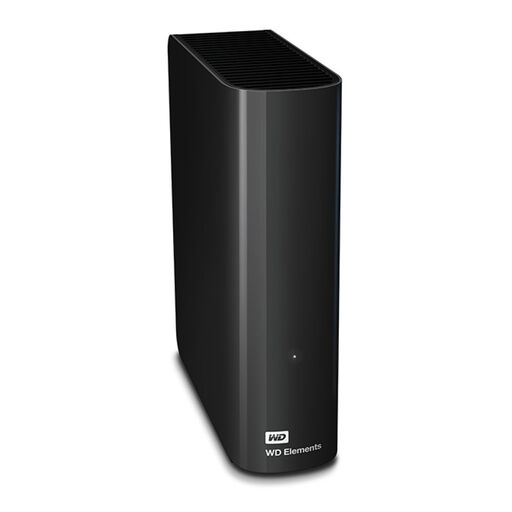 No image available
WD Elements 8TB External Hard Drive
This desktop-drive option suits an archive intended to remain mainly at the new address rather than travel frequently.
It has a stated 8TB capacity and uses an AC adapter. Check that you have suitable power and computer connections at the destination, and retain a separate verified copy of the recordings.
View on Joybuy
Frequently asked questions
Is one external drive enough for meeting recordings during a move?
No, not if it would hold the only remaining copy of recordings you need to keep. Seagate describes a backup as keeping important data in a second physical location, so check that the new drive's files open and retain another verified copy separately.
Should I encrypt a drive containing meeting recordings?
Assess encryption if the recordings contain personal information or are covered by an employer or client security policy. The Information Commissioner's Office describes encryption as protection for personal information on backup media; choose a method your computers and authorised users can use, and safeguard recovery access.
What if I lose a BitLocker recovery key?
You may be unable to regain access when BitLocker requests the key. Microsoft says a recovery key can be required after certain access or system changes, so arrange secure, separate storage for it before the move.
Can I use the same archive drive with Mac and Windows?
Yes, if you choose a suitable file-system and connection workflow before the drive becomes your only usable copy. Apple Support identifies ExFAT for disks over 32GB intended for Windows use and warns that formatting erases files; Toshiba says its Canvio Basics range is supplied as NTFS for Windows and requires reformatting for its listed macOS versions.


