Choose a portable SSD if you regularly open and work on music projects from the drive; a portable HDD is better suited to keeping larger offline archives when fast access to active sessions is less important. Whichever you choose, check the computer connection and file format, and keep a separate backup that you disconnect when it is not in use.
Who needs an external drive?
Active-project producers
If you open sessions, recordings or sample libraries directly from an external drive, prioritise a suitable connection and drive speed. Ableton advises connecting an external project drive directly rather than through a USB hub where possible.
Creators keeping offline backups
If the drive will mainly hold copies of finished sessions and recordings, plan for enough archive space and a repeatable backup routine. The National Cyber Security Centre advises against leaving every backup connected at the same time.
Mobile session and location recordists
If you carry projects between recording locations, check the drive’s size, cable and compatibility with each computer you use. Consider protection suited to travel, while keeping another copy of work you cannot replace.
What matters when choosing?
Decide whether the drive will run current projects or hold archive copies, then check how you will connect it, share its files and back it up.
| Concern |
What to check |
Who this matters to |
| Active-project access |
Check the drive connection against your computer’s port and cable. If you also use a USB audio interface, see whether each can connect directly. |
I need to open sessions or sample libraries from the drive without an avoidable connection bottleneck. Around 29% of consumers put active-project access first. |
| Offline backup resilience |
Plan a second copy and a routine for disconnecting at least one backup after use. |
If a computer or connected drive fails, I need a separate copy from which to recover my sessions. Keeping a backup recoverable is the main concern for around 29% of consumers. |
| Archive capacity |
Allow for your existing projects, recordings and expected growth; decide whether the drive is for archives rather than active work. |
My completed sessions and source recordings need room to accumulate, even if I rarely work from the archive drive. Around 24% of consumers prioritise archive capacity. |
| Sharing between computers |
Check that every intended computer and music application can use the chosen file system, and check the required cables. |
When I move a project between Mac and Windows computers, I need both to read and write its files. Cross-platform access comes first for around 18% of consumers. |
Mistakes to avoid
-
Treating one external drive as the entire backup
A drive left connected can be affected alongside its computer; it can also be lost or damaged. The National Cyber Security Centre advises keeping backups from all being connected at once.
Keep another copy of valuable sessions, disconnect at least one backup after use and occasionally check that a project and its audio files can be restored.
-
Choosing a drive by its headline speed alone
Samsung’s stated T7 Shield speeds depend on a compatible USB 3.2 Gen 2 host, cable and UASP. Ableton also advises avoiding a shared USB hub for the project drive where possible.
Check the computer port and cable before choosing a speed-sensitive SSD. Where your setup allows, connect the drive directly and use a different port for the audio interface.
-
Reformatting before copying existing projects
Apple states that erasing and reformatting a storage device deletes its contents.
Copy projects to another device and check the copy before changing the drive’s file system.
-
Relying on a rugged rating to protect the only copy
Ingress and drop claims describe specified test conditions, not protection against every incident. Samsung says liquid, dust and drop damage are not covered under its T7 Shield warranty.
Choose an enclosure suited to how you carry the drive, but keep a separate backup of important work.
Relevant brands to consider
Samsung
The T7 Shield line illustrates a portable SSD intended for active projects that also travel between locations.
- Samsung specifies up to 1,050MB/s read and 1,000MB/s write with a compatible USB 3.2 Gen 2 host, cable and UASP.
- Its IP65 and 3-metre drop-test claims do not guarantee data protection; Samsung excludes liquid, dust and drop damage from warranty coverage.
Crucial
The X9 Pro line illustrates a compact portable-SSD option for moving projects between compatible devices.
- Crucial specifies up to 1,050MB/s read and write for the X9 Pro and describes compatibility with several computer and mobile platforms.
- Transfer performance depends on the host setup, while access across devices depends on the file system and the devices being used.
LaCie
The Rugged Mini HDD line illustrates a portable hard-drive route for offline archives.
- LaCie lists capacities up to 5TB for the line, which may suit a growing collection of completed projects.
- LaCie specifies transfer rates up to 130MB/s for this HDD line; consider the demands of your workflow before using it for active sessions.
Joybuy product choices
These portable SSDs offer choices for current projects, while the portable hard drives provide options for keeping larger local archives. Check capacity, connections and file-system suitability against your own projects and computers.
 Image unavailable
Samsung MU-PE1T0S 1TB, black
For carrying current projects between locations, check that your computer and cable suit its USB Type-C 3.2 Gen 2 connection. Confirm that 1TB meets your storage needs, and keep a separate copy of valuable work.
View on Joybuy
 Image unavailable
Samsung Portable SSD T7 4TB, grey
For a larger collection of active projects, this portable SSD offers 4TB and a USB Type-C 3.2 Gen 2 connection. Check the port, cable and file format you intend to use; do not rely on one drive as your only copy.
View on Joybuy
 Image unavailable
SanDisk Portable SSD 2TB
For storing current projects on a portable SSD, assess whether 2TB leaves enough room for sessions and associated audio. Check the connection and file format against every computer you plan to use.
View on Joybuy
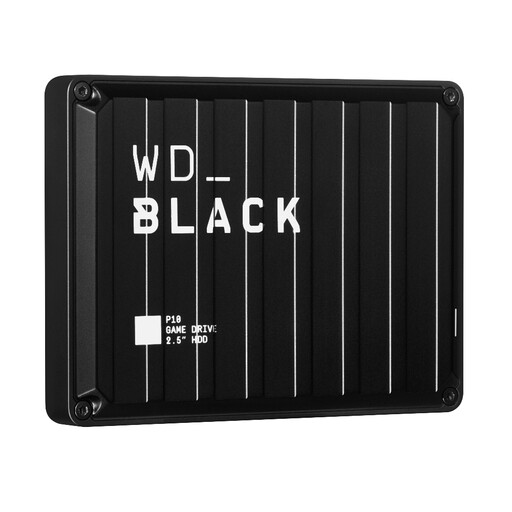 Image unavailable
Western Digital WD BLACK P10 Game Drive 5TB
For a larger offline project archive, consider whether 5TB accommodates your recordings and future copies. Because this model is presented as a game drive, check its file system and suitability for your music workstation before relying on it.
View on Joybuy
 Image unavailable
Western Digital My Passport Ultra for Mac 5TB, silver
For a Mac-centred local archive, assess whether 5TB fits your project collection. If you also need Windows access, check the stated HFS+ driver requirement against that computer and its music applications before moving files.
View on Joybuy
Common questions
Can one external drive be my only offline backup?
No. One drive gives you a local copy, but it can still be lost, damaged or affected while connected to your computer. The National Cyber Security Centre advises keeping backups from all being connected at once, so maintain another copy and disconnect at least one backup after use.
Should I use an SSD or HDD for music projects?
Choose a portable SSD if you regularly work on projects from the external drive; a portable HDD is more suited to a larger archive that you access less often. Ableton notes that drive speed can affect Live performance, particularly as simultaneous audio activity increases, so check your own connection as well as the drive.
What file format should I use between Mac and Windows?
ExFAT is an option to check for a drive shared between Mac and Windows: Apple identifies it as Windows-compatible and recommends it for Windows volumes over 32 GB. Confirm that each computer and music application can use the format before changing it.
Will reformatting erase my existing projects?
Yes. Apple states that erasing and reformatting a storage device deletes its contents. Copy your projects elsewhere and check that the copy opens before you reformat the drive.


