Choose a portable SSD if you regularly carry the drive, transfer large photo or video folders or need a more resilient working copy for travel. A portable HDD suits periodic multi-terabyte backups, while a mains-powered desktop HDD is more suitable for a large archive that stays at one desk; in every case, check the port, cable, format, usable capacity and backup routine before buying.
Who each option suits
Households building a separate photo archive
You need a second copy of family photos and documents outside the laptop, with enough capacity for a repeatable backup routine rather than only fast editing. The National Cyber Security Centre defines a backup as a separate copy kept in a separate safe location.
Laptop users carrying active files between places
You need to free a full laptop while moving current photo, video or work files often. Transfer speed, compact size, cable compatibility and protection against travel-related knocks become more important than archive capacity alone.
Mixed Mac and Windows households
You need a removable drive that can exchange files between operating systems. Check the file-system format and any application-specific requirements before placing the only accessible copy of data on the drive; Apple lists ExFAT as compatible with Windows.
What to check before buying
Choose the drive type around your normal backup routine, then confirm that its capacity, connection and format fit the computers and files you actually use.
Portable external SSD
Choose it when: you carry active files, move large folders often or need a portable working copy for travel.
Keep in mind: quoted maximum speed depends on the host connection, and capacity may be less suitable for a large long-term archive.
Portable external HDD
Choose it when: you want a bag-friendly, multi-terabyte drive for periodic copies rather than frequent active-file work.
Keep in mind: it is less suited to repeated large transfers, and cable and adapter contents vary by model.
Desktop external HDD
Choose it when: the archive stays near one computer and needs more space than a convenient portable drive.
Keep in mind: it needs mains power and a fixed location, and remains only one copy of your files.
| Priority |
What to check |
Your needs |
| Separate backup copy |
Keep a copy apart from the laptop; allow room for older versions if you plan to retain them; disconnect removable media between backups where appropriate. |
I want protection from a laptop failure, loss or incident rather than simply more free space on the laptop. |
| Archive capacity |
Measure the current library and expected growth; check the selected capacity variant; decide whether a portable or desktop form factor fits the required space. |
My photo, video and document library is likely to grow, so the drive must remain useful after the first copy. |
| Transfer routine |
Check the USB generation on both drive and computer; treat maximum transfer figures as conditional on compatible hardware; consider stated ruggedness only within its test conditions. |
I move large folders often or carry the drive with my laptop, so waiting time and portability matter to me. |
| Ports and format |
Confirm the laptop port, drive-end connector and supplied cable or adapter; choose a file system for the intended operating systems and applications; back up files before reformatting. |
I need the drive to work with the computers already in the household, not just fit one connector shape. |
Backup mistakes to avoid
-
Treating one external drive as the entire backup plan
A drive holding the only remaining copy can still be lost, fail or be affected by an incident involving a connected computer. The National Cyber Security Centre describes the 3-2-1 approach as at least three copies on two devices, with one copy offsite.
Use the external drive as one separate copy, check that files can be restored, and keep another copy in a genuinely separate location or service that suits your circumstances.
-
Buying on connector wording alone
USB-C describes a connector shape, not a guarantee that every cable, port and drive will operate at the same speed. Package contents and USB generation differ by model.
Check the laptop port, drive-end connector, supplied cable or adapter and USB generation before buying. Confirm the exact capacity variant rather than relying on a product-family description.
A replacement cable or adapter may be needed if the supplied lead does not fit the computer.
-
Assuming a portable HDD and SSD suit the same workflow
Regular large-file transfers and travel can make transfer speed and physical resilience important, while a stationary archive may need capacity more than portability. Which? assesses external drives on transfer speed, durability, connections and capacity.
Match the route to the routine: consider a portable SSD for active portable work, a portable HDD for capacity-led periodic copies, and a desktop drive for a large fixed archive.
-
Reformatting after copying the only files
The file system affects Mac, Windows and specialist application compatibility, and formatting can remove existing data. Apple advises APFS for external storage used with Final Cut Pro, Motion or Compressor.
Choose the format before loading the only backup, and retain another verified copy while setting up the drive. For ordinary Mac and Windows file exchange, check whether ExFAT fits the intended workflow.
Reformatting can leave photos or files inaccessible if there is no other copy.
Relevant brand references
Western Digital
Relevant for portable HDD backup drives and larger desktop archives. Western Digital UK lists My Passport USB-C portable drives up to 6TB and My Book desktop storage up to 26TB.
- Western Digital UK lists USB-C portable options with USB-A support and larger-capacity desktop ranges.
- Confirm the exact capacity, included cable or adapter, operating-system support and warranty for the selected SKU.
Samsung
Relevant for a compact portable SSD working copy or travel backup. Samsung’s UK T7 Shield range is positioned around USB 3.2 Gen 2 transfers and ruggedisation.
- Samsung states that the T7 Shield can provide up to 1,050 MB/s reads, IP65 dust and water resistance, and 3 m drop resistance under stated test conditions.
- Transfer speed depends on compatible host hardware, and stated IP or drop ratings do not cover every kind of damage.
Toshiba
Relevant for straightforward portable HDD backup storage, including USB-A-oriented Canvio Basics and USB-C-oriented Canvio Basics USB-C variants in the EMEA market.
- Toshiba lists Canvio Basics drives up to 4TB with USB 3.2 Gen 1; its USB-C variant is bus-powered and uses a USB-C cable.
- Windows readiness does not establish Mac format compatibility, and the USB-C model requires a USB Type-C port.
Joybuy product options
Joybuy product options for portable SSD working copies, portable HDD backup drives and larger desktop archives for photos and household files.
 No image available
Samsung MU-PG4T0B 4TB USB Type-C USB 3.2 Gen 2x2
For active portable files and frequent large photo or video transfers.
4TB capacity with USB Type-C and USB 3.2 Gen 2x2 stated in the product name.
Maximum transfer speed requires a USB 3.2 Gen 2x2 host connection; lower-capability ports may transfer more slowly.
Joybuy
 No image available
Western Digital My Passport Ultra Portable External Hard Drive 4TB Silver
For a portable, capacity-led archive with USB-C and USB-A connection options.
4TB portable external HDD.
It is pre-formatted for Windows; check the intended Mac file-system workflow before copying the only files.
Joybuy
 No image available
Samsung MU-PE1T0S 1TB USB Type-C USB 3.2 Gen 2
For a compact working copy used during travel and frequent large-folder transfers.
1TB capacity with USB Type-C and USB 3.2 Gen 2 stated in the product name.
Check that 1TB covers the current library, future additions and any retained backup versions.
Joybuy
 No image available
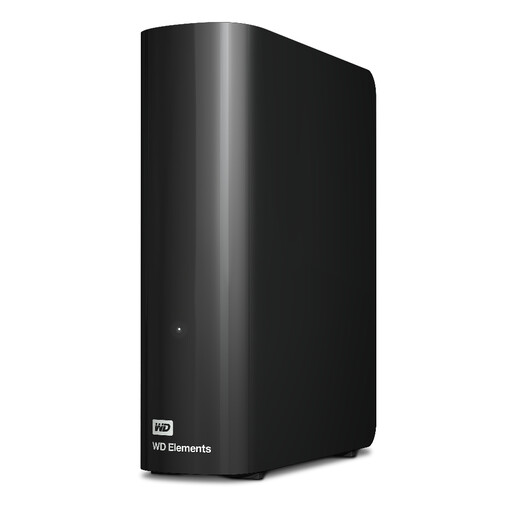
Western Digital WD Elements 12TB USB 3.2 Gen 1 Desktop Hard Drive
For a larger household archive that stays in a fixed, mains-powered location.
12TB capacity with USB 3.2 Gen 1 stated in the product name.
It requires mains power and is pre-formatted NTFS for Windows; macOS use may require reformatting.
Joybuy
 No image available
Western Digital Elements Portable 4TB Black USB 3.0
For periodic photo and file copies where portable capacity matters more than active-file speed.
4TB capacity and USB 3.0 stated in the product name.
The supplied connection is USB-A; a USB-C-only laptop may need a compatible adapter or cable.
Joybuy
Frequently asked questions
Is moving files to an external drive the same as backing them up?
No. It is a backup only when the drive holds a separate copy of important data in a separate safe location. If you move the only copy off the laptop and delete it from the laptop, you have transferred data rather than created a backup.
Should the backup drive stay plugged into the laptop all the time?
For a removable-drive backup routine, disconnect it when a backup is not being made. The National Cyber Security Centre advises against leaving a backup device permanently connected, because an incident affecting the computer may also affect a connected backup.
Which format should I use if a drive will be shared between a Mac and Windows PC?
For ordinary cross-platform file exchange, Apple lists ExFAT as compatible with Windows. For a Mac-only drive, APFS is the macOS file system, and Apple advises APFS for external storage used with Final Cut Pro, Motion or Compressor; copy files elsewhere before reformatting because formatting can erase the drive.
Will a USB-C external drive work with an older USB-A laptop?
Only if the selected model includes a suitable USB-A cable or adapter, or you obtain a compatible one. Western Digital states that its My Passport USB-C range supports USB-C and USB-A, while Toshiba offers separate USB-A and USB-C Canvio Basics variants, so confirm the exact package contents before purchase.


