For important personal records, use an external drive as one separate copy, not your entire backup plan. A portable hard drive suits a larger local archive, while an SSD suits frequent copying and carrying; if the drive travels with sensitive documents, consider how you will set up encryption and retain access credentials. A separately protected cloud copy can provide another recovery route, but every route needs a usable restore process.
Who needs a separate copy?
People keeping household records
If identity documents and household records sit on one computer or phone, a copy stored elsewhere gives you a way to recover them if that device becomes unavailable. The National Cyber Security Centre (NCSC) defines a backup as a copy kept in a separate safe location.
People carrying sensitive files
A drive that travels between locations calls for a plan for both loss of the device and access to its files. Consider encryption alongside how you will keep its password, PIN or recovery information separate.
Multi-device households
If records change across several devices, a cloud copy can help keep recent files available while a separately stored local copy provides another route to them. Check that the chosen services and drives work with the devices you use.
What should you check before choosing?
Start with how you would recover the records, then choose the capacity, access controls and copying routine that fit that plan.
| Priority | What to check | Your needs |
|---|
| Recoverable copies |
Keep a copy apart from the main device. Disconnect and store a local drive when it is not being updated, and restore sample files to check that they open. The NCSC advises keeping a recent offline copy of important data. |
If my main device fails or files are deleted, I need a copy I can actually open—not just a drive that has been connected to the computer. |
| Protection on the move |
Check how encryption is enabled, how the drive unlocks and where recovery information will be kept. The Information Commissioner’s Office (ICO) identifies encryption as protection against unauthorised access to personal information on backup media. |
When I carry identity or financial documents, I want someone who finds the drive to be unable to read them, without putting my own access at risk. |
| Capacity and copying |
Measure the files to be backed up and allow for growth. For an SSD chosen for speed, check the computer port and cable: Samsung says the T7 Shield’s stated maximum speeds require USB 3.2 Gen 2 and UASP support. |
A mostly stationary archive may make drive capacity my main concern; if I move files often, copying time and portability matter too. |
| Routine and separation |
Check whether copying can run on a useful schedule, what the cloud service retains after deletion, and whether the local copy stays separate from the same account or connected computer. The NCSC warns that neither physical nor cloud backups resist ransomware by default. |
I want recent records without relying on a single device, account or permanently connected drive. |
What can undermine a backup?
-
Treating one external drive as the whole plan
A drive kept connected to the main computer can be affected by the same incident. The NCSC warns that physical and cloud backups need additional measures against ransomware.
Keep another independent copy, store a recent local copy offline when it is not being updated, and try restoring files from it.
-
Leaving encryption unconfigured
An encryption feature does not protect files until it has been set up; keeping the unlock details with the drive also weakens protection if both are lost.
Enable encryption before copying sensitive records, keep the secret and recovery information separately, and check that the locked drive cannot be opened without them.
-
Choosing an SSD for a speed figure alone
Samsung says the T7 Shield’s stated maximum read and write speeds require a compatible USB 3.2 Gen 2 host and cable with UASP support.
Check your computer’s port and the cable before making transfer speed the deciding factor. For an archive copied infrequently, weigh capacity and the backup routine as well.
-
Encrypting a drive that holds the only copy
Apple says encrypting an external device with Disk Utility requires erasing it, which removes its existing contents.
Make a separate copy, confirm that its files open, and only then erase and encrypt the device. Check compatibility if you need to use it with both macOS and Windows.
Relevant brand references
Samsung
The portable T7 Shield SSD is an example to examine when compact storage and frequent file copying matter.
- Samsung states maximum read and write speeds of 1,050 MB/s and 1,000 MB/s, conditional on a compatible USB 3.2 Gen 2 host, cable and UASP mode.
- Samsung’s stated liquid, dust and drop conditions are not a substitute for another backup copy; its cited warranty terms exclude those types of damage.
Seagate
The One Touch portable hard-drive line illustrates a capacity-focused local backup option.
- Seagate describes 2 TB and 4 TB versions with USB-C, hardware encryption and backup tools.
- Check the exact model, capacity and supported tools on any listing you consider rather than assuming every One Touch drive has the same configuration.
iStorage
The diskAshur M2 is a PIN-authenticated portable SSD option for records carried between locations.
- iStorage describes physical PIN access, AES-XTS 256-bit hardware encryption and capacities from 240 GB to 2 TB.
- Plan where to keep the PIN and recovery information; encryption cannot replace an independent copy of the files.
Apricorn
The Aegis NVX is a keypad-secured portable SSD referenced in PCMag UK’s 2026 encrypted-drive ranking.
- Its keypad format is relevant if access without installed encryption software is part of your selection criteria.
- Confirm the precise model’s capacity, device compatibility and warranty before choosing it for a backup routine.
Joybuy storage options
These drives and USB devices offer different ways to keep a physical copy of personal records. Choose one against your archive size, the devices you use and how you will maintain another separate copy.
 No image available
Western Digital My Passport 2 TB Portable Hard Drive, Black
A local-drive option for a recurring copy of household records. The listing describes USB 3.2 Gen 1, scheduled backup tools and password-protected 256-bit AES hardware encryption; set up the tools and check that 2 TB accommodates the archive and its growth. Keep another independent copy.
View on Joybuy
 No image available
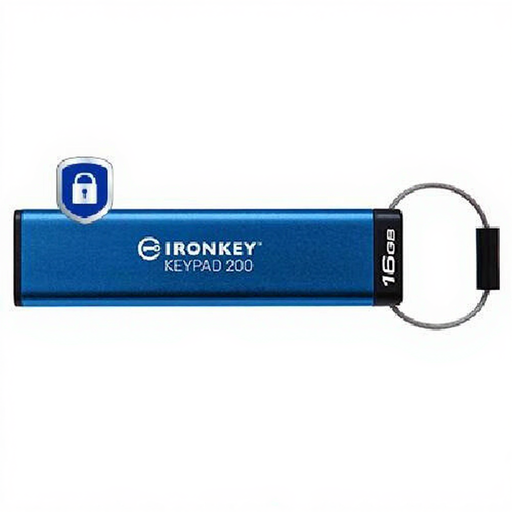
Kingston IronKey Keypad 200 16 GB USB Drive
A compact physical copy for a small set of sensitive files carried between locations. The listing specifies USB Type-A, keypad PIN access and AES-XTS 256-bit encryption. Check whether 16 GB fits the files, how access can be recovered if the PIN is unavailable, and where another copy will be kept.
View on Joybuy
 No image available
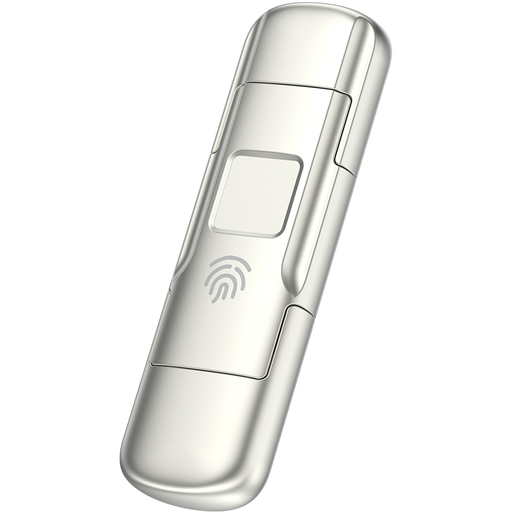
MOVESPEED YSUYC-256GSN 256 GB Fingerprint USB Drive, Silver
For moving a physical copy between USB-A and USB-C devices, the listing describes dual interfaces, fingerprint access and AES-256 encryption. Measure the archive against its 256 GB capacity, and check the access procedure if fingerprint unlocking fails. Retain a separate backup.
View on Joybuy
 No image available
Samsung T7 Shield MU-PE1T0S 1 TB Portable SSD, Black
A portable local copy for people who move records regularly. This USB 3.2 Gen 2 SSD has 1 TB of storage; the listing describes optional password setup for AES 256-bit hardware encryption and IP65 and 3 m protection claims. Enable password protection if needed, check capacity and host compatibility, and keep another independent copy.
View on Joybuy
 No image available
Western Digital My Passport Ultra for Mac 5 TB Hard Drive, Silver
A larger local archive option for a Mac household. The listing specifies USB-C, 5 TB of storage, macOS 11 or later use and password-protected 256-bit AES hardware encryption; it describes Windows use as requiring a downloadable HFS+ driver. Check the archive size, configure protection and keep another independent copy.
View on Joybuy
Common questions
Is one external drive enough for important records?
No: one drive can provide a useful separate copy, but it can also be lost, damaged or affected while connected. The NCSC advises keeping important data in a separate safe location; retain another independent copy and test that you can restore files.
Should I encrypt a portable drive containing sensitive documents?
Encryption is worth setting up when a removable drive containing personal information could be lost or stolen. The ICO identifies encryption of backup media as protection against unauthorised access; keep the unlock secret and recovery information separate from the drive.
Can I encrypt a drive using Windows or macOS?
Check your operating system and the drive’s existing contents first. Microsoft says BitLocker Drive Encryption is available on Windows Pro, Enterprise and Education, not Windows Home. Apple says encrypting an external device through Disk Utility requires erasing it, so confirm that another copy of its files opens before proceeding.
Where should I keep an encryption PIN or recovery key?
Keep a recoverable record in a secure place separate from the drive. An encrypted backup may be inaccessible when you need it if its only unlock information is lost; keeping the secret beside the drive also weakens protection against theft.
How often should I test a records backup?
Set a routine that reflects how often the records change, and periodically restore representative files to another location and open them. A completed copy is useful only if its contents can be recovered when the original device is unavailable.


