For routine presentation-file hand-offs, start with a USB 3.2 Gen 2 external SSD and check that every studio computer can connect to it and write to its file system. Consider a faster-rated Gen 2x2 drive when the computers, cables and required settings support it; if the drive travels or holds confidential client files, handling and access control matter as much as its speed rating.
Who is this for?
Teams handing files between Macs and Windows PCs
If several people need to open, edit and return the same presentation package, check the drive’s file system as well as its connectors. Apple’s guidance distinguishes Windows-compatible ExFAT from Mac formats and notes that a Mac may read an NTFS drive without being able to write to it through Disk Utility.
Presenters moving large media-heavy packages
Linked videos and high-resolution images can make copying time a practical concern between sessions. Samsung’s stated maximum speeds for its T7 Shield and T9 depend on the host connection and cable; the T9’s higher rating also requires USB 3.2 Gen 2x2 and UASP.
Studios carrying confidential client files
A drive passed between rooms or taken off-site needs an agreed owner, an appropriate access-control process and a separate copy of important files. Before reassignment or disposal, the National Cyber Security Centre’s sanitisation guidance is relevant to SSDs.
What matters when choosing?
Check that everyone can connect to and write to the drive before deciding whether a higher speed rating addresses the studio’s copying workload. Then account for how the drive is carried and who may access its files.
USB 3.2 Gen 2
Consider it: For routine shared hand-offs, particularly when mixed USB-A and USB-C ports make the supplied connections important.
Trade-off: The cited Samsung T7 Shield and Kingston XS1000 have lower quoted peak speeds than Samsung’s T9, and their own maximum speeds still depend on the connection.
USB 3.2 Gen 2x2
Consider it: When large media-heavy packages are copied regularly and the studio computers and cables support this interface.
Trade-off: Samsung says its T9’s quoted maximum also requires UASP; a USB-C connector alone does not establish that the full connection can reach that rating.
| Concern |
What to check |
Who this matters to |
| Read/write access across devices |
List the computers and ports; check supplied cables and the intended file-system format before loading working files. |
If my deck moves between a Mac and a Windows PC, I need both people to save changes to the same drive. Around 31% of consumers put cross-device read/write access first. |
| Copying time |
Compare the SSD interface with each regular host port and cable; check any stated UASP requirement. |
When linked video and images make a package large, I want copying to fit between sessions. For around 31% of consumers, transfer time is the primary concern. |
| Shared handling |
Check the exact model’s drop and ingress claims and their conditions; keep a separate copy of important files. |
If the SSD is repeatedly carried between desks and rooms, I care most about how it withstands handling. Around 15% of consumers prioritise physical resilience. |
| Confidential files |
Check password-feature requirements and agree who manages access and sanitisation before reassignment. |
For client material shared among colleagues, I need clear control over who can open the files and what happens when the drive changes hands. Access control comes first for around 23% of consumers. |
Mistakes to avoid
-
Assuming every USB-C port can deliver a drive’s quoted speed
USB-C describes the connector, not the host’s transfer capability. Samsung says its T9’s maximum quoted speed requires a USB 3.2 Gen 2x2 host, suitable cable and UASP.
Check the specifications of the computers used for hand-offs before choosing a faster-rated drive.
-
Assuming a drive writable on one computer is writable on another
A drive may connect successfully yet have an unsuitable file system. Apple notes that a Mac might read an NTFS drive without being able to write to it through Disk Utility.
Decide whether the drive is for mixed Mac-and-Windows hand-offs or Mac-only work, check its format and back up existing files before reformatting.
-
Treating a rugged rating as a backup
Samsung describes the T7 Shield’s ingress and drop resistance as controlled-test claims that can vary in use; it says liquid, dust and drop damage are not covered by its warranty.
Keep another current copy of critical presentation files, even when the SSD has a protective rating.
-
Passing on a drive after merely deleting confidential files
The National Cyber Security Centre describes sanitisation as reducing the likelihood that data can be retrieved or reconstructed from storage media, including SSDs.
Assign responsibility for the shared drive and follow a documented sanitisation process before it leaves the studio’s control.
Relevant brands to consider
Samsung
Samsung’s T7 Shield and T9 illustrate two different interface choices for studio hand-offs: USB 3.2 Gen 2 and Gen 2x2.
- Samsung UK rates the T7 Shield at up to 1,050 MB/s read and 1,000 MB/s write, with IP65 and a 3 m drop-resistance claim from controlled testing.
- Samsung rates the T9 at up to 2,000 MB/s only with a compatible USB 3.2 Gen 2x2 host and cable and UASP enabled; neither rating establishes the speed of a particular studio setup.
Kingston
The Kingston XS1000 is a compact USB 3.2 Gen 2 option for hand-offs involving different connector types.
- Kingston lists a USB-C-to-A cable and USB-A-to-C adapter with the XS1000, alongside a maximum quoted speed of 1,050 MB/s.
- Its cited interface is USB 3.2 Gen 2, rather than the Gen 2x2 interface relevant to Samsung’s higher-rated T9.
SanDisk
The SanDisk Extreme Portable SSD line is relevant when a portable hand-off drive also needs physical-protection and password features.
- SanDisk lists IP65, up to 3 m drop protection, password protection and built-in 256-bit AES encryption for the cited product line.
- These are manufacturer claims for that line, not a substitute for checking the exact drive’s setup, maintaining backups or managing password recovery.
Seagate
Seagate’s One Touch SSD is a reference point for straightforward Windows-and-Mac file hand-offs.
- Seagate lists USB-C/USB 3.0 connectivity, up to 1,030 MB/s and Windows-and-Mac compatibility without reformatting for the cited line.
- Seagate’s UK page states that the product is no longer in stock, so check availability before planning a purchase around it.
Joybuy product choices for studio hand-offs
These portable SSDs cover routine USB 3.2 Gen 2 hand-offs and Gen 2x2 options for studios considering larger transfers. Check the actual computers, cables and file-system format before choosing one for shared use.
 No image available
Samsung MU-PG4T0B 4 TB USB-C Gen 2x2 SSD, black
A 4 TB option for a studio storing and moving large presentation packages; check Gen 2x2 support across the computers and cables before relying on its faster-interface route.
USB 3.2 Gen 2x2. The product information identifies this variant as neither waterproof nor dustproof; keep a separate copy of important files.
View on Joybuy
 No image available
Samsung T7 Shield MU-PE1T0S 1 TB SSD, black
Consider this USB 3.2 Gen 2 drive when the presentation SSD is regularly moved around the studio.
Samsung UK rates this T7 Shield variant at up to 1,050 MB/s read and 1,000 MB/s write, with IP65 and a 3 m drop-resistance claim under controlled conditions. Those claims do not replace careful handling or backups.
View on Joybuy
 No image available
Samsung Portable SSD T7 1 TB Gen 2, blue
A USB 3.2 Gen 2 choice for routine presentation-file hand-offs; confirm the cables and file-system format needed by the studio’s computers.
1 TB capacity. This T7 variant is not stated to have a water-resistance IP rating, so do not choose it on that basis.
View on Joybuy
 No image available
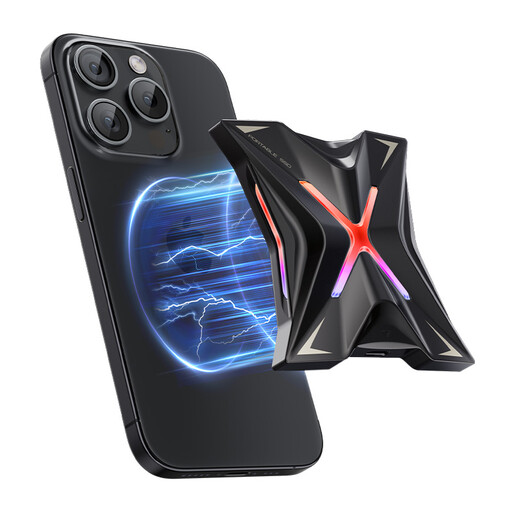
MOVESPEED YSPSRX20M-1TTG 1 TB magnetic Gen 2x2 SSD
Consider its Gen 2x2 interface for large files only after checking the studio hosts and cables; also confirm any required password feature.
USB 3.2 Gen 2x2, with a quoted transfer speed of up to 2,060 MB/s. The magnetic design is associated with its phone-use feature, not a requirement for studio-computer hand-offs.
View on Joybuy
 No image available
DigiEra LPS2000M-3 1 TB magnetic Gen 2x2 SSD, pink
A Gen 2x2 option for large presentation packages when the studio connection supports that interface; check file-system suitability for every computer that must write to it.
USB 3.2 Gen 2x2, with a quoted speed of up to 2,000 MB/s. Its stated magnetic attachment and direct ProRes recording use apply to the specified iPhone 15/16 Pro and Pro Max models, not to studio computers generally.
View on Joybuy
Common questions
Should a shared Mac-and-Windows SSD use ExFAT?
ExFAT is a format to consider when both Mac and Windows computers need to write to the same hand-off drive. Apple identifies it as Windows-compatible for volumes over 32 GB; check the drive’s existing format and back up its files before any reformatting. A Mac-only production drive may have different requirements.
Will a 2,000 MB/s SSD copy a presentation twice as fast as a 1,000 MB/s model?
No such doubling can be assumed from the quoted maximum speeds. Samsung says its T9’s maximum requires a USB 3.2 Gen 2x2 host and cable with UASP enabled, while the T7 Shield’s maximum also depends on its stated host and connection requirements. Check the complete connection path for the computers actually used.
When can we unplug the SSD after copying files?
Eject the SSD before disconnecting it. Microsoft advises using Safely Remove Hardware and Eject Media in Windows to avoid data loss, then waiting until Windows says the device is safe to remove.
What should happen before a confidential-file SSD is reassigned or disposed of?
Follow a documented sanitisation process before the SSD leaves the studio’s control. The National Cyber Security Centre explains that sanitisation reduces the likelihood of data retrieval or reconstruction and includes SSDs in its storage-media guidance.


