Households protecting photos and documents
If important files exist only on one computer, you need a separate copy and a way to retrieve it when the original is unavailable.


Choose a configured cloud backup or storage service if access across devices matters and your internet connection and plan capacity suit your files. An external hard drive is worth considering for a large local collection, while a portable SSD also suits frequent transfers; for important photos and documents, keep a separate copy in another location and check that you can restore it. None of these routes guarantees recovery on its own.
The National Cyber Security Centre defines a backup as a copy of important data stored in a separate safe location, where it can be restored if the original becomes inaccessible.
If important files exist only on one computer, you need a separate copy and a way to retrieve it when the original is unavailable.
If you have many files or large media files, a local drive may be practical when internet access is limited. Microsoft identifies these as circumstances in which external storage may suit a Windows backup.
If you carry selected files between devices, check whether each one has a compatible USB-C or USB-A port. A transfer drive still needs a repeatable copying routine if it is also to hold backup copies.
Start with the files you need to protect and how you will restore them; then choose the capacity, connection and routine that fit.
| Priority | What to check | Your needs |
|---|---|---|
| Restorable copies | Identify the folders included, where the separate copy is kept and how to restore a file. The National Cyber Security Centre advises keeping important data in a separate safe location. | I want my photos and documents to remain retrievable if the original device becomes inaccessible. |
| Capacity | Compare the size of the files to protect with the drive or cloud-plan capacity, allowing for new files. For Time Machine, Apple recommends a backup disk with at least twice the Mac’s storage capacity. | My photo and video collection needs room to grow, not just enough space for today’s files. |
| Connection and software | Match the drive connector and cable to your computer’s ports, then check the intended backup software and operating-system requirements. Apple says Time Machine can use external storage connected to a compatible Mac port. | I need the drive to connect to my computer and work with the backup method I intend to use. |
| Transfer routine | Decide whether you need scheduled copies or mainly move selected files. Check the host connection before relying on an SSD’s advertised speed; Samsung makes maximum T7 Shield speeds conditional on a compatible host, cable and UASP. | I regularly move large files, so transfer time matters alongside keeping a separate copy. |
| Location and access | Decide whether a local copy alone is enough for your routine or whether you also need a copy elsewhere. Check which folders a cloud service includes and whether its capacity and internet requirements fit. | I want access from another device, or a separate-location copy as well as the files kept at home. |
The connector and backup software must suit the computer. Samsung says maximum T7 Shield speeds require a compatible host, cable and UASP; Apple recommends a Time Machine disk with at least twice the Mac’s storage capacity.
Check the computer’s ports, the drive’s connector, the backup workflow and the amount of storage needed before choosing.
As Which? explains, copying files to an external USB drive creates copies. It does not automatically include files changed after that transfer.
Choose which folders to protect, repeat or schedule the copying, and try restoring an important file.
A growing photo or video collection can exceed the capacity of the plan you first choose. A large collection may also be less convenient to upload when internet access is limited.
Measure the folders you intend to protect and check the service’s capacity and backup settings.
A physical drive remains one copy, while access to cloud-stored files depends on the account and service. The National Cyber Security Centre describes backups as separate copies that can be restored, not a guarantee against every incident.
Keep important copies in separate locations, protect account access and periodically check that restoration works.
Apple households can consider iCloud storage alongside Time Machine backups to external storage on a Mac.
Windows households can compare OneDrive folder backup with a separate local backup to external storage.
Samsung’s T7 Shield is a portable SSD line to consider when moving large files as well as keeping a local copy.
SanDisk offers flash drives aimed at carrying selected files between devices.
These options cover external SSDs and a hard drive for local copies, plus a USB flash drive for moving selected files. Whichever you choose, plan when to update the copy and how to restore it.
 No image available
A portable SSD to consider for a sizeable local file collection or repeated transfers. The stated connection is USB 3.2 Gen 2; check that its capacity, cable and connection suit your computer, and maintain a separate backup routine.
 No image available
This portable SSD offers 1 TB for a local copy or files you move regularly. It states USB 3.2 Gen 2; Samsung says the T7 Shield’s maximum speeds depend on a compatible host, cable and UASP. Check that 1 TB leaves enough room for your backup routine.
 No image available
A 2 TB portable SSD for a local collection of photos and documents. Check its connector and compatibility with your intended computer before buying, then set up a repeatable backup and test a restore.
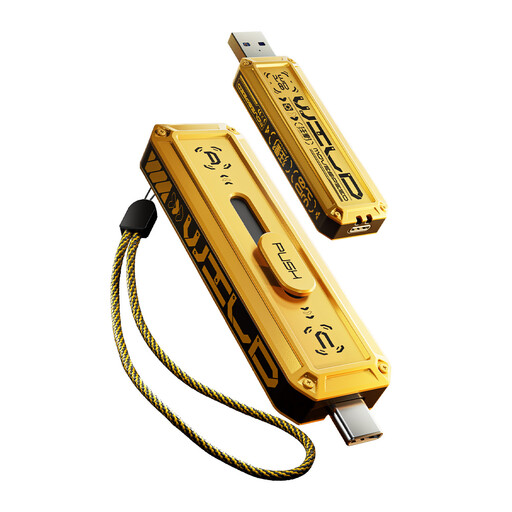 No image available
Its stated USB-A and USB Type-C interfaces suit moving selected files between devices with matching ports. Copying files to a flash drive is a manual task; repeat it when files change rather than treating a one-off transfer as a maintained backup.
 No image available
This external hard drive offers 4 TB for a local copy of a large file collection. Check its connection and the setup required by your computer; a local drive also needs regular backups and does not by itself keep a copy elsewhere.
It creates copies, but a useful backup routine also keeps them separate, updates them when important files change and allows you to restore them. The National Cyber Security Centre defines a backup as a separate copy of important data that can be restored; Which? notes that copying files to an external USB drive leaves copies on that drive.
Apple recommends a backup disk with at least twice the Mac’s storage capacity. That recommendation applies to Time Machine, rather than every external-drive or cloud backup method.
Not for the external-drive installation workflow described by Microsoft Support: it says the drive must be non-ejectable and removable USB drives are not supported. You can assess an external drive separately as a destination for a suitable local backup method.
No. Samsung says maximum T7 Shield speeds require a compatible USB 3.2 Gen 2 host and cable with UASP enabled. Check the computer’s port, cable and exact SSD model before relying on a headline speed.