Choose an extra controller for the device running the racing game: a DualSense for PS5, an Xbox Wireless Controller for Xbox or Windows PC, or a suitable Pro Controller or Joy-Con arrangement for Nintendo Switch. Before buying, check that the exact game supports local split-screen with your intended number of players; connection limits, control styles and charging arrangements can then determine which controller fits.
Who needs an extra controller?
PS5 racing-night hosts
If the shared setup is a PS5, an additional DualSense gives another flatmate a platform-native controller. PlayStation says the console can use up to four controllers at once, provided the game supports the planned number of local players.
Xbox or Windows PC sharers
For a racing setup that moves between Xbox and Windows PC, the Xbox Wireless Controller supports both devices, according to Microsoft. A USB connection is also worth considering when setting up controller features on Windows.
Nintendo Switch party racers
Switch owners can consider a full-size Pro Controller or additional Joy-Con, depending on the game’s supported control style. Nintendo’s controller-count rules also matter if the flat uses Bluetooth audio during play.
What matters when choosing?
Start with the device and the exact racing game, then count the players and controllers. Connection and charging choices matter once those requirements are clear.
| Concern |
What to check |
Who this matters to |
| Device and game compatibility |
Check the playing device and whether the exact game supports local split-screen and the intended controller type. |
I need a second controller that works with our device, but it will not help if the racing game lacks the local mode we want. Roughly 36% of consumers put this compatibility question first. |
| Enough controllers for every racer |
Check the game’s local-player limit and count every controller needed; on Switch, account for how Joy-Con are counted and whether Bluetooth audio is connected. |
When several flatmates want to race together, I need everyone’s controller to connect at the same time. Around 29% of consumers make the planned player count their primary concern. |
| PC and wired use |
Check the PC game’s controller support and the connection needed for any features you intend to use. |
If our racing setup moves between a console and PC, I want a connection method that suits each session. For roughly 21% of consumers, that flexibility comes first. |
| Charging routine |
Check how the controller is powered, what charging equipment it needs and where multiple pads will be kept ready. |
I do not want a shared controller to be unusable when it is someone else’s turn to play. Around 14% of consumers prioritise keeping the pads powered and ready. |
Mistakes to avoid
-
Choosing by controller brand alone
A controller matched to the device still cannot add split-screen play to a game that does not offer it.
Check the exact game’s local multiplayer mode, supported controllers and player limit before choosing an extra pad.
-
Leaving Bluetooth audio connected for a larger Switch group
Nintendo says that a Switch can connect no more than two wireless controllers while a Bluetooth audio device is connected. That limit matters for a planned three- or four-player session.
If more than two wireless controllers are needed, disconnect Bluetooth audio and test the full controller arrangement before playing.
-
Assuming an Xbox Wireless Controller charges its AA batteries
Microsoft says the standard controller can use AA batteries or a rechargeable battery pack, but rechargeable AA cells do not charge inside the controller.
Decide whether the flat will use replacement AAs, rechargeable AAs with an external charger, or a compatible rechargeable pack.
Rechargeable AAs need a separate charger, adding another item to the household’s charging routine.
-
Expecting every DualSense feature over PC Bluetooth
PlayStation says DualSense haptic feedback on PC requires USB, while adaptive triggers depend on game support.
If those features matter for PC racing, check the game’s support and keep a suitable USB data cable available.
Relevant brands to consider
Sony PlayStation
DualSense is relevant when the shared racing setup uses PS5.
- PlayStation says PS5 can use up to four controllers simultaneously, subject to the game’s local-player support.
- Adaptive triggers and haptic feedback depend on game support; PlayStation says PC haptic feedback requires USB.
Microsoft Xbox
The Xbox Wireless Controller is relevant to households playing on Xbox and Windows PC.
- Microsoft lists support for Xbox consoles and Windows PC, along with Bluetooth and Xbox Wireless connectivity.
- The standard controller uses AA batteries or a separate rechargeable solution. Microsoft says many Xbox Accessories app features on Windows are not supported over Bluetooth.
Nintendo
Switch players can choose between a full-size Pro Controller and Joy-Con arrangements accepted by their game.
- Nintendo supplies a USB-C charging cable with the Switch Pro Controller and estimates its battery life at approximately 40 hours, depending on use.
- Nintendo says Bluetooth audio restricts a Switch to two connected wireless controllers; controller type and enabled features also affect the usable arrangement.
Controllers for these setups
These choices cover a PS5 pad, two different approaches to Xbox play, and a Joy-Con pair for compatible Switch games. The Xbox Wireless Controller also supports Windows PC, according to Microsoft; check the racing game’s local-play requirements before choosing any of them.
 No image available
Sony PlayStation 5 DualSense Wireless Controller, Starlight Blue V3
Consider this as an additional wireless pad for a PS5 racing setup. Check the game’s local-player limit; PlayStation says DualSense feedback features depend on game support.
View on Joybuy
 No image available
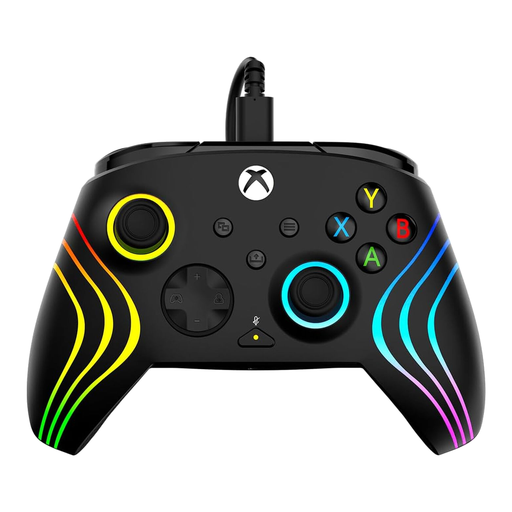
Turtle Beach Afterglow Wave Wired Controller for Xbox, Black
Consider this wired Xbox controller if the shared playing position suits a cable. Confirm connection reach and the racing game’s local controller support before buying.
View on Joybuy
 No image available
Xbox Wireless Controller, Robot White
Consider this wireless controller for an Xbox or Windows PC setup. Microsoft says the standard Xbox Wireless Controller uses AA batteries or a separate rechargeable solution, so plan how the flat will keep it powered.
View on Joybuy
 No image available
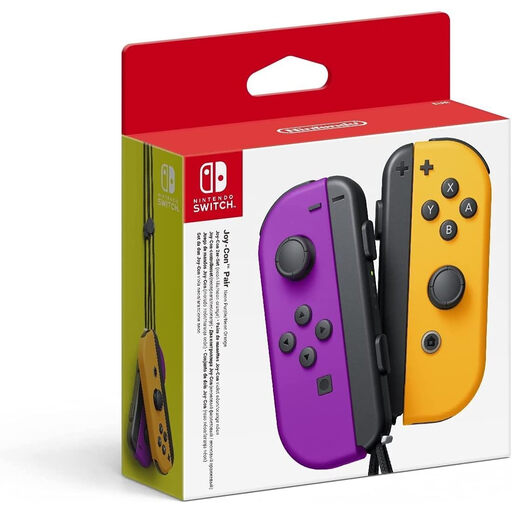
Nintendo Joy-Con Pair, Neon Purple/Neon Orange
Consider this pair for Switch racing if the game accepts the intended Joy-Con control arrangement. Check its player limit and remember Nintendo’s two-wireless-controller restriction when Bluetooth audio is connected.
View on Joybuy
Common questions
Is a second controller enough for split-screen racing?
Only if the game supports local split-screen on the device you use and accepts the planned controllers. Check the exact game listing for its local-player limit before buying another pad.
How many controllers can PS5 and Switch use together?
PlayStation says PS5 can use up to four controllers at once. Nintendo says Switch can normally pair up to eight wireless controllers, but the arrangement depends on controller type and enabled features; with Bluetooth audio connected, no more than two wireless controllers can connect. The game may allow fewer local players than the console can connect.
Will DualSense feedback work over Bluetooth on a Windows PC?
Do not count on every feedback feature over Bluetooth. PlayStation says PC haptic feedback requires USB, while adaptive triggers work only when the game supports them.
What should I do with an old controller in the UK?
Take an unwanted controller to an appropriate electrical-waste collection point rather than putting it in ordinary household waste. GOV.UK says waste electrical products can be taken to a local household waste recycling centre and advises taping the terminals of removable lithium batteries to reduce fire risk.


