Choose the calendar service and account setup before choosing a screen: an iPad is a practical route for households using Apple Accounts and Family Sharing, while an Android tablet merits consideration when the household plans through Google Calendar. For a tablet that stays on a study desk, check the calendar app, editing permissions and reminders first; then decide whether a larger display, handwriting or viewing several apps together matters enough to shape the choice. Consider a Fire tablet only after confirming that the household’s essential apps work on Fire OS.
Who is this for?
Shared-calendar households
Families who need several people to see and update one schedule. Set editing access and notifications for each person before relying on the tablet as the household hub. Google For Families Help describes access to its Family calendar; Apple says Family Sharing uses individual Apple Accounts.
Desk-based visual planners
Consumers leaving a tablet in a quiet study who want to read a weekly calendar, appointments and tasks at a glance. A roughly 10–11-inch display may suit this setup better than a pocket-sized view, provided the chosen calendar remains readable from its intended position.
Handwritten schedule keepers
Consumers who regularly mark up timetables or write planning notes. Check pen compatibility and the exact bundle contents: Apple lists Pencil-compatible iPad models, while Lenovo lists a Tab M11 bundle with a pen.
What matters when choosing?
| Concern |
What to check |
Who this matters to |
| Shared calendar access |
Check the household’s calendar service, each person’s editing permissions and reminder settings. |
If several people need to change appointments, I need them to use the same schedule without sharing one personal login. Around 36% of consumers put shared access and permissions first. |
| Readable desk view |
Compare screen size and readability in the intended desk position; check whether the model can show a calendar beside another app. |
When I am checking dates against messages or notes, I want a week view I can follow without constantly changing screens. Around 29% of consumers prioritise desk readability and simultaneous planning. |
| Handwritten planning |
Verify pen compatibility, whether the selected bundle includes a pen and how the tablet will be supported while writing. |
If I mark up school schedules or write quick planning notes, pen input needs to be part of the setup I can actually use. Handwriting comes first for around 21% of consumers. |
| App access and initial cost |
For a Fire tablet, confirm that essential planning apps work on Fire OS and check the listed charging accessories. |
I can consider a simpler device, but not if it prevents my household from using its calendar. Around 14% of consumers put a workable lower-cost setup first. |
Buying pitfalls
-
Choosing the device before checking the calendar
A shared schedule depends on account access, editing rights and reminders, not just screen size. Apple Family Sharing uses individual Apple Accounts, while Amazon UK says Google Play is not supported on Fire tablets.
Try the intended calendar with family members’ existing devices first: check that each person can see an event, make an appropriate change and receive a reminder. Confirm app availability on the tablet you plan to buy.
-
Assuming the pen or desk accessories are included
A compatible pen is not necessarily in the tablet box, and bundles for the same model can differ. Lenovo lists a Tab M11 bundle with a pen as well as separate accessories; Amazon UK says the cited Fire HD 10 does not include a power adaptor.
Check the exact variant and box contents, including any pen, charger, case or stand needed for your study setup.
Relevant brands to consider
Apple
Consider an iPad if the household already uses Apple Accounts and wants to organise shared access through Apple Family Sharing.
- Apple UK lists an 11-inch, 2360 × 1640 display and support for Apple Pencil (USB-C) and Apple Pencil (1st generation) on the iPad 11-inch (A16).
- Pencil compatibility does not mean a Pencil comes with the selected iPad; check the exact model and bundle.
Samsung
An Android option for households using Google Calendar, particularly if viewing planning apps together matters.
- Samsung UK says the Galaxy Tab A9+ can show up to three apps on screen.
- Do not assume the A9+ includes the S Pen described for Samsung’s Galaxy Tab S9 FE line.
Lenovo
The Tab M11 is worth considering for study-desk planning when its display and a specific pen bundle meet the household’s needs.
- Lenovo UK lists an 11-inch, 1920 × 1200 anti-glare IPS display and a Tab M11 configuration bundled with a pen.
- Bundle contents vary; check whether the chosen configuration includes the pen and any other needed accessories.
Amazon
Consider the Fire HD 10 only if its available apps support the household’s calendar routine.
- The cited Fire HD 10 has a 10.1-inch display and parental controls.
- Amazon UK says Google Play is not supported on Fire tablets and that the cited Fire HD 10 does not include a power adaptor.
Joybuy product choices
These choices include a dedicated digital schedule board and general-purpose tablets for a study desk. For either type, confirm that its calendar app, account access and reminders fit the household’s routine.
 No image available
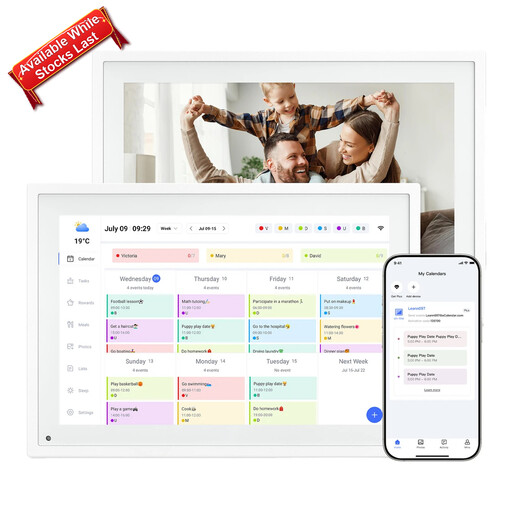
TABWEE P10 10.1-inch Wi-Fi digital calendar
Consider this dedicated schedule board if a fixed calendar display is more useful than a general-purpose tablet. Its title specifies two-way schedule syncing through a mobile app; check the exact calendar service, family access, reminders and how the board will stand or mount in the study.
View on Joybuy
 No image available
Samsung Galaxy Tab A11+, 8GB/256GB, Wi-Fi, Grey
For a household planning to use a general-purpose tablet with Google Calendar, check the intended app and each person’s sharing and notification settings. This is the Galaxy Tab A11+, not the Galaxy Tab A9+ discussed in the brand examples; confirm the desk stand or case you need.
View on Joybuy
 No image available
Apple 11-inch iPad Air (2026, M4), Wi-Fi, 128GB, Starlight
For an Apple-account household, check that the chosen calendar and reminders work as intended for each family member. This iPad Air is a different model from the iPad 11-inch (A16) in the brand examples; confirm Pencil compatibility for this exact model if handwriting matters, and allow for a separately sold Pencil.
View on Joybuy
 No image available
DOOGEE U11 PRO 11-inch tablet, 256GB, Black
This general-purpose tablet is an option for a fixed planning spot if the household’s calendar app and account-sharing setup work on it. The title specifies an 11-inch, 90Hz IPS screen; assess the listed 1280 × 800 resolution for your intended calendar view and check what is needed to support it on a desk.
View on Joybuy
 No image available
Xiaomi Pad 7, 8GB/128GB, Grey
For visual planning or handwritten notes at a study desk, check the household’s calendar workflow before choosing this model. Confirm the exact bundle contents if you need the Focus Pen: the product title names it, but the accessory description does not confirm it. Check charging equipment and desk support too.
View on Joybuy
Frequently asked questions
Can family members edit one Google calendar from different devices?
Yes, people with access to a Google Family calendar can change its events while signed in on their own devices. Google For Families Help says people outside the family can also be given access, so review editing permissions before using it for household plans.
Does Apple Family Sharing require everyone to use one account?
No. Apple says each person uses their own Apple Account for shared eligible features and services. Set up the intended calendar access for each person rather than sharing one account password.
Is a pen included with every tablet that supports handwriting?
No. Pen compatibility and an included pen are separate things. Check the exact tablet variant and bundle: Lenovo UK lists a Tab M11 bundle with a pen, while a compatible Pencil should not be assumed to come with an iPad.
What should I do with an old tablet when replacing it?
Ask the retailer which electrical-waste take-back route applies to the old tablet. GOV.UK describes retailer responsibilities for taking back waste electrical equipment of the same type as an item purchased.


